Google Business Profile Categories for Service Businesses
The right Google Business Profile category decides which local searches show your service business. Here is how to pick a primary category and add the rest.
Your profile says General contractor, and your customers type “gutter cleaning near me”. Google never connects the two. The calls go to a company that picked its label properly.
We see that mismatch in audits all the time. It is the cheapest visibility leak a service business carries. Most owners never spot it.
Which category should you pick, and how many can you use? Here is the short version.
Pick one primary category that names your exact trade, like Plumber, and skip broad labels like General contractor. Add secondary categories only for services you offer. Your categories decide which local searches show your profile. You cannot create custom categories. Service-area and hybrid businesses also set the areas they serve.
Most advice on categories is theory from people who never managed a listing. Google’s help page gives the rules. The list sites dump thousands of options and stop. This is the version from the audits.
TL;DR
- One category is the primary, and it should name your exact trade. The list holds roughly 4,000 labels.
- You can add up to 9 more, but Google’s rule is a few, and only for real services.
- Category edits can trigger re-verification, so change once and change right.
- Service-area and hybrid businesses choose categories the same way, then set the areas they serve.
What is a Google Business Profile category, and why does it matter?
A category is the label from Google’s own list that tells Google what your business does. It decides which local searches can show your profile. Google says the categories you select affect your local ranking. Pick a label that names your service. You answer for the right searches.
Google’s example runs on food: set Pizza restaurant as the primary, and the profile may show for restaurant searches and for pizza searches. The same mechanics run on trades. Set House cleaning service, and the profile can answer for cleaning service searches in your area.
The label also decides which extra features the profile gets. Google pairs each with its category type:
- Hotels can show class ratings and list their amenities.
- Restaurants can add online orders and menu items.
- Health and beauty businesses get a booking button and a service list.
Home-service trades rarely get those extras. Their win is simpler: the right label matches the right local search.
The list is fixed, and you cannot create your own category. If your exact trade is missing, pick the closest general label that fits. The old guidelines for representing your business on Google still hold. Accurate labels win.
Your category is a ranking input. Treat it like one, because it decides which searches can ever find you.
Pick the primary category that names your trade
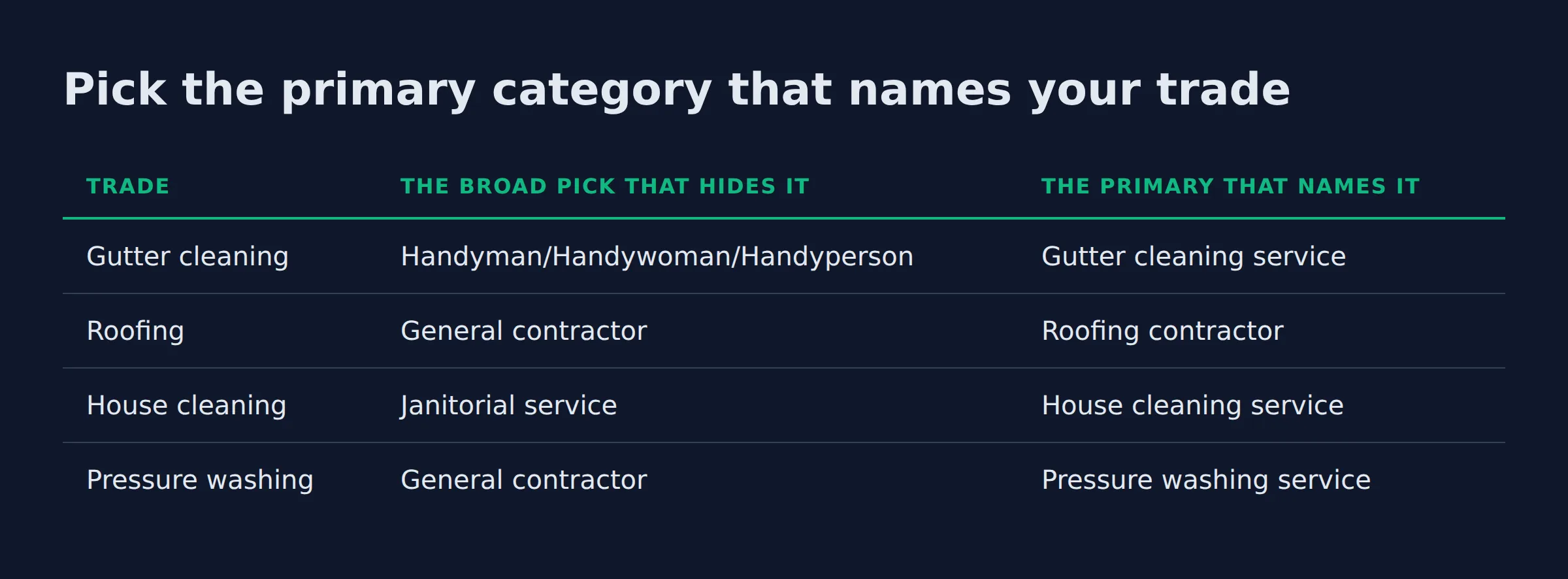
Your primary category should name the exact trade you sell, not the bigger business that includes it. Google’s own example: “Salon” becomes “Nail salon”. The general label is the trap, and the specific one is the job.
Google’s instruction is to pick a specific category. Specific costs nothing. Its guidelines give the reason: choose Golf Resort, and Google implicitly includes the general tags above it, like Resort Hotel and Golf Course. They come along for free.
The failure we un-fix most in audits is the owner who picked broad to cover more ground. A gutter company under General contractor answers for remodeling calls that never start. The trade search goes elsewhere. The same story repeats across every trade we audit.
Pick the primary category that names your trade
| Trade | The broad pick that hides it | The primary that names it |
|---|---|---|
| Gutter cleaning | Handyman/Handywoman/Handyperson | Gutter cleaning service |
| Roofing | General contractor | Roofing contractor |
| House cleaning | Janitorial service | House cleaning service |
| Pressure washing | General contractor | Pressure washing service |
Those middle-column picks are the ones we remove most in audits. Fix the primary. The profile starts matching the searches the owner actually wants.
The specific pick still answers the general searches above it. Broad answers for the wrong trade.
How many categories can a Google Business Profile have?
One primary and up to 9 additional categories, so 10 slots total. Google’s guidance is a few categories that describe real departments or services, not one for every product. Trackers put the official list at roughly 4,000 labels. Pick a few.
The cap comes from the people who maintain the full list: 1 primary plus up to 9 additional. Google’s own page says it shorter. Use a few.
Google’s grocery example sets the pattern: primary Grocery store, then Bakery and Deli as additional categories. The same logic runs on trades. A cleaning company with a window crew gets House cleaning service and Window cleaning service, and a roofer who also cleans gutters gets Roofing contractor and Gutter cleaning service.
One more rule hides there. Departments that are separately owned are not yours. Google’s example is a health club with a cafe run by someone else. The cafe gets its own profile. The club does not add the Cafe category.
The stuffing habit never skips an audit. We open a profile with 9 additional categories, and most of them are products or neighbor trades. A gutter company with Plumber and Air duct cleaning service stacked on answers for work it does not do.
The calls that come in are wrong. We cut the list back to the services the owner actually sells, and the profile stops answering for everyone else in town.
Ten is the ceiling. In the audits, the focused profiles carry one primary and two or three extras.
Do additional categories help or hurt local ranking?
They help when they match services you offer, because each category is another local search you can show up for. They hurt when they describe products, general terms, or other trades. Google ties your categories to local ranking. Its guidance: the fewest that fit.
Google’s own line is direct: “The categories you select affect your local ranking on Google.” Each label adds the searches that match it. The pizza example showed that. Each additional category is one more set of searches.
The symptom we watch for is drift in the calls. A house cleaning profile carrying Landscaper gets lawn calls, which the owner reads as random. It is the category list doing exactly what it was told. Clean the list back to real services. The calls line up again.
Google keeps a separate services section for the detailed list of what you offer. The services editor holds the product list and the offers. Categories stay for business type.
That split lives in Google’s own docs, and it fixes a stuffed category list. We do that matching daily. It is the heart of our local SEO service.
Getting the labels right is one thing. A profile set up fine can still stay quiet, which is why owners end up asking why the business is not showing up on Google Maps.
Each extra category is a search you volunteer for. Volunteer only for work you sell.
Edit your Google Business Profile category: the steps
Open your Business Profile and choose Edit profile. In the Business category editor, replace the primary with your new label. Save when you finish.
The exact flow, straight from Google’s add or edit categories steps:
- Open your Business Profile in the manager or the app.
- Select Edit profile.
- Next to Business category, select Edit.
- Type in the Primary category box, then pick the label from the list that appears.
- Select Add another category for each extra label, or Remove for one you want gone.
- Select Save.
The catch sits in Google’s own warning: an edit might trigger re-verification to confirm the business info is accurate. It looks like setup day again. Google may ask for a new code or a review of the change.
The profile usually keeps showing. The old label stays up until the new one clears.
Our standing advice: make the edit in a quiet week, and do not stack a second category change on top while verification is open. Each new edit can restart the check. Change once, change right, and let it settle.
Loose profile elsewhere? Fix the foundation. Set up your Google Business Profile correctly, which starts with claiming and verification.
Change once and change right. Each edit can start a new verification round.
Which trade categories do service businesses get wrong?
Mostly the same mistake. Owners pick umbrellas instead of trade names. We keep finding gutter companies under Handyman labels and house cleaners under Janitorial service. The fix is the same for every trade: pick the category that names the exact service you sell.
The category box autocompletes as you type, and the list that appears mixes every near match. Owners grab a label that sounds big, in the middle of setup, in a hurry. That mistake lives on for years.
| Trade | Extras that fit, if you really do them | Extras that mislead |
|---|---|---|
| Gutter cleaning | Pressure washing service, Window cleaning service | Plumber, Landscaper |
| Roofing | Gutter cleaning service | Handyman/Handywoman/Handyperson, Home improvement store |
| House cleaning | Carpet cleaning service, Window cleaning service | Landscaper, Plumber |
| Pressure washing | Window cleaning service, Gutter cleaning service | Cleaners, Janitorial service |
Most of these trades run as service-area businesses: they visit the customer and do not serve people at their own address. Google’s definition names a plumber as the example. A hybrid does both. An auto shop with roadside assistance fits.
The category rules are identical either way. The difference comes after: Google shows the profile for its category and the areas you serve. Keep the service area within about 2 hours of driving time from where the business is based.
Want to see every option? Trackers maintain the full list, 4,046 categories as of a May 2026 snapshot. Google updates it over time.
The same snapshot logged 3 new categories in 30 days, including pet microchip scanning station and event fabrication service. Yours could vanish next. Check the list and edit to the closest match.
The fastest research is live and free. Search your main service term on Maps, and open the profiles in the local pack.
Read their categories. That shows what the winners answer for, and the umbrellas we remove in audits.
Umbrella labels are the top wrong primary we remove in audits. The fix: name the trade.
Quick answers on Google Business Profile categories
Does changing my category reset my rankings?
Google does not describe a reset. Its help page names one effect of an edit: possible re-verification, which confirms your business info rather than wiping your history.
The profile then carries the new label, and since categories affect local ranking, the searches it answers for shift with it. Expect a quiet window in between.
Can two businesses with the same name use different categories?
Yes, when they are separate companies. Google’s own guidelines tie the category to the business, and locations of one business share it. Separately owned departments get their own profiles and their own categories, never a slot on yours.
What happens if Google renames or removes the category I chose?
Google updates the list over time. Trackers log additions and removals.
If your label disappears, edit the profile and pick the closest match still on the list. If a name changes, confirm the profile still shows what you sell. Keep the primary honest.
Should I pick the category with the most searches or the one that describes me?
Pick the one that describes you. A popular broad label matches searches you do not serve. The wrong calls cost money.
Google’s example shows why. Choose Golf Resort, and the general searches still come along. Description wins. Accuracy is the ranking signal.
How many categories does a service-area business actually need?
The same ceiling applies: 1 primary and up to 9 additional. Service-area and hybrid businesses pick categories exactly like storefronts, then set the areas they serve. Most trades need the primary plus 1 to 3 extras that match real services. The area list carries the rest.
A straight read on your categories
Category mistakes are invisible until the phone goes quiet. They are also the fastest fix we make in an audit. The label is the gate. Reviews and ads wait for it.
If you want a straight read on your categories and where your Google visibility stands, a fifteen-minute call covers it. Book a time to talk.
Related: google business profile posts do they help ranking
Related: how to get more google reviews for a service business
Related: how to ask customers for reviews without being pushy
Related: does a local business need a website with google business profile
Related: local service website pages that rank on google
Related: local business schema markup explained
Related: local service website conversion rate
Related: what should a local service homepage say
Related: why is my website getting traffic but no calls
Related: service area pages for local seo
Related: how many location pages should a local business have