Local Service Website Pages That Rank on Google
What makes a local service page rank: one page per service, the city named in the body, schema, and internal links. A build order you can copy.
A homeowner searches your service plus the town name. Your competitor’s page answers that search in its first line. Your site has one page holding every service you sell, and it answers nothing in particular.
Plenty of service page advice comes from writers who have never audited one. We audit them for a living, and this is the build order that comes out of that work.
Local service pages rank when each page answers one service in one place. Put the service in the H1 and the city or served area in the body. Add proof from real jobs and one obvious way to book. Your profile carries the same business details, and Google matches the two.
TL;DR
- One page per service beats one page for the whole business.
- The city belongs in the title tag, the H1 and the first paragraph.
- Copy one page and swap the town name and you are into doorway page territory.
- Point the profile’s website field at the service page you want more of.
How does Google decide which local service pages show up?
Google picks local results on 3 factors: relevance, distance and prominence. Relevance is how well a page matches the words typed. Distance is how far the business sits from the searcher. Prominence covers links and reviews, and it is the one you can move.
For the full picture, see Google Business Profile Optimization Services.
The relevance, distance and prominence split comes from Google’s own help page. It also states plainly that no one can pay for a better local ranking. The whole job sits on the page and the profile.
Customers meet you in Google Search, in Google Maps and in the local pack that sits under the search box. That is where a service page does its work.
Distance stays put. It is measured from where the searcher stands. Prominence is the lever an owner can pull, and it grows with every site that links to you and every review you collect.
Local Services Ads are the paid lane above all of it. They sell leads as calls and messages, per Google’s Local Services Ads overview, which is a budget line rather than a page.
Pages you own carry a real share of the results. Business websites hold 47% of the business results in Google’s first 10 local results. Directories hold 31%, local search results data shows.
Reviews decide who gets the click. After reading positive reviews, 54% of consumers visit the business’s website, consumer survey data shows. Another 72% use Google to look up local business information.
When we pull Business Profile performance insights for an owner with a thin site, calls and direction requests outrun the website field clicks. The gap is wide. The few people who do tap through land on a page that lists everything and proves nothing.
The 3 factors stack in a clear order, which we break down further in how Google ranks local businesses.
Prominence is the factor you can move, and links and reviews are what move it.
What does a service page need on it to rank in a city?
One service in the H1 and the city in the title tag. Name the served towns in the first paragraph, then add proof from real jobs. The phone number and the form sit above the fold, with one clear way to book.
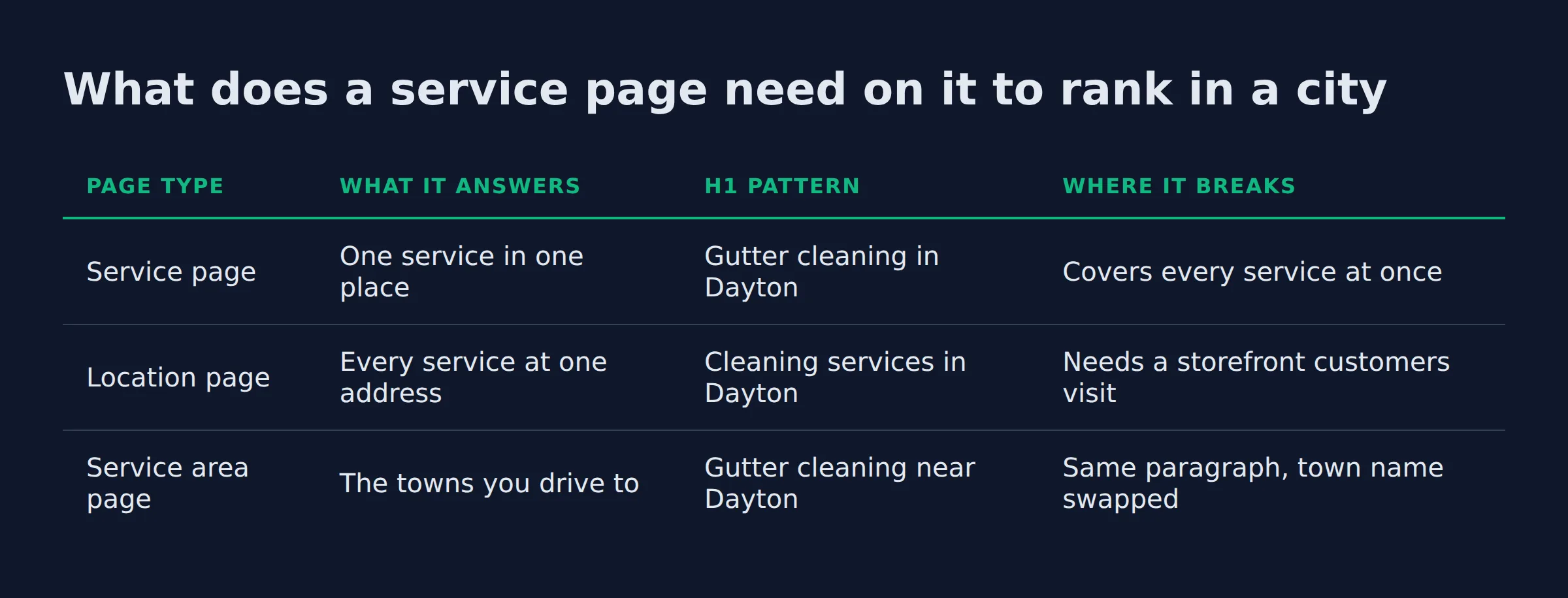
3 page types get used for local searches, and each one answers a different question. The table below is the quickest way to see which one you built.
| Page type | What it answers | H1 pattern | Where it breaks |
|---|---|---|---|
| Service page | One service in one place | Gutter cleaning in Dayton | Covers every service at once |
| Location page | Every service at one address | Cleaning services in Dayton | Needs a storefront customers visit |
| Service area page | The towns you drive to | Gutter cleaning near Dayton | Same paragraph, town name swapped |
Keep the page to one service and one area. Then build it in this order.
- Title tag with the service and the city
- H1 that repeats the service in plain words
- One paragraph naming the towns and neighborhoods you cover
- Photos from finished jobs, with the job named in the alt text
- A services list using the words customers type, not SEO keywords
- Reviews pulled onto the page, replies included
- Phone number, form and booking link above the fold
- Name, address and phone matching the profile exactly
Each one feeds Google business ranking in its own way. The title tag and the meta description both carry the service and the city. A searcher sees what the page answers before the click.
Google’s guidance on helpful content says its ranking systems favor pages made to help people. One service on one page is easier to write that way.
If the H1 and the first paragraph do not say what you do and where you do it, the page gives Google nothing to match.
The 3 checks we run on a service page first
We run the same 3 checks on every page we audit: the H1 test, the city test and the proof test. The H1 has to name one service. The body has to prove the city. The page has to carry proof a customer would recognize.
The H1 test fails more often than owners expect. The heading usually carries the business name or the trade, so the page never says which job it does. Google local business results ranking turns on naming the service and the place, so that page starts behind.
The city test is where the false versions show up. A real city signal names routes you drive, towns you cross and the supplier you buy parts from. A swapped one keeps the same sentence and changes one word.
The proof test is the one that fails hardest. A photo of a finished roof means nothing without the roof type, the square footage or the day it was done. The pages we audit are full of stock photos and cropped truck shots.
If a paragraph would work for any town in the country, it proves nothing about yours.
Should you build one page per service, or one page for all of them?
One page per service, for the services you actually sell and can show proof for. A single page holding every service gives Google one blurry answer, and it leaves the customer no page that matches what they typed.
The tell in our audits is the menu. One item called Services opens a page carrying the whole list, and the title tag reads Services in Dayton with no single service named.
Not every service deserves that treatment on day one. Build a page for each service people search by name, and for the ones that pay your bills. A rarely asked specialty can live inside the main service page until it earns its own.
| One page per service | One page for everything |
|---|---|
| Google reads one clear service | Google reads a mixed list |
| The customer lands on the words they typed | The customer scans to find their job |
| Job photos and detail fit the page | The proof turns generic fast |
| Each new page needs its own real content | Copied pages risk the doorway rule |
Then there is the city page trap. The doorway page policy in Google Search Central’s spam docs names pages aimed at specific cities that funnel users to one page. It also names pages with slight variations built to catch one query. Ten towns and one template lands you there. That is how thin content and duplicated pages pile up, one URL at a time.
BrightLocal’s service area page guidance is blunter about it. Stick to the coverage zones that bring real business, and group a wide region instead of building a page for every corner of it.
One page per service. A page that has to answer 5 different searches answers none of them well.
Can a service page rank with no website behind it, or with no profile?
A service page needs a site to live on, and a profile needs a page worth sending clicks to. A profile can show in the map pack with no website at all. A service page cannot exist without a domain.
Owners ask this one as “can I rank on Google without a website”. No storefront is a separate question, and Google’s guidelines for representing your business cover both cases. A service area business (SAB) hides its address and works from a service area instead. Google keeps that area within about 2 hours of driving time from your base.
We answer the no-website question in full in whether you need a website for a Google Business Profile. The profile can carry calls and direction requests on its own, and the work that proves the job lives on the page.
No storefront and no street address are both fine. No domain is not.
How do your service pages and your profile’s website link work together?
Point the profile’s website field at the service page you want more of. Keep the name, address and phone on that page identical to the profile. Then link your other service pages back to it, so the links land where you aimed them.
The Google Business Profile website field is one field most owners never chose. We show an owner where that field points. Sometimes it points at a booking platform page or a directory listing. We usually hear that whoever built the site set it that way.
Your profile tells the same story in its own fields. Business categories, services, attributes, photos and hours all describe the business you actually run. Google’s profile rules allow one profile per business and ask for the fewest categories that cover the core work.
Name, address and phone number, your NAP, have to match everywhere. The profile, the service page and every directory citation should read the same.
Structured data says the same thing in a format Google reads directly. LocalBusiness structured data tells Google the details of the business, and a search can come back with a knowledge panel built from them. Add Service schema on each service page and FAQPage schema on the questions you answer there. The vocabulary behind both is public at schema.org.
Internal links decide which page you are pushing. Every service page should link to the service hub and back to the main service page. Use anchor text a customer would recognize. That link pattern is how topical authority builds around one service.
AI Overviews and AI Mode answers pull from the same place. They quote the page that states one service in one area in plain sentences. A page holding everything gives them nothing to quote.
Keeping the profile fields, the pages and the reviews pointed at one business is most of the work inside our local SEO service.
The website field decides which page gets the clicks you already earned.
Related: Thin Content vs Real Local Landing Pages: How to Tell
Related: How to Set Up Google Business Profile Correctly
Related: Service Area Pages for Local SEO: How to Rank in More Cities
Related: how to get backlinks for a local service business
FAQ
How long does it take for a new service page to rank locally?
Indexing takes days, and position moves over weeks and months. Competition, distance and review activity in that city set the pace. Check the page in Google Search Console before you judge it, because an unindexed page cannot show up at all.
How many service pages should a local service business have?
One per service you sell and can prove. Owners with 6 real services get 6 pages. A service with no work to show can stay inside the main page until the proof exists.
Do service pages need schema markup to rank?
No, structured data is not a ranking switch on its own. It tells Google the business details in a format it reads directly, which is what the knowledge panel pulls from. Add it after the page reads well.
Should service pages live on the main domain or on a subdomain?
Main domain. A subdomain starts its own authority from zero, so links you earn on the main site stop helping the service page. Keep pages at yourdomain.com/service-name and point every internal link at them.
Should you build a separate page for every city you serve?
Only for cities where you have real work to show. One template with the town name swapped across 10 pages is the doorway pattern. Build pages for the coverage zones that bring business, and group the rest.
Does a service page still work if the business has no office address?
Yes. A service area business hides its address in the profile and serves named areas instead. The page names the towns and shows the work, and the profile supplies the pin and the reviews.
Where to start this week
Build one page for the service that pays your bills. Put the city in the title tag and in the H1, and add a photo from your last job of that type. That page does more than a rewrite of the page holding everything.
The shape is the same for every local service website page that ranks on Google. Pick one service and one area, then prove the work and make booking easy.
At Local Biz Boost we keep the profile, the pages and the reviews pointed at the same business details.
If you want a straight read on where your local visibility stands, a 15-minute call covers it.