Thin Content vs Real Local Landing Pages: How to Tell
Thin content on a city page is anything that would still be true in another town. The test, what a real local landing page carries, and what to fix first.
Open 20 city pages from one local service site and read them in a row.
A few carry a job photo and a review from that town. The rest read the same after a name swap.
Is my local landing page thin content, or is it a real page?
A thin local landing page is one where nothing on it is true only of that place. Swap the town name and the page still reads the same, which is the doorway pattern Google’s spam policies call a violation. A real page carries proof from that town: its jobs, its photos, its reviews.
For the full picture, see How to Rank in a City You Are Not Located In.
Below is the test we run on a live city page, plus what we change first when it fails. It runs in about a minute.
TL;DR
- A thin city page has nothing on it that is true only of that town.
- The swap test: read the opening of two of your city pages, one after the other.
- A real page carries a job photo, a review, and a detail from that market.
- Find the thin ones in the Page Indexing report, then merge the pages that earn no clicks.
What is considered thin content in the context of SEO?
Thin content is a page with little original information and weak supporting evidence. On a city page it means nothing on the page is true only of that town, so the whole page still reads the same after a name swap.
Around 50 people a month in the US search for thin content. Another 20 search for the longer question behind it, per the keyword pull we ran for this page. The person behind that search is usually an owner looking at their own city pages.
The pages we audit turn thin in three shapes, and published thin content guidance draws the same line:
- Little original information, so the page repeats a sentence you already published somewhere else.
- No supporting evidence, so nothing on the page proves the claim it makes.
- Copy that could sit on another city page without changing its meaning.
Google’s helpful content guidance is the standard a city page gets measured against: content made for people first, with search ranking as a result of that.
Thin pages are easy to spot once you know the shapes. Keyword stuffing shows up as the same phrase in the H1, the title tag and the first line. Duplicate content shows up as the same paragraph across several URLs. Spun content shows up when a tool rewrote the town list and left the sentences untouched.
Thin is a measure of what the page says. Word count is a poor stand-in for it.
How do I tell a thin city page from a real one?
Run the swap test. Open two of your city pages and read the opening paragraph of each. If the town name is the only thing that changes, you have one page with two URLs, and that page is thin.
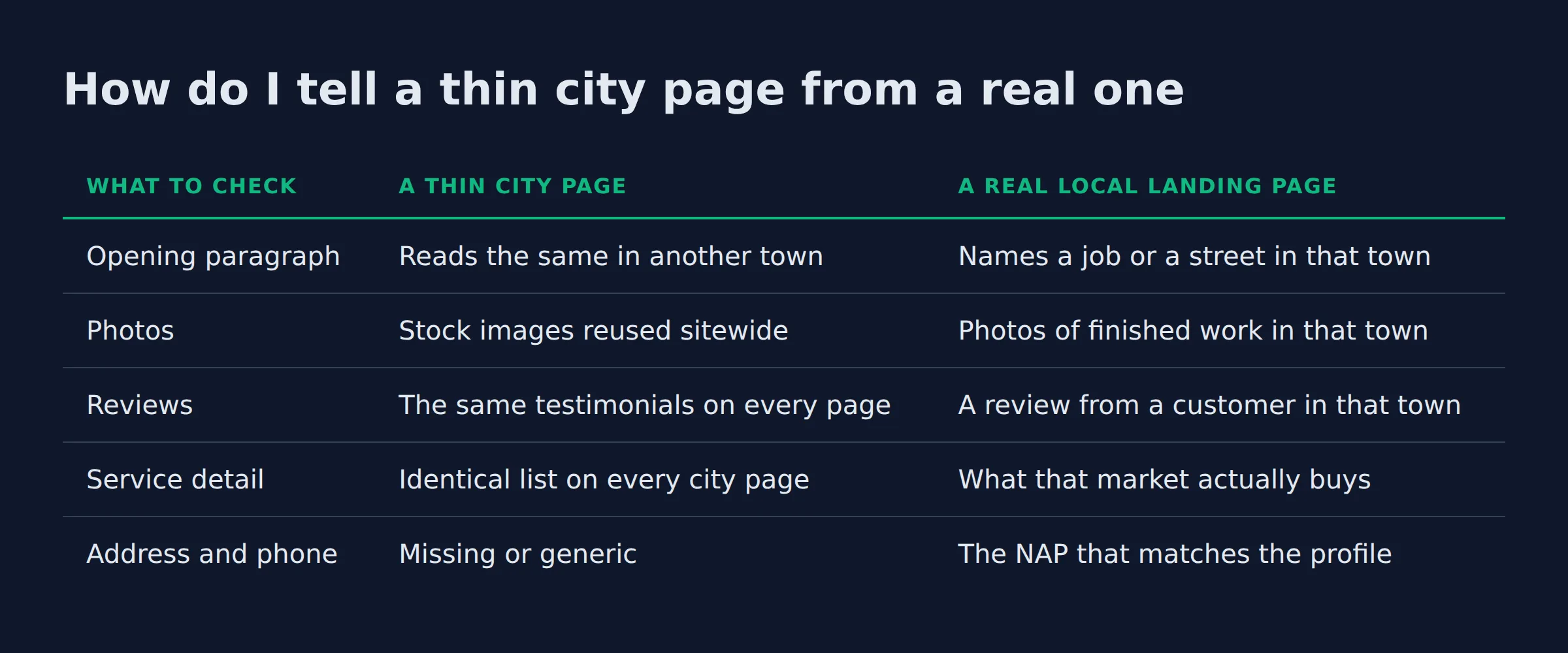
The comparison below is the set of checks we run by hand on every city page.
| What to check | A thin city page | A real local landing page |
|---|---|---|
| Opening paragraph | Reads the same in another town | Names a job or a street in that town |
| Photos | Stock images reused sitewide | Photos of finished work in that town |
| Reviews | The same testimonials on every page | A review from a customer in that town |
| Service detail | Identical list on every city page | What that market actually buys |
| Address and phone | Missing or generic | The NAP that matches the profile |
We run this test on every city page an owner sends us, and it lands on the same two lines each time. The opening sentence and the photo caption carry the swap.
Take one page and swap the town name in both places. A roof page that mentions a specific street, a specific job and a customer by first name survives the swap. A page that opens with the words “quality roofing services at fair prices” does not.
- Image suggestion: two city pages from the same site side by side, with the identical opening paragraph highlighted on both.
The swap test needs no tool. Two pages, one read, and the answer is plain.
Does thin content get a local business penalised, or just filtered out?
Filtered, in most cases. A thin city page usually stops earning impressions before it earns a penalty. The pages that do cross the line get named as doorway abuse and scaled content abuse. Those are two separate violations in its spam policies.
Our read matches the wording of the rules. Google’s spam policies on doorway and scaled content describe doorway abuse as pages built to funnel users to one URL. The same rule covers several pages with slight variations aimed at one query.
The second pattern sits beside it as its own violation. Scaled content abuse covers pages produced at scale mainly to manipulate rankings instead of helping users.
The difference matters for what you do next. A penalty needs a reconsideration request. A filter needs a better page. Owners on the filter side rarely see a message in Search Console at all.
We see it as a page that shows up for its own business name and nothing else. Search the town and the page is nowhere.
A thin city page usually gets filtered instead of penalised. A filtered page is still invisible to the people searching.
What does a real local landing page have that a thin one does not?
A real local landing page carries proof from that town. A photo of finished work there, a review from a customer there, and one service detail that only that market needs. A swapped copy cannot fake any of the three.
Broken into parts, the elements a template cannot supply are the ones that make the page real:
- A photo of a finished job in that town, shot by the crew that did the work, so the photography is proprietary to the business.
- A review from a customer who lives there, with the town named in the review.
- A service detail that only that market has, like the roof style common in that area or the permit office a job there goes through.
- Deeper service detail than the main service page, written for the jobs that market actually buys.
- The town in the
H1, the title tag and the meta description. - The same name, address and phone (NAP) that appear on the Google Business Profile, so the page and the profile agree.
- LocalBusiness structured data that carries the address, phone and hours for that office.
- The areaServed property from schema.org, which names the towns that office covers.
Reviews and localized testimonials do the most work. A named customer in the town answers the question the searcher is really asking: have you done this here?
A city page also has a ceiling. Local results run on relevance, distance and prominence, and a page cannot change distance. The page can still get found in Search for that town. The map pack in a town where the business holds no address keeps its own order.
Every element has to point at the same business. Each page should reinforce the same entity: the business, its services, and the towns it covers. Local landing page examples that get found across several towns all repeat that same set.
Proof from the town is the part a competitor cannot copy. Everything else on a city page can be templated.
How do you write 20 city pages that are not one page with the town swapped?
Build each page around a job you finished in that town. Write the opening paragraph from what happened on that job. Then let the town decide the rest.
A page built this way stays different because the work was different. The pages that fail get written from a template first and a job second, which flips the order.
Service-in-city pages fail on the same seam. A page named for one service and one city has a single variable, and the rest of the page is boilerplate. Templated city pages like that are also called geopages, and the name does not change the problem.
A programmatic set of landing pages makes the seam wider. When a template and a data set build the town list, the only variable left is the town name. Every page carries the same sentences.
A service area business runs the same rule at a larger size. Ninety people a month search local seo for service area business, per the same keyword pull. The pages they land on still have to say something true about one town. Service area pages for local SEO covers what a service area page is and how it differs from a location page.
Watch for cannibalisation while you build. When two nearby city pages chase the same query, they split the signal and one of them earns nothing. That is the reason a merge beats a rewrite in most of the cases we handle.
The searches a city page earns are non-branded, a service plus a town. The page answers that on its own proof, because nobody typed the business name.
Building that list from real job data is part of what our local SEO service does for local businesses.
Write from the job, then from the town. A page with 20 real details about one town needs no filler.
How do I find the thin pages I already published?
Open the Page Indexing report in Google Search Console and read the status of each city URL. Pages marked “Discovered: currently not indexed” are the ones Google found and chose not to keep, which is what a thin city page usually shows.
The Page Indexing report in Search Console groups URLs by status and says why each one sits where it does. Read the counts by status first, then open the city URLs inside each group.
Next, split your city pages by what they earn. Open the Performance report, switch to the Pages view, and compare clicks against impressions for each URL.
In the audits we run, the split between city pages that earn impressions and the handful that earn clicks is stark. Twenty pages carry impressions. Two or three carry the clicks. The pages that earn clicks all have a photo and a review from that town sitting on them.
Add GA4 to that read. GA4 shows the sessions each page sends, and call tracking shows which of those turn into a phone call. That is the measured outcome for the page.
- Image suggestion: our own Search Console Page Indexing report for a site with 40 city URLs, with the “Discovered: currently not indexed” count visible.
Impressions with no clicks is the shape of a thin page. It appears and nobody picks it.
What a thin city page costs the rest of your site
A thin city page costs the whole site, because it spends crawl attention that the pages earning calls need.
The worst index bloat we see sits on small sites, ones with 40 city pages and 6 real ones. The good pages wait in line behind pages nobody wants.
Google budgets crawling by host. Index bloat and crawl budget is the name for what a stack of low value URLs does to that budget. A large number of low value URLs slows how often the pages that matter get crawled and re-crawled.
New city pages land in the same queue. When a site carries dozens of pages that answer nothing, a new page waits longer to be found at all.
Index bloat also thins the signals. Each thin URL can compete with a better page for the same query, and the two split the result.
- Image suggestion: our own Search Console Performance chart for a site with 20 city pages, showing the long impressions line above the short clicks line.
Thin pages cost the site twice. They waste crawl attention and they split the signal for the pages that earn calls.
What we add first to a page that has to stop being thin
We add the strongest proof the owner can hand us, which is usually a photo of a finished job in that town. A review comes next.
In the audits we run, the first page to earn a click is usually the page where the proof was strongest.
| Order | What we add | Why it goes first |
|---|---|---|
| 1 | A photo of a finished job in that town | Proves the crew was there |
| 2 | A review from a customer in that town | Proof a template cannot copy |
| 3 | A service detail only that market has | Gives the page its own subject |
| 4 | The town in the H1, title tag and meta description |
Tells the reader which town the page is for |
| 5 | An internal link to the main service page | Connects the page to the page that sells |
The order matters, because the first two items change the job the copy has to do. Once the page carries a local job and a local review, the writing has something to describe.
Owners usually ask for the title change first. We do it last, because a town in the title does nothing for a page with no proof under it.
- Image suggestion: one rebuilt city page before and after, with the job photo and the local review added.
Add proof before you add words. A page with a real job photo needs fewer sentences.
Should I fix a thin city page, or delete it?
Rebuild the pages that earn impressions, merge the ones that earn nothing, and remove the ones nobody searches. That is the decision, and the count of city pages follows from it.
We sort the pages into three buckets in the Performance report.
| What the page earns | What we do with it | Why |
|---|---|---|
| Clicks and calls | Rebuild it around the proof from that town | It already answers a real search |
| Impressions, no clicks | Merge it into the nearest page that earns clicks | Two pages split one query |
| No impressions for 12 months | Redirect it or noindex it |
Nobody searches it |
Google’s guidance on consolidating near duplicate pages is the mechanics of the merge. Pick one URL, point the near duplicates at it with a canonical, and let the strongest page carry the queries. A redirect moves the same signal and retires the old URL.
Deleting outright is the last option. A page with no traffic can still hold a link or a review, and a redirect keeps what the page earned.
The count of city pages a site can support is its own question, and it turns on the proof you can show per town. How many location pages a local business should have covers the count and what to do with the pages you already published.
Watch for orphaned pages while you clean up. A city page with no internal link pointing at it is hard to find for a reader and for Google.
Deciding what to merge is part of what our local SEO service does. We start with the pages you already have.
Merge before you delete. A merge keeps whatever the page earned and hands it to one URL.
Do AI Overviews treat a thin local page differently?
Yes, on the outcome. Google’s guidance for AI features says there are no extra requirements to appear in an overview, so the overview pulls from whatever answers the question best. A page with no proof from the town gives it nothing to quote.
Google’s guidance for AI features is plain that AI Overviews and AI Mode add no special requirement. There is no schema to add and no format to follow. The answer on the page is the work.
That raises the cost of a thin page. An AI Overview for a local search picks one answer, and it needs a page it can lift. A page that answers the question and names the town is a candidate for that lift.
The same answer gets reused elsewhere. AI Mode, ChatGPT, Gemini and Perplexity all pull from pages that state an answer early. Generative engine optimization on a local site comes down to a clear answer plus proof from the place.
Scaled content abuse sits at the back of this. A city page written by a script for 200 towns is the pattern that rule names.
The pattern we see across the sites we audit holds here. Pages with a photo and a review from the town are the ones that get quoted. Pages with a swapped paragraph get skipped.
An overview can only quote the page that answers. A thin page hands the citation to another site.
Related: Local Service Website Pages That Rank on Google
Related: What Should a Local Service Homepage Say?
Related: How Google Ranks Local Businesses
FAQ
What are common landing page mistakes?
Writing the template first is the big mistake. A page that starts as a reusable block with a town name dropped in ends up with nothing that is true only of that town. The second mistake is keyword stuffing, where the town name lands in every sentence.
What is the best structure for a landing page?
Answer the query in the first line, then prove it. On a city page, that means a one-sentence answer at the top. Under it, a photo of a finished job in that town and a review from a customer there. Keep the page to one service and one place, and link back to the main service page.
Are landing pages still a thing?
For a local business, the city page is the landing page. The form-only page built for paid ads is a different job. A city page has to answer a search and carry proof from the town. That is what a reader and an AI answer both pull from.
Are service-by-location pages against Google’s guidelines?
They are fine when each page says something true only for that town. They cross the line when they funnel users to one URL, or exist to catch a query. That is what Google’s spam policies call doorway abuse. The page itself decides which side it sits on.
Do service area pages hurt local SEO through duplicate content?
Only when they repeat each other. Duplicate pages split the signal between URLs, and the fix is to pick one URL and point the others at it. A page that carries its own photos and reviews duplicates nothing.
How do you write unique content for 20 plus city pages without it looking spun?
Write each page from a real job in that town. One photo, one review and one detail from that market give the page its own subject, and the copy follows. The long version of that process sits in the section above.
If you want a straight read on where your Google visibility stands, a 15-minute call covers it. Bring your city page list and we will show you which pages to rebuild first. Book the 15-minute call.