What Should a Local Service Homepage Say? (Checklist)
What a local service homepage needs to say, section by section: the H1, the phone, the service area, the proof, and the words that get it found.
Your homepage looks fine on a laptop. On a phone it is still a stranger’s first impression, and the phone in your pocket keeps quiet.
Most advice on the service homepage comes from people who review pages for a living. We open those pages on a phone, fix them, then watch the phone log. This is the plain version.
So what should a local service homepage say? A local service homepage should answer 3 things before a visitor scrolls: what you do, where you work and how to reach you. Put the service and city in the H1, then the phone and one quote button above the fold. Add proof, service area and hours below.
TL;DR
- The homepage needs the service and the city on the first screen, plus an easy way to call.
- Google weighs relevance, distance and prominence. Relevance is the one your page controls.
- Name your services and your towns plainly, then give the bigger ones their own pages.
- Proof belongs on the page: a recent review, real photos, your licence and your warranty.
What should be above the fold on a local service homepage?
The first screen needs 3 things: what you do, the city you serve and how to call you. Put the phone number and one quote button within thumb reach, and keep the H1 short enough to read at a glance.
Above the fold is whatever a visitor sees before they scroll. On a phone that is a narrow strip of screen, so the words matter more than the picture beside them. The same stack holds for a cleaning crew, an electrician and a roofer.
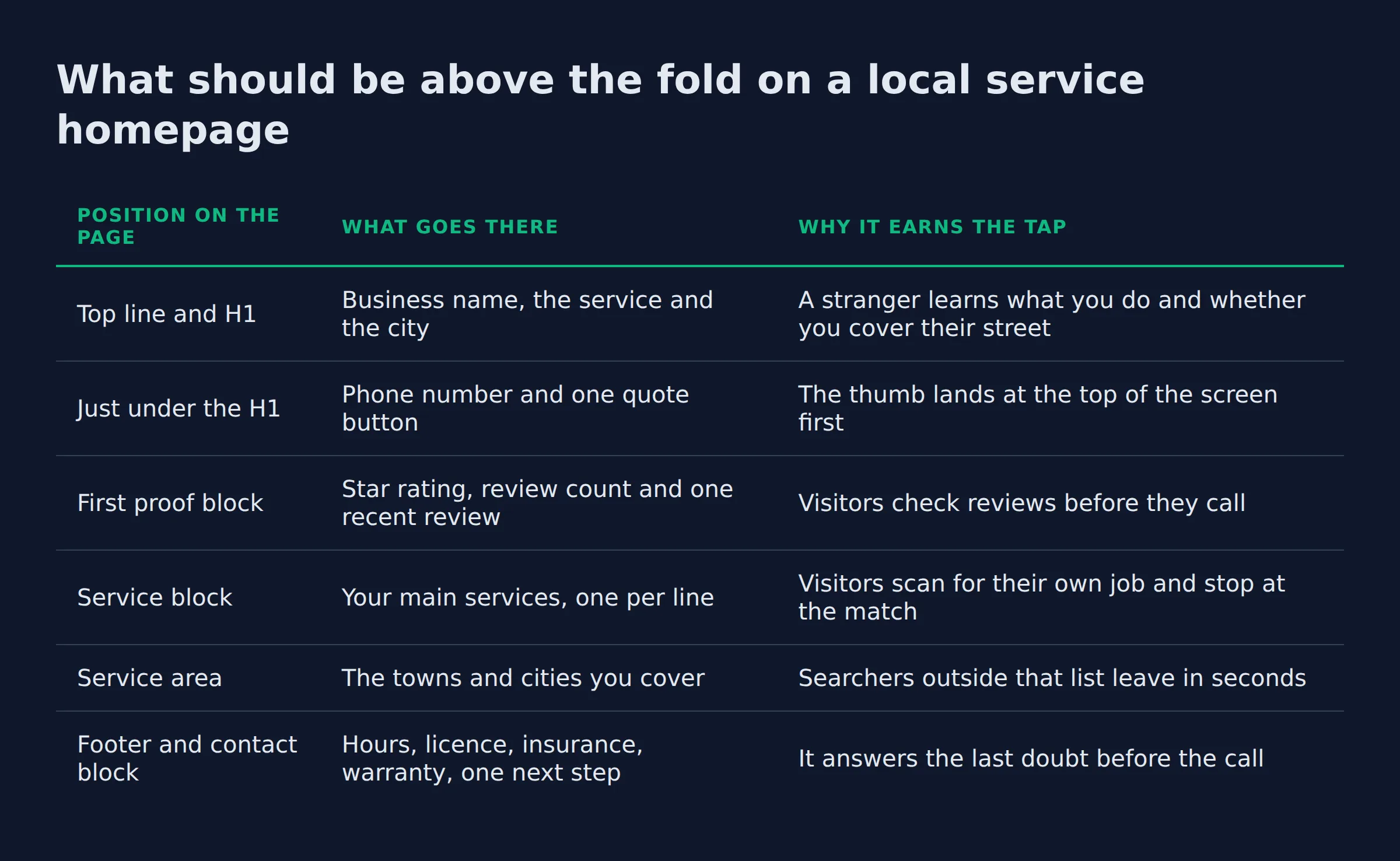
Here is the stack we build, top to bottom.
| Position on the page | What goes there | Why it earns the tap |
|---|---|---|
| Top line and H1 | Business name, the service and the city | A stranger learns what you do and whether you cover their street |
| Just under the H1 | Phone number and one quote button | The thumb lands at the top of the screen first |
| First proof block | Star rating, review count and one recent review | Visitors check reviews before they call |
| Service block | Your main services, one per line | Visitors scan for their own job and stop at the match |
| Service area | The towns and cities you cover | Searchers outside that list leave in seconds |
| Footer and contact block | Hours, licence, insurance, warranty, one next step | It answers the last doubt before the call |
The H1 carries the hardest working line on the page. Write the service and the city into it, and leave the slogan out. The subhead carries the value proposition in one plain line, so the visitor sees what you do and how fast you show up. Your title tag and meta description carry the same idea in shorter form, and they are what a searcher reads on the results page.
A tappable number is click to call. If the number is an image, or sits in the footer, the tap does not happen. Make the tap the easiest thing on the screen. Add a plain line about what happens next, so a visitor knows how soon someone will call back.
The rest of the first screen is furniture. Your logo sits top left, the menu navigation stays short, and the same branding runs down the page and through your profile.
The H1 should name the trade and the town, because a stranger on a phone has 2 seconds and no context.
Page speed decides whether a visitor stays long enough to tap. An HVAC company with a slow hero image loses the tap before the visitor sees the work.
Google’s Core Web Vitals thresholds set 3 numbers. Largest Contentful Paint should land within 2.5 seconds. Interaction to Next Paint should stay at 200 milliseconds or less, and Cumulative Layout Shift at 0.1 or less. Google reads all 3 at the 75th percentile of page loads, and PageSpeed Insights reports them for any URL.
Google indexes and ranks the mobile version of your site, crawled with the smartphone agent, and calls this mobile-first indexing. That is why we judge a homepage on a phone before we judge it anywhere else.
What does Google actually look at when it ranks a local business?
Google’s own guide names relevance, distance and prominence as the factors behind local results. Your homepage moves relevance, because it tells Google what you do and where you work. Distance you cannot change, and prominence grows with links and reviews.
That list is Google’s own, and its guidance on relevance, distance and prominence ties prominence to how many sites link to your business and how many reviews you have.
Relevance is how well your business matches the search. Distance is how far you are from the person searching.
Only one of those is yours to write.
| What Google weighs | What it means | Can your homepage move it |
|---|---|---|
| Relevance | How well your business matches the search | Yes, this is the signal the page controls |
| Distance | How far you are from the person searching | No |
| Prominence | How well known you are, from links and reviews | Partly, when the page earns links and shows fresh reviews |
The map pack above the results runs on the same 3 signals, so the page and the map card are working on one job. Google Search and Google Maps read the same page.
Structured data is how you spell those facts out for Google in code. The LocalBusiness structured data page lists the fields Google reads, including address as a PostalAddress with streetAddress, addressLocality, addressRegion and postalCode. It also reads telephone, openingHoursSpecification and priceRange, plus aggregateRating, which Google recommends only for sites that collect reviews about other businesses.
Relevance is the signal you can write your way into, because it starts with the words on your page.
The 3-second phone test we run on every homepage
We do not start on a laptop. We open the page on a phone and hold it out at arm’s length. Then we give it 3 seconds, which is about how long a visitor gives it before the thumb moves.
Then we answer 3 questions out loud: what the business does, where it works and how a visitor would call it.
Most owner homepages fail the first 2. The H1 reads like a company name with a line under it about quality, and the trade and the town sit in a paragraph further down.
Owners tell us their town already knows the name. A searcher two towns over does not. They read the page before they call, and a page that never mentions their street gives them nothing to hold.
The tap shows up in the same 3 seconds. If the number is not tappable, or the quote button sits below a photo gallery, the visit ends in a back button.
Run the test on your own page tonight. If you cannot name the service, the town and the phone number in 3 seconds, a stranger cannot either.
How do you name every service and every city you serve without keyword stuffing?
Start with the 2 or 3 services that bring the most work and name them near the H1. Put the rest in a service block with one bullet per service. A bullet list reads faster than a comma run and gives every service a line of its own.
The town goes in the H1 once, near the service. Then a service area section lists the cities and towns you actually cover, one per line. If you run the work from a van or a spare room and cover a region, you are a service area business. Those town names are what a searcher matches against.
Service area pages do the rest. Each one names a city and the work you do there, and each one gets its own title tag. That covers the towns without stuffing the same place name into every sentence.
The homepage is the hub page. Every service page and every city page should link back to it, and it should link out to them. Those internal links build the path a visitor follows from the homepage to the page for their own job.
A pressure washing business with 2 services needs a shorter block than a landscaping crew with a long list. The shape stays the same either way.
Keep your NAP, which is your name, address and phone, identical everywhere it appears. The footer, the profile and the directories should all say the same thing, because a mismatch splits the signal.
Which pages carry that weight is its own question, and we cover it in the pages on a local service site that actually rank.
A service belongs on the homepage as a name. The detail belongs on its own page.
What proof belongs on a local service homepage?
Reviews are the proof most visitors check first. 97 percent of consumers read reviews online before they call a local business. Another 47 percent will not use a business with fewer than 20 reviews.
BrightLocal’s survey of how consumers read reviews before they call a local business found that 85 percent are more likely to use a business after reading positive reviews. It also found that 74 percent only care about reviews written in the last 3 months.
That last number is the one owners miss. Review recency does more for a service business than the raw count, because a review from last month answers a doubt that praise from 2 years ago cannot touch.
Owners also ask how to get more Google reviews for a service business. The short answer is to ask every customer on the day the job ends, while the work is still fresh in their mind.
The rest of the proof list is short.
- A star rating and a review count, near the first screen.
- One recent review quoted in full, with a first name and a town.
- Real photos of your own crew, van and finished jobs.
- Before and after photos for the trades where the change is visible, like pressure washing or gutter clearing.
- Your licence and insurance, listed plainly.
- A workmanship warranty and a written estimate.
- A short video of the owner or the crew on a job.
Answer your reviews as well. A reply under a recent review shows a visitor that a real person watches the page, and a reply to a rough review reads better than silence.
Claims without proof are the thing to watch. A line about being fully insured with no certificate behind it is a claim a visitor cannot check, and a visitor who cannot check it calls the next business.
Testimonials on a home service page work the same way. A name, a town and a job beats a quote with no one attached to it.
One review from this month beats a wall of praise from 2 years ago, because visitors read dates before they read compliments.
Does your homepage have to match your Google Business Profile?
Yes. The phone number and website on a profile should be the single, authoritative ones for the business. Both have to be verifiable by the owner, and the website content has to be owned and managed by the owner.
Google’s business eligibility and ownership guidelines set that rule, and they ask for a phone number and a website the owner can verify and keep current.
A local search usually starts on the profile. Google Maps and the map pack show the hours, the photos and the newest reviews, and a visitor reads that card before they see your page.
The two should read like one business, told twice.
| The fact | On your Business Profile | On your homepage |
|---|---|---|
| Phone number | The number you answer | The same number, tappable |
| Hours | Your opening times | The footer and the contact block |
| Services | The services you picked | The service block |
| Service area | The towns you cover | The service area section |
| Reviews | Star rating and review count | The proof block, with a recent review named |
A Google Business Profile setup that disagrees with the page costs you both ways, because the visitor meets the profile first.
One business, one phone number, one website. Google says the profile and the page should point at the same ones.
What should you leave off a local service homepage?
Drop the hero slogan that says nothing. Drop the stock photos that pretend to be your crew. Drop the carousel that hides your best work and the social feed that sends visitors away. One main call to action stays.
Every element on the page competes for the visitor’s attention, so the cuts matter as much as the additions. These are the ones we remove first.
- A hero slogan tells a visitor nothing about the trade or the town.
- Stock photos read as a template and hide the crew behind them.
- A carousel puts your best job behind a swipe most visitors never make.
- A live social feed moves the visit to another app.
- A long about-us block above the service list buries the work behind a story.
- Claims with nothing behind them cost more trust than they buy.
Keep one main action. For most local trades the phone number is that action, and the quote form is the backup for the visitor who will not call during work hours.
Every element you cut makes the call button easier to find.
What we cut first, and what stays
We cut the carousel first, because it hides the work behind a swipe. Then the about-us block above the service list, because a homeowner with a burst pipe is not reading the story of how you started.
Then we put the profile next to the page and read them side by side. The mismatches we find are quiet ones. The profile lists one opening time and the footer lists another. The profile photos are the ones uploaded on the first day. The newest review is months back, so the page looks busier than the profile does.
What stays is short.
- The H1 with the service and the city.
- A tappable phone number in the header.
- The service list and the service area.
- The star rating with one recent review.
Those 3 checks are the ones we run inside our local SEO service, where the page and the profile get fixed together.
A rewrite of the top of the page usually beats a rebuild, and it costs less. Most homepages we open need a new first screen, and the rest of the site can stay.
A mismatch between the profile and the page reads as a business that stopped paying attention.
How do you know the homepage is working?
Watch calls and form fills, counted by source. Compare your local service website conversion rate against what a normal conversion rate looks like.
Conversion rate is the number to compare, and we break down what a normal conversion rate looks like. Traffic on its own tells you nothing about the phone.
In Google Analytics 4 you can mark a tap on the number as a conversion with the call_click event, and a form fill with generate_lead. A call tracking number then tells you which source sent the call.
Give any change 30 days before you judge it. Calls move first, because the fix sits on the page.
Count the calls and the form fills by source. The visitors who never call are the gap this page closes.
Related: How Google Ranks Local Businesses
Related: Do You Need a Website for a Google Business Profile?
Related: Why Is My Website Getting Traffic But No Calls?
Related: how to show up in chatgpt for local businesses
FAQ
How long should a local service homepage be?
Long enough to answer the questions a visitor arrives with, and no longer. A page that names the service, the town, the proof and the hours can run short and still earn the call. Everything below the first screen has to earn the scroll.
Should the homepage list every single service you offer?
Yes, name every service, but not all at the same weight. Give the 2 or 3 biggest earners a line near the H1, and give the rest one bullet each in the service block. Then send the services with real search demand to their own pages.
Should the homepage name every city you serve?
Name the town you work from and the main cities around it, then push the long tail to service area pages. A wall of town names helps nobody and reads as stuffing to a visitor and to Google. Each city page carries one town and the work you do there.
How many calls to action should a homepage have?
One main call to action, plus 1 backup. The phone number is the main one for most local trades, and a short quote form covers the visitor who will not call during work hours. A third and fourth button split the attention the phone needs.
Why does the phone number need to be tappable?
Most local searches happen on a phone, and a number in plain text makes a visitor copy it digit by digit. A tappable number opens the dialer in one move. That move is a click to call you can count in your reports.
How do you build trust on the homepage if you are a new business?
Show what you can prove. Name your licence and insurance, and list the towns you cover. Add real photos of your own work on the jobs you have finished. Quote every review you have, even if there are only 5.
Should you show prices on a local service homepage?
Say how you price, and send the visitor to a written estimate. A stated range invites an argument before anyone has seen the job, and a fake starting price costs you the call. If you give free estimates, say that on the page.
Getting a straight read on your homepage
If you want a straight read on where your homepage is losing calls, a 15-minute call covers it. We open the page on a phone, run the 3-second test and name the first thing we would change. The call is a read of your page from the operator side, and the read is yours to keep.
You can book that call here: https://link.localbizboost.com/widget/booking/lobOMW2RpbL2Vu9SblWG