Why Is My Website Getting Traffic But No Calls?
Traffic without calls is usually the wrong traffic, a phone number nobody can tap, or a page that never asks. Find which one you have.
Your traffic chart climbed last month and the phone stayed quiet. It shows up in every trade. Owners bring us one version of the question almost every week: why is my website getting traffic but no calls?
Traffic without calls usually comes down to three things. The visitors arrived for information and left once they had it. The page never made calling easy. Or nobody measured the calls at all. Check your search queries first, then your phone placement, then your tracking. Fix the first cause you find.
Plenty of pages list the causes. The check that proves which one you have is the part they leave out.
TL;DR
- Most local service traffic is research traffic. A cost guide answers the question and the visitor closes the tab.
- A phone number nobody can tap, or a long form, loses the few visitors who were ready to book.
- Some calls start on your Business Profile and never reach your website analytics.
- Find your cause before you change the page. Each check takes a few minutes.
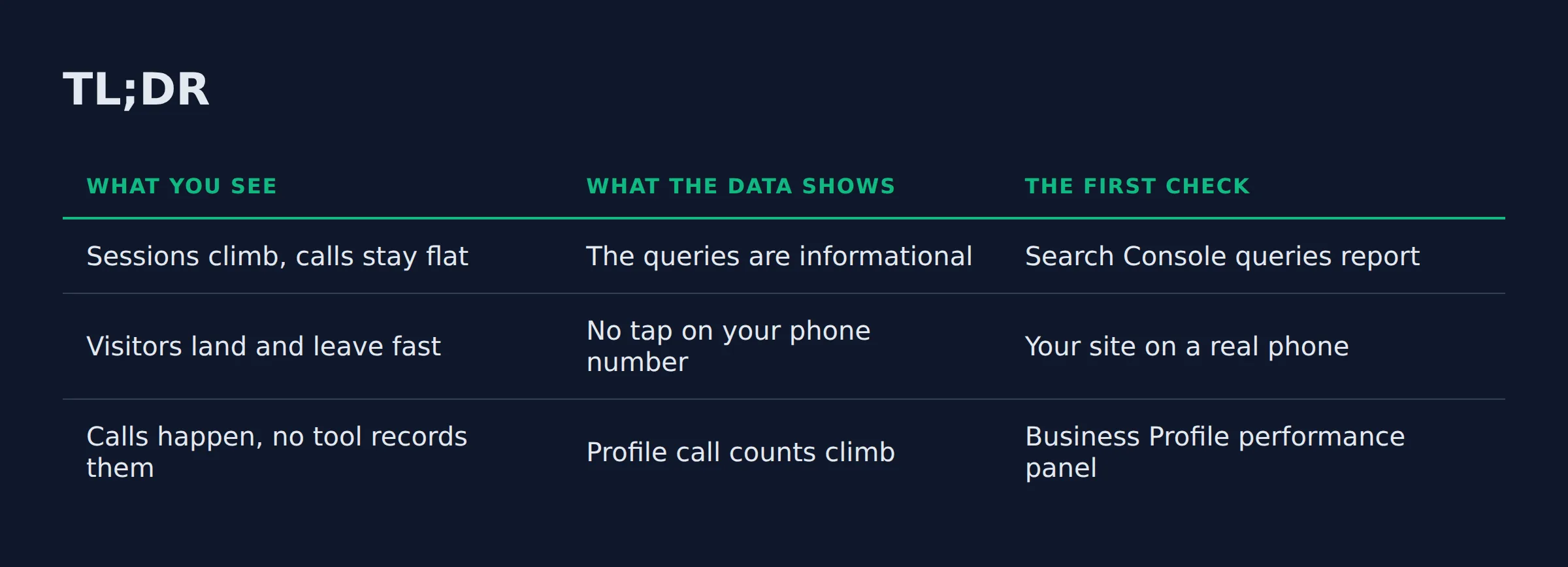
Here is how the 3 causes show up in your own data. Each one points to a check.
| What you see | What the data shows | The first check |
|---|---|---|
| Sessions climb, calls stay flat | The queries are informational | Search Console queries report |
| Visitors land and leave fast | No tap on your phone number | Your site on a real phone |
| Calls happen, no tool records them | Profile call counts climb | Business Profile performance panel |
Why is my website traffic the wrong traffic?
Most local service traffic is research. Someone searches a cost guide, gets the answer, and never hires. Buy-intent visitors want a service and a city, and they are ready to call today.
Those are 2 visitors with 2 jobs. Google’s guidance on how Google ranks local results puts relevance first, so a listing shows up for the words a person typed.
A page that matches a how-to question gets the visit. The call goes to someone else.
AI Overviews and AI Mode work the same way on Google’s side. Those features answer the question right on the results page. Plenty of searchers stop there.
Label the research visits. Then they stop looking like lost business.
If you searched “website traffic but no leads”, the queries report holds your answer. Start there. Open Search Console, then Performance, then Queries, and read the last 20 that earned a click.
| What the visitor typed | What they want | What they do next |
|---|---|---|
| how much does duct cleaning cost | A number | Read, then leave |
| when should I clean my gutters | A fact | Read, then leave |
| plumber near me open now | Someone today | Tap call |
| your business name | Proof and hours | Read reviews, then call |
When we read that report with an owner, the top rows are usually cost and timing questions. The reaction is the same every time. They assumed those visits were buyers.
Why do visitors leave without calling?
Visitors leave when calling feels like work. A number nobody can tap loses the ready buyer. A form that asks for everything and a slow page on a phone lose the rest.
We keep the diagnosis simple. Open your own site on your own phone and count the seconds until your number is tappable.
On the sites we audit, that number often hides in the footer as plain text or an image. It rarely sits at the top.
Owners describe this as getting website visits but no sales. The cause is usually mechanical.
Speed has a hard line. Largest Contentful Paint should land within 2.5 seconds.
Interaction to Next Paint should stay at 200 milliseconds or less. Cumulative Layout Shift should hold at 0.1 or less, per Google’s Core Web Vitals thresholds. Those are the lines to beat.
The thresholds get measured at the 75th percentile of page loads, split by phone and desktop. Run PageSpeed Insights on your site. It takes a minute.
Phones carry a big share of it. Statcounter put the share of US web traffic by device at 43.14% on phones in August 2026. Desktop held 56.86%, so roughly 4 in 10 visitors see your site on a small screen.
Reviews move that number too. In BrightLocal’s 2026 survey, consumers read reviews before choosing a business more than they did the year before.
41% always read reviews, up from 29%. Only 18% said they would skip an AI-written summary of them.
Recency decides the tap. The same survey found 32% of consumers look for reviews written in the last 2 weeks. 89% expect a reply when they leave one.
Every extra step costs you the call. Most of them take minutes to fix.
Slow follow-up ends the story. If the phone rings out at 6pm, that homeowner calls the next listing on the map. A missed call without a callback is the same loss.
Is it a traffic problem, a page problem or a tracking problem?
Each cause leaves its own fingerprint in your data. Wrong traffic shows in your queries report. A page problem shows up as sessions with no call taps and no form fills. A tracking problem shows up as real calls that no tool recorded.
Settle the question today, in this order. Check the query mix first. If the queries name services and cities, your traffic is fine and the fault sits on the page or in your reporting.
The tools below separate them. Each one sees part of the picture.
| The tool | What it shows you | What it cannot see |
|---|---|---|
| Google Search Console | The queries that earned clicks | Anything after the click |
| Google Analytics 4 | Sessions, form submits, outbound taps | Calls placed from your profile |
| Microsoft Clarity | Session recordings and heatmaps | Whether the phone ever rang |
| A call tracking number | The calls, their source, and the time | Calls to your main line |
| Business Profile performance | Calls, direction requests and website clicks | Calls from your website |
Google counts a profile call when somebody taps the call button. That is your Business Profile call count.
Verify your profile to see it. Add your phone number too.
A tracking number with dynamic number insertion swaps the number on your site per traffic source. It catches what the other tools miss. One channel stops hiding inside another.
Confirm the cause first. Then you fix the right thing.
If someone asks why am I getting clicks but no conversions, check the query mix first. Research intent explains most of it.
What should the page do before a visitor decides to call?
Three jobs come before the call. Say what you do and which cities you cover. Show that you have done it before, then make the next step one tap.
The first screen carries the weight. A visitor should see what you do, where you work, and how to reach you. We covered what the homepage has to say above the fold in its own post.
A page written for every city reads as a generic service page. It converts like one too. Name the towns you serve, even on a service area business with no storefront.
Keep your name, address and phone identical on your site and on your profile. That way the 2 records match.
Then look at the form. Ask for the least you need to call back. Every extra field is another chance to lose them.
Proof sits next to the button. Reviews with recent dates, a license number, and photos of real jobs all answer the question behind the question. Say what happens after hours too, because voicemail at 6pm sends that visitor to a competitor who answers.
LocalBusiness schema gives Google your hours, phone and service area in code. That helps. Some owners want the benchmark first, so what a normal conversion rate looks like covers the range for a local service website conversion rate.
Show the service, the city and a tappable number in the first screen. That does most of the conversion work.
Are the calls landing on the profile instead of the site?
Sometimes the calls happen. Your website never sees them. A Profile call button tap counts as a call, and it can arrive without any site visit. When profile calls climb and sessions stay flat, the profile is winning.
The tap is what sends the call. Everything else about google business ranking is a longer story.
A local pack slot is where many service calls start. Local results come down to relevance, distance and prominence, according to Google’s documentation. Prominence grows with reviews and links.
Fresh reviews beat older praise. Review count and recency decide the tap, and that tap happens inside your profile.
We have opened performance panels where the call count climbs while the site reports flat sessions. Owners read the flat line as a slow month. The calls were there all along.
A call that starts on your profile is still a call. Give it credit first.
What do I fix first this week?
Fix the phone number first. Then the form, then the heading. The number is the fast change, and owners see it in the call log first.
The order matters more than the list. A number a thumb can tap recovers the visitors who already wanted to call you, and that group is the one neglect loses.
Then cut the form. Ask for the least you need to call back. A shorter form is easier to test, because form submits show up in Google Analytics 4.
Here is the sequence we use.
| Do this | In this order | The check that confirms it |
|---|---|---|
| Tap-to-call number in the header | First | Your phone shows the call |
| Form cut to the least you need | Second | Form submits in Google Analytics 4 |
| Heading with the service and the city | Third | Queries in Search Console get tighter |
How to get more calls from a local service website comes down to that loop, run a few times. Our own work on this is simple. It is the system you get from our local SEO service: profile, site, reviews and tracking handled together.
Change one thing at a time. Let the check tell you it worked, then move on.
Related: Local Service Website Pages That Rank on Google
Related: Do You Need a Website for a Google Business Profile?
Related: How to Set Up Google Business Profile Correctly
Related: how to track leads from google for a local business
Related: call tracking for local service business
FAQ
Why are my Google Ads getting clicks but no calls?
The ad decides where the click lands. When it sends a homeowner to a page that describes a service but never gives a way to call, the budget goes and the phone stays quiet. Paid strategy is a different job from this page.
How do I know whether my traffic is the right traffic?
Open Search Console and read the last 20 queries that earned a click. It takes 2 minutes. Questions about cost and timing mean research traffic, and queries that name a service and a city come from people ready to call.
What is a good conversion rate for a local service website?
There is no single number that fits every trade. A benchmark from another market misleads. Track the change from last month, and check that your calls and your forms get counted in the same place.
How many fields should my contact form have?
Ask for the least you need to call back. A name, a phone number, and a short note about the job is enough. Everything else waits. You can ask the rest on the phone.
How long before I see more calls after a fix?
A tappable number can show in the call log the same week. A heading rewrite waits on search. That takes longer. Judge each fix on its own check, and give it a few weeks before you change direction.
If you want a straight read on where your Google visibility stands, a 15-minute call covers it. We look at your queries and your profile numbers. We open your site on a phone.
Then we name the cause you have. Book a 15-minute call and we will show you where the calls are leaking.