Call Tracking for a Local Service Business (2026 Guide)
Call tracking shows a local service business where each call came from and which ones booked jobs. Here is the setup, and what Google counts for free.
Three Google calls land on a Tuesday. You answer all 3 and book one job. By Friday you still cannot say where those calls came from, or how many callers hung up when the line was busy.
Call tracking gives your local service business a dedicated phone number. Every call gets counted and traced to the source that produced it. Google’s free profile report counts some calls but not their origin.
Most advice on this is written by call tracking vendors, for other marketers. It opens by telling you to buy a tool. This is the owner’s version. It starts with the decision, then walks the setup in the order you would do it.
TL;DR
- You need a tracking number once more than one channel can make your phone ring. One number covers the profile and the site at once.
- Google already counts some of this for free in your profile performance panel. Read that before you pay anyone.
- A tracking number does not break your NAP. Your real number rides in the profile’s secondary number field.
- The outcome matters more than the count. Tag each call by what it became, and watch the booked jobs.
Do you actually need call tracking for a local service business?
Yes, if Google sends you calls and you cannot say which channel sent them. One tracking number names the source behind every call, so you stop guessing. If you get a handful of calls a month, the free profile report is enough to start.
The owner who needs this hears from more than one place. A call can start in several spots:
- A tap on your map result.
- A tap on the phone number in your profile.
- A click from organic search to your site.
- A click on a paid ad.
Each one rings the same phone. The phone tells you nothing about which channel earned the call.
For a small shop, call tracking for small business usually means one number and one report. You do not need a platform to learn where your calls come from.
Getting found at all runs on 3 signals Google names in how Google ranks local results:
- Relevance.
- Distance.
- Prominence.
None of those name the channel behind a single call. That is the gap a tracking number fills.
A tracking number is worth it the moment you cannot tell where a call came from by memory.
What does Google already tell you about your calls, for free?
The Business Profile performance panel counts 4 interactions on your profile and shows how often people view you on Search and Maps. It is free and it builds itself. It counts your calls. It does not name the channel behind them.
Open it inside your profile under Performance. Read it as a trend, not a single day. A quiet Tuesday means little. A climbing line over a month means plenty. Google tallies each tap for you in your Business Profile performance report.
The panel counts 4 interactions:
- Calls.
- Messages.
- Direction requests.
- Website clicks.
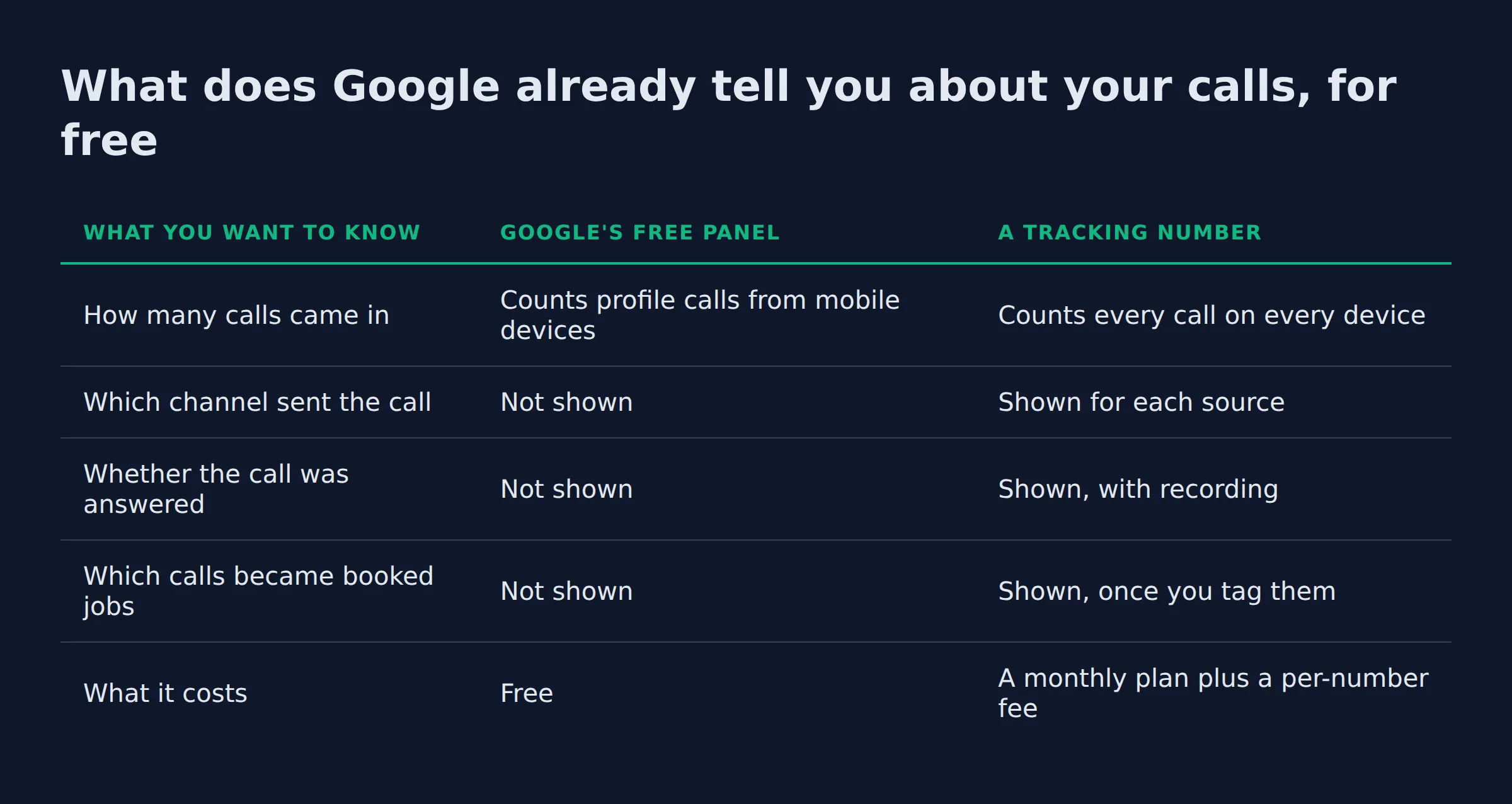
Owners hunting for Google Business Profile call tracking usually want one thing: the source behind each call. The free panel gives the count. A tracking number gives the source. Here is the free count, next to what a tracking number adds.
| What you want to know | Google’s free panel | A tracking number |
|---|---|---|
| How many calls came in | Counts profile calls from mobile devices | Counts every call on every device |
| Which channel sent the call | Not shown | Shown for each source |
| Whether the call was answered | Not shown | Shown, with recording |
| Which calls became booked jobs | Not shown | Shown, once you tag them |
| What it costs | Free | A monthly plan plus a per-number fee |
The free count has one blind spot. BrightLocal reports that Business Profile Insights count only the calls made from a mobile device, so the profile’s own call number undercounts your totals. Anyone who looks you up on a laptop and then dials is missing from that figure.
The phone is still the main thing a profile produces. BrightLocal’s figures, as published by CallTrackingMetrics, cover how people use a Business Profile. They put the average at 1,009 searches a month. That average is for one business. About 84% of those are discovery searches, and roughly a quarter of all profile actions are phone calls.
Google counts your calls for free. It will not tell you which channel made the phone ring.
How do you add a call tracking number to your Google Business Profile?
Buy a tracking number with your local area code, or a toll-free one if you already use it. Then edit the number in your profile. Keep your real number in the secondary phone field, so the listing still shows a number your customers recognize.
Changing the number takes a few minutes and no developer:
- Buy a local number in your area code, or a toll-free number that matches your sign.
- Change the phone number from inside the profile editor. Google walks through editing the phone number on your profile.
- Add your real number in the secondary phone number field.
The usual worry is NAP consistency, which means your phone number matches everywhere your business is listed. A tracking number in the main field is fine. Google’s business listing guidelines cover the number a profile shows, and the secondary field exists so a second number is allowed.
A service-area business works the same way. You manage service areas instead of a street address, and a service-area business still shows one phone number customers can tap.
A tracking number sits in the main phone field. Your real number sits in the secondary field, and your NAP stays whole.
How do you track calls from your website, Maps and ads in one place?
Dynamic number insertion swaps the number shown on your website for a tracking number, and it does it by source. That puts every call into one report, whatever channel it came from. Google Ads counts its own calls with a forwarding number.
Dynamic number insertion is the piece that ties the web side to the rest. A visitor from a Google search sees one number. A visitor from an ad sees another. Both are tracking numbers, and both report back. This is also how you track leads from Google Maps, because the map call and the profile call are the same call.
Name the source with UTM parameters, so the click and the call land under the same campaign. On the site itself, mark a call tap or a form as a key event in Google Analytics 4. Google Tag Manager handles the tag if you would rather not touch the code.
Paid search keeps its own count. Measuring calls from ads uses call assets and a Google forwarding number, so a paid click that becomes a call is tracked for you. Local Services Ads count their calls inside the ads product too.
One quiet step helps search read your site. A LocalBusiness schema block tells Google what the business is and where it serves. Wiring the whole picture at once is part of our local SEO service. For where every Google lead lands beyond the phone, see tracking every lead Google sends you.
Dynamic number insertion turns 3 call logs into one list that names the source.
What should a local service business measure beyond the number of calls?
Measure what each call turned into. Tag every call with a short label, so the count points to an outcome. Booked jobs are the one label that tracks to revenue.
A raw count says the phone rang. A label says what the call was worth. Set one short legend and use it on every call.
- Booked job. Money on the calendar.
- Quote. A real buyer, decision pending.
- Wrong number. Out of area, or a misdial.
- Telemarketer. No buyer behind it.
- Hung up or voicemail. A lead you may still save.
That legend is the difference between a call report and a sales report. Recording and transcription come on most paid plans, and a transcript is what lets you tag a call you never took.
Match the label to the source and you can rank your channels by booked jobs. The Google Business Profile performance report gives the count for each interaction. Your schedule gives the outcome. Put the two side by side once a week. For the website half, Search Console shows which queries send the clicks that become calls.
Add one more source to the legend: callers who say ChatGPT or a Google AI answer sent them. Those calls rarely show up as a click. How to rank a local business in AI search covers that channel.
A call count tells you the phone rang. A call label tells you whether it paid.
What we see in the call logs we audit
The tagged calls almost always disagree with what the owner assumed, and the channel they were sure about is rarely the one on top.
When we put a number on an owner’s profile, the surprise is consistent. They point at the website or the ad as their main source. The labels show Maps and the profile sending more of the calls. The calls they thought were website calls were mostly map taps.
Missed calls are the second pattern. On a home-service account, the after-hours and lunch-rush calls are the ones that go unanswered. They never reach a booked-jobs column, because nobody ever spoke to the caller. Add a text-back or a live answering path and those same calls start turning into quotes. The call count barely moves. The booked-job count does.
Many owners who ask about a tool still have a half-filled profile with no tap-to-call number. Their month of call data is smaller than it should be, and the first fix costs nothing.
The read we hand an owner is one screen on a Monday. Open the performance panel, look at the call count for the week, then match it against the calls you tagged as booked. That is the whole check. It is the same read a full agency report buries under a dozen charts.
What an owner assumes about their best channel is usually wrong, and the missed calls are the ones that never reach the booked-job column.
How much does call tracking cost, and is it worth it?
Call tracking starts near $30 a month on the lowest plans and grows with numbers and minutes. Local numbers run about $0.50 to $3 each. The free profile report answers the first question before you pay for anything.
The entry tiers bill usage on top of the plan, so the price climbs with minutes and texts.
| Tool | Entry price | Extra numbers | What to know |
|---|---|---|---|
| WhatConverts | $30/month | $2.50 to $3.50 each | 14-day free trial |
| CallRail | Lead tracking from $55/month | $3 each | Voice Assist starts at $95/month |
| CallScaler | $65/month plus usage | $0.50 each | Also sells a pay-per-call plan |
Those three numbers come from the vendor pricing pages (WhatConverts, CallRail, CallScaler). Ask for the price of your busiest month, not your quietest. Other tools in the same market sell the same shape at other prices:
CallTrackingMetrics.Nimbata.CallSource.Invoca.
The worth-it test is simple. If one booked job a month is worth more than the plan, the tool earns its place. If one job is worth less, read the free panel and wait. If you run no ads and get every call from Maps, the free panel may be all you ever need.
A tracking plan costs less than one lost job a month, and it earns that back the first time it shows you which channel to fund.
Related: how to measure local seo roi
Related: How to Set Up Google Business Profile Correctly
Related: Why Is My Website Getting Traffic But No Calls?
FAQ
Does using a tracking number hurt my Google Business Profile or my NAP?
No. Google lets your profile show a tracking number, and the secondary field holds your real one. Your business details still line up across the web. Google’s business listing guidelines spell out the number a profile may show, and a tracking number is fine.
Can I track calls from Google without paying for call tracking software?
Yes, to a point. The performance panel and Search Console are free, and they show your call taps and site clicks. They count the calls. They do not name the channel behind each one, so the free route shows that calls happen.
Do Google Business Profile messages count as leads?
Yes. Messages are 1 of the 4 interactions the profile counts. They show in the same performance report.
Do I need a separate number for every channel?
No. One number covers a profile and a website at once through dynamic number insertion. You add numbers only when you run ads beside organic search and want the ad calls split out. One agency guide lays out a setup that buys a bundle of numbers for exactly that split.
How do I track leads if I have no website?
You track everything inside your profile, and every interaction shows in the performance panel. For the full path with no site, read tracking leads when you have no website.
How do I know which calls turned into booked jobs?
Match the call label to the job. Tag each call as it arrives, then compare the booked-job tags with your schedule. A number that records calls makes this a weekly habit instead of a guess. It never promises a count of jobs, because the caller decides that.
Finding the calls you are already missing
You do not need a big setup to see where your calls come from. You need one number on your profile and a habit of reading the panel.
If you want a straight read on where your Google visibility stands, a 15-minute call covers it. We open your profile with you and point at the leaks. Book a 15-minute call.