How to Measure Local SEO ROI Step by Step
How to measure local SEO ROI: count the calls, forms, and direction requests you can trace, price each booked job, and compare that to your monthly cost.
Most guides on SEO return are written for online stores and blogs. You run a van and answer a phone. This is the plain version for a local service business.
How do you measure local SEO ROI? Take the revenue your profile and website bring in, subtract what you spend to get it, and divide by the spend. Trace the leads you can see. Price the jobs that book, then compare that total to your monthly cost.
TL;DR
- Local SEO ROI is traced revenue minus cost, divided by cost.
- Trace 4 lead types. Calls, messages, direction requests, and form fills all count.
- Price each booked job at your average job value, then set it against what you pay.
- Your Business Profile performance report is free and covers 3 of those 4 lead types.
What local SEO ROI actually measures
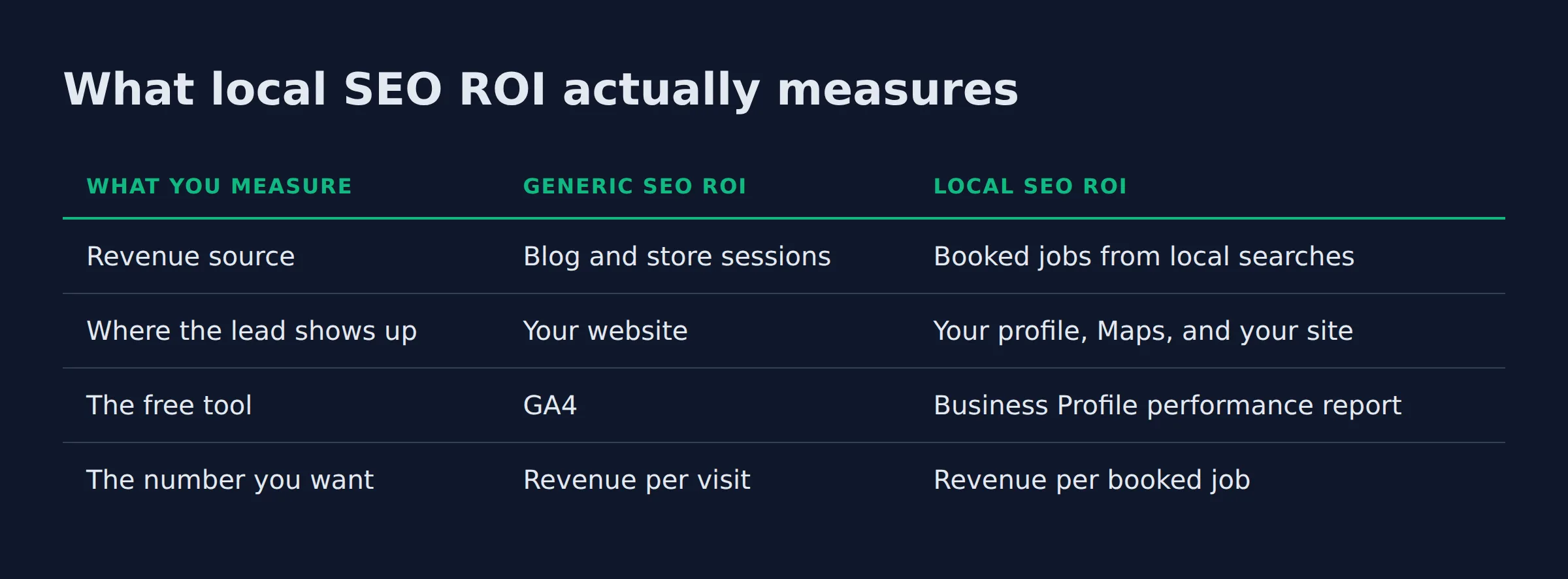
Local SEO ROI measures what your Google Business Profile and your website bring back. It also covers the map pack, where most nearby customers first find you. Point the same formula at “any visitor” instead and you have generic SEO ROI. That swap decides which numbers count.
Generic guides track sessions and rankings. Local ROI tracks calls and direction requests. Each one ends in a booked job or it does nothing for your bank account.
| What you measure | Generic SEO ROI | Local SEO ROI |
|---|---|---|
| Revenue source | Blog and store sessions | Booked jobs from local searches |
| Where the lead shows up | Your website | Your profile, Maps, and your site |
| The free tool | GA4 | Business Profile performance report |
| The number you want | Revenue per visit | Revenue per booked job |
Google ranks local results mainly on relevance, distance and prominence, and prominence grows with reviews and links. Your service area settings inside your profile tell Google where you work, and local ranking uses those areas.
Each factor is broken down in how Google ranks local businesses.
Only booked jobs from local searches move your return.
How do you calculate local SEO ROI step by step?
Track every lead you can see for one month. Multiply your booked jobs by your average job value to get revenue. Subtract your monthly cost, then divide by that cost. Multiply by 100 for a percent.
The formula is revenue minus cost, divided by cost, times 100. Work the steps in order.
- Add up traced leads for the month. Calls, messages, direction requests, and form fills all count.
- Apply your close rate. 40 leads that close 1 in 4 become 10 booked jobs.
- Multiply booked jobs by average job value. 10 jobs at $180 each is $1,800.
- Subtract monthly cost, divide by cost, multiply by 100. $1,800 minus $500, divided by $500, is 260 percent.
GA4 reports carry the conversions you loaded as events or goals, so your form fills and site calls feed in, per Google.
Work the formula on traced leads only. Traffic you cannot trace is not revenue.
How do you attribute a lead to Google Business Profile, Google Maps, or the website?
A profile call is its own lead type. So are a profile message and a direction request. Your Business Profile performance report counts each one. Form fills and site calls come from GA4 and Search Console.
Your Business Profile performance report lists every interaction on your listing, and it opens only for a verified profile. The table below breaks those interactions down.
The Search Console Performance report adds the query level view that the profile report cannot show:
- The searches you appeared for
- Impressions and clicks
- Click-through rate
- Average position
GA4 applies models like last-click and data-driven, so one form fill may credit a search from days earlier. For where each lead lands and how to capture it, see how to track leads from Google for a local business.
| Lead type | Where it shows up | Counted by | How to price it |
|---|---|---|---|
| Calls | Profile, Maps, and your site | Profile report, GA4, call tracking | Average job value times close rate |
| Messages | Your profile | Profile report | Average job value times close rate |
| Direction requests | Maps and your profile | Profile report | Average job value times close rate |
| Form fills | Your website | GA4, your CRM | Average job value times close rate |
| Website clicks | Search and profile | Profile report, Search Console | Trace it to the next step first |
One profile per business, with matching name, address, and phone, per Google’s guidelines for representing your business. A messy listing breaks the very data your report runs on.
Attribution matters only when it ends in a booked job. Track the lead type, then price it.
The calls and messages your forms will never capture
Most local leads arrive as a call or a message straight from your profile, and neither one touches a form. Customers can message your business from the profile, which is where those leads land, per Google. A form-only view of ROI undercounts you every month.
Google’s call reporting counts calls from ads and from your website. A tracked call works the same way, with a number that routes and records it.
Not every tracked call is a lead. When we switch on call tracking for a service business, a share of the calls turns out to be suppliers and current customers. Some are spam. We listen to a sample and strip those out before any call counts.
The number pools and dynamic number insertion that make this work live in call tracking for a local service business. This post stays on what a tracked call is worth.
A raw call is not a lead until you listen to it. Remove suppliers, current customers, and spam first.
How do you put a dollar value on a call with no sale yet?
Give each raw call a lead value: your average job value times your close rate. A booked job worth $180 that closes 1 in 4 makes each raw call worth about $45.
A lead value puts calls and form fills on the same scale. From there you can read cost per lead and cost per booked job instead of one blended number.
Here is the test we apply before any lead counts. Call it the 3 gates.
- Traced: you can point to the call, form, or message it came from.
- Reviewed: it is a real buyer, not a supplier or a wrong number.
- Priced: it has a lead value tied to your average job.
Only leads that pass all 3 gates belong in the report.
Calls from Google tend to close at a higher rate than form fills for the home-service clients we track. Owners rarely have a CRM, so we rebuild the close rate from their own job log and a few recorded calls.
If you want an outside set of eyes on those numbers, our local SEO service is built around reading them for owners.
A lead value turns raw calls and forms into one number you can compare.
How long before local SEO pays back, and how do you report it monthly?
Payback is the month your traced revenue first covers everything you have spent to date. No fixed timeline exists. Run the same report each month and watch the break-even line move.
The break-even month is the honest milestone, because a plain ROI number ignores time. A 200 percent return in month 12 lands very differently than the same return in month 3.
Each monthly report carries the same 4 lines:
- Traced leads by type
- Booked jobs from those leads
- Revenue at average job value
- Total spend and the running break-even line
GA4 is the free platform most owners already have running, per Google.
For the clients we onboard, the first honest ROI report often lands near break-even around month 3. What keeps an owner in is the second line on the page: the trend, not the total.
The break-even month is the real milestone. One month of data never shows it.
Which numbers should you ignore when you measure local ROI?
Ignore raw traffic and keyword rankings when they stand alone. They measure activity, not money. A jump in profile views that never becomes a call adds nothing to the return.
Google’s helpful content guidance asks you to write for people first, not to chase rankings. The same logic trims your report. Keep what a customer’s job paid for, and drop the rest.
Adding LocalBusiness structured data helps Google read your hours and area served. Treat that as setup, not as an ROI result.
Every month we open a profile and the owner points at the same number: profile views. It is the one figure in the report with no dollar value attached.
If a number cannot be traced to a job, it does not belong in your ROI report.
Related: How to Set Up Google Business Profile Correctly
Related: Google Business Profile Manager: What It Is and How to Use
Related: Local Service Website Conversion Rate: What Is Normal?
FAQ
How do you calculate local SEO ROI if the business has no website, only a Google Business Profile?
Use the profile on its own. The Business Profile performance report gives you calls, messages, and direction requests. Price the booked jobs those bring in, then run the same formula against your monthly cost.
Do Google Business Profile calls and messages count as leads?
They count as interactions, not as leads. A call from a supplier or a wrong number is not a lead. Listen to a sample and remove the noise. Count only what remains.
What is a good ROI for local SEO?
There is no single good number. A business with one van and a high job value can cover its spend in a few months. A business with thin margins needs more traced jobs. Most owners we talk to want the cost covered inside 3 to 6 months.
How long does local SEO take to show ROI?
Look at it month over month, not against a fixed date. Search Console and the performance report each show the same 30 day window. Watch the trend, and mark the month revenue crosses your cost.
Which free tools measure local SEO ROI?
GA4 covers it. So do Google Search Console and your Business Profile performance report. A paid calculator is only as good as the numbers you feed it, and most ask you to guess them.
If you want a straight read on where your local visibility stands, a 15-minute call covers it. Book it at https://link.localbizboost.com/widget/booking/lobOMW2RpbL2Vu9SblWG