Google Business Profile Manager: What It Is and How to Use
The Google Business Profile manager is the dashboard you use to run your listing. Where to sign in, what to do each month, and how to share access.
You sit down to fix your holiday hours and the button has moved. Your old bookmark opens a page you do not recognize, so you close the laptop and try again next month.
Most posts about this dashboard describe buttons their writer never clicked. This page gives you the order we actually work in when we take over a profile.
The Google Business Profile manager is the dashboard you use to run your listing. Sign in at business.google.com with the Google account that owns the profile, or edit directly on Google Search and Google Maps. There you update hours and services and reply to reviews, and you add owners or managers to share access.
TL;DR
- The manager is the dashboard for your profile. You reach it at
business.google.com, on Google Search, or in Google Maps. - Sign in with the account that claimed the business. The wrong Google Account shows you nothing.
- The dashboard is free, and Google says no one can pay for a better local ranking.
- Set 1 pass a month on the same few fields. The habit does the heavy lifting.
Where do I sign in to the Google Business Profile manager?
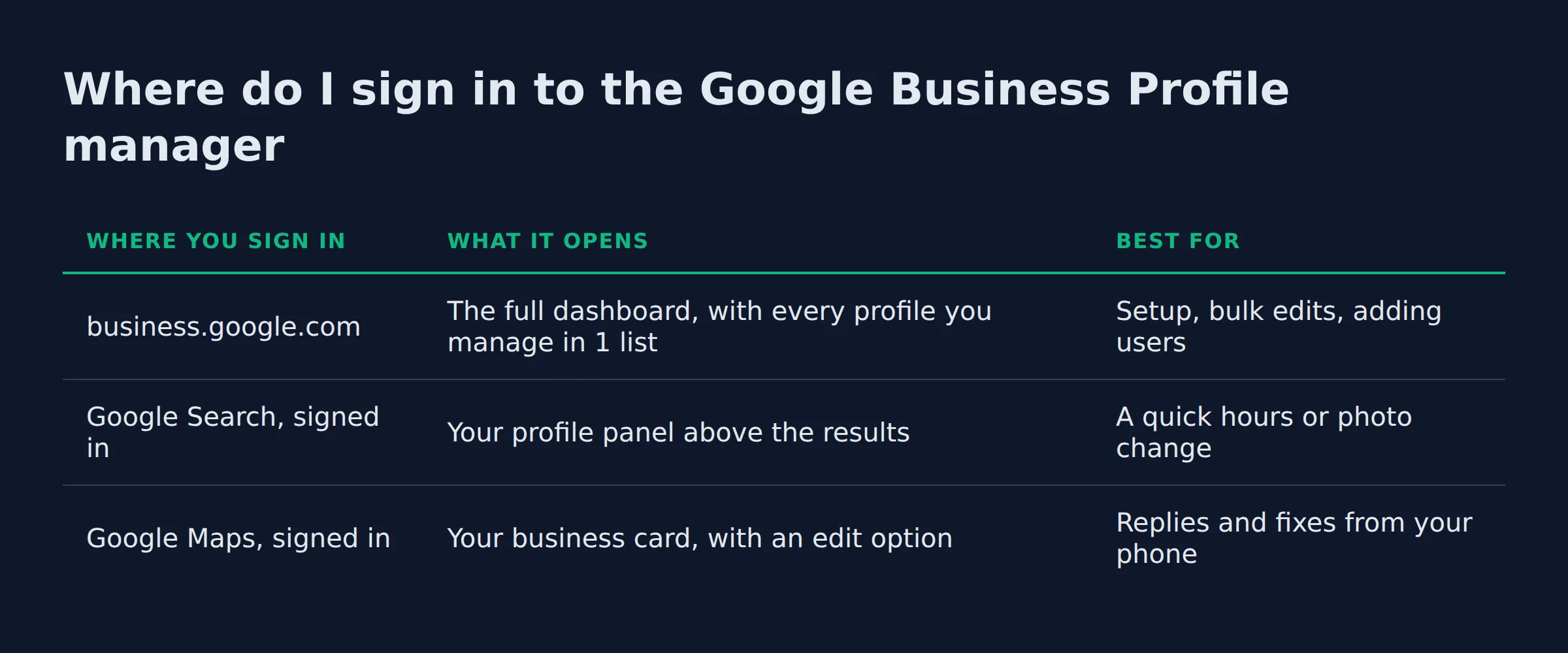
Sign in at business.google.com with the Google account that claimed the profile, then pick the location. You can also edit the same listing while signed in to Google Search or Google Maps. The old mobile app is gone.
The same listing sits behind 3 front doors. Google’s help page on editing your Business Profile covers the Search and Maps routes. The dashboard adds the bulk view you need once you run more than 1 location.
| Where you sign in | What it opens | Best for |
|---|---|---|
business.google.com |
The full dashboard, with every profile you manage in 1 list | Setup, bulk edits, adding users |
| Google Search, signed in | Your profile panel above the results | A quick hours or photo change |
| Google Maps, signed in | Your business card, with an edit option | Replies and fixes from your phone |
The dashboard at business.google.com is what most owners mean by the manager. It lists every profile you own or manage, so it is the one surface that scales.
The Google My Business app that used to live on your phone was retired in July 2022, per BrightLocal. The work did not leave. It moved into Search and Maps, so an old bookmark goes nowhere.
The account you sign in with decides which business you see, so the wrong Gmail is the first thing we check.
The order we actually work in
We fix access first. Then the fields Google matches on. Last comes the pass we repeat each month. That order is not random.
Here is the sequence we run on every profile we take over:
- Get the access right, signed in to the account that holds the profile.
- Fill the fields Google matches on, starting with the category.
- Set the service area if customers never come to you.
- Reply to every review and start a photo habit.
- Run 1 short pass a month so nothing goes stale.
Owners jump to step 2, because it is the part they can see. Step 1 is the one that quietly costs listings.
The access is the foundation. The fields come next, then a pass you repeat. Skip step 1 and every other step sits on a listing you do not control.
What should you actually do in the dashboard each month?
Set 1 pass a month and hit the same 4 spots. Update your hours and special hours, and reply to each new review. Add photos and 1 post, then read Insights for the searches that brought calls.
The pass is small work. It is also most of the game.
In the profiles we open after a quiet quarter, the last review reply is months old and the photo count has not moved. The listing still works. It just stops growing.
What you can skip: the old messaging tools. Chat and call history are gone from the profile, so there is nothing there to manage. Skip the third-party trackers that scrape your own listing too, since they show you the same page you already own.
One task is worth the whole pass. Watch for a Get verified button on the profile. If it appears, something changed and the listing needs you.
A short pass on a schedule beats a long panic session the week a customer calls about your hours.
How do you add a manager or owner to your Business Profile?
Open the profile and invite the person by email from the sharing screen. They accept from their own Google Account, and the role takes effect. Owners can add users and remove the profile, while managers can edit the listing but cannot add or remove anyone.
Google’s guide to inviting users as owners or managers is clear on 1 rule. Everyone signs in with their own account, so a shared password is not an option.
| What you can do | Owner |
Manager |
|---|---|---|
| Edit hours, services, photos and posts | Yes | Yes |
| Reply to reviews | Yes | Yes |
| Add or remove users | Yes | No |
| Transfer ownership to another person | Yes | No |
| Remove the Business Profile | Yes | No |
When we take over a profile, the business owner holds Owner and we sit as Manager. We have watched a former web designer hold Owner on a listing the business paid for. That role carries the power to delete it. The fix is a transfer, and it is easier to ask for before the relationship cools.
Every profile also has 1 primary owner. Keep that person reachable. A profile chained to an email nobody reads is the hardest kind to recover.
The Owner role is the only one that can delete the profile. It belongs to the business, never a vendor.
Which Business Profile manager settings actually affect local ranking?
Local ranking runs on relevance, distance and prominence. Distance you cannot change. Relevance comes from your category and your services, and prominence builds from reviews and posts.
Google’s tips to improve your local ranking name those 3 factors, and the same page states that you cannot pay for a better spot.
That narrows the dashboard work to a short list:
- Your primary category, chosen with care, and only a few secondary categories.
- Your services and attributes, written the way customers search.
- Your hours and special hours, kept current.
- Your photos and posts, refreshed on a rhythm.
- Your replies to reviews.
The category is the field we change first. We broke down that choice in pick the right primary category.
Reviews carry their own weight. BrightLocal’s local consumer review survey reports that 41% of consumers always read reviews when browsing for a business in 2026, up from 29%. Every reply you write joins that record.
These fields decide whether you compete for the map pack. A profile that is thin across all of them sits outside it.
Relevance is the ranking lever you own outright, and the category is where most profiles lose it.
Do you need a website to use the Google Business Profile manager?
No. The dashboard and the profile are free, and the website field is optional. A call-only business can run every task here without a site. What a missing site costs is prominence, since links build it.
You add or claim a profile at no charge, and the website field is a single box you can leave empty.
Service-area businesses are where this trips people up most. The address comes off the profile and the service area goes on, per Google’s representation rules. We see cleaners and mobile detailers leave a home address visible, then wonder why customers arrive at the house.
The fastest way to build the site well is to start from a correct profile, which set up your Google Business Profile correctly walks through.
Leave the website box empty. Never leave a home address on a business that travels to customers.
When should you hire someone to manage it for you?
Hire for the stuck moments and the weekly grind. A failed verification or a suspension appeal needs someone who has done it before. So does a duplicate listing or a lost owner account.
A single location is manageable solo. Several locations change the math. That is where the Business Profile API comes in, since it updates many profiles in bulk instead of 1 click at a time.
Ads are a separate lane. Local Services Ads and Google Guaranteed sit above the map pack and run on their own budget. They do not fix a thin profile underneath.
Duplicates and suspensions are not dashboard jobs. Both have a recovery path, and both stall a listing until someone clears them. When a suspension will not budge, owners compare notes on the Local Search Forum.
That ongoing work is what we run for owners at Local Biz Boost. In the first month we lock access and fix the category. The review ask comes next, then anything on the website.
A stuck profile and a quiet one need the same thing, someone doing this every week.
What the dashboard will not fix
The dashboard runs your listing. It does not build the trust behind your ranking, and it will not clear a suspension on its own.
3 jobs live outside it:
- Your name, address and phone have to match across the web.
- Duplicate listings have to be found and reported.
- Review volume and links have to keep growing.
Google allows 1 profile per business, which is why a duplicate quietly splits your reviews. A suspension is a different problem, and it needs an appeal with evidence. Google’s guide to fixing a suspended profile spells out those steps.
None of this shows up inside the dashboard. You see it from the customer’s side, which is why we start every audit there.
The dashboard holds your listing. Your ranking also rides on your info across the web and the reviews you earn off it.
Related: How Google Ranks Local Businesses
Related: Do You Need a Website for a Google Business Profile?
Related: How to Track Leads From Google for a Local Business
Related: google business profile optimization services
Related: google business profile marketing kit
FAQ
Is the Google Business Profile manager free?
Yes. Adding or claiming a profile costs nothing, and Google states that no one can pay for a better local ranking.
What is the difference between a Google Business Profile owner and a manager?
An owner can add or remove users and can delete the profile. A manager can edit the listing and reply to reviews, but cannot add users or remove the profile.
Can I manage my Google Business Profile without a website?
Yes. The website field is optional, so a call-only business can run every dashboard task and still show on the map.
Why can’t I find my business in the Google Business Profile manager?
Two causes cover most cases. You are signed into the wrong Google Account, or the profile is not verified yet. Search the business on Maps to see which account holds it.
What happened to Google Business Profile chat and messaging?
Google removed chat and call history from profiles on July 31, 2024, per its notice. The messaging tools are gone from the dashboard.
Where to start this week
Start with access. Confirm which account holds the profile and who sits in the Owner role. Then fix the category and set your monthly pass. Leave the rest on a rhythm.
If you want a straight read on where your Google visibility stands, a 15-minute call covers it.