Google Business Profile Marketing Kit: What Replaced It
Google shut down its free Business Profile Marketing Kit in June 2023. What the kit was, where to find free materials now, and what to build instead.
The link still looks official. You click it and land on your own Business Profile, with no kit and no download.
Most pages on this term still point at a tool that closed in 2023. This one says what happened, and what to build in its place.
Is there still a free Google Business Profile marketing kit? No. Google retired its free Marketing Kit on June 26, 2023, and the old address now opens your Business Profile. You can still produce every asset the kit made.
TL;DR
- Google retired the free Marketing Kit on June 26, 2023. The tool is gone.
- The old address redirects to your Business Profile, and the old help page redirects to the Help Center home.
- The replacement is already inside your profile. Posts, photos, review replies and a review link all cost nothing.
- Printed assets still work, and they come second. Reviews and a complete profile come first.
What was the Google Business Profile marketing kit?
The Marketing Kit was a free Google tool that turned your Business Profile into ready-to-print and ready-to-post assets. It built posters, stickers, table tents and social posts from the reviews and photos already on your listing.
Google shipped it under the older name, so many owners still search for the Google My Business marketing kit. The agency Grow built the tool for Google, which localized it for 76 countries in 16 languages, per Grow’s case study.
The output was always print and post. The kit pulled a review quote or a photo you already had, dressed it, and handed you a file. It never wrote a post, and it never replied to a review.
Owners could download a poster, a sticker or a table tent for the counter. The kit also made a flyer, a door hanger and a social post image for the feed.
The kit only reformatted what you already had: your reviews and your photos.
Is the Google Business Profile marketing kit still available?
No. The kit was deprecated as of June 26, 2023, and it is no longer available. Nothing replaced it as a single tool, and the old address is a redirect.
That date comes from a thread in the Google Help community, where a Diamond Product Expert gave the answer. The person who asked the question marked it as accepted. Google published no retirement notice of its own, so the record lives in a forum.
The address proves it faster. marketingkit.withgoogle.com still loads, and it resolves to your Business Profile. The kit itself carried the MarketingKit name, and that page is now a doorway to your listing. The old help page for the kit redirects to the Business Profile Help home as well.
Search demand has cooled with the tool. The phrase pulls about 90 US searches a month, down from 170 last November to 40 this September. Those are the Google Ads search volume figures we pulled on October 18, 2026.
The kit is gone, and the reviews and photos it used to format are still sitting on your listing.
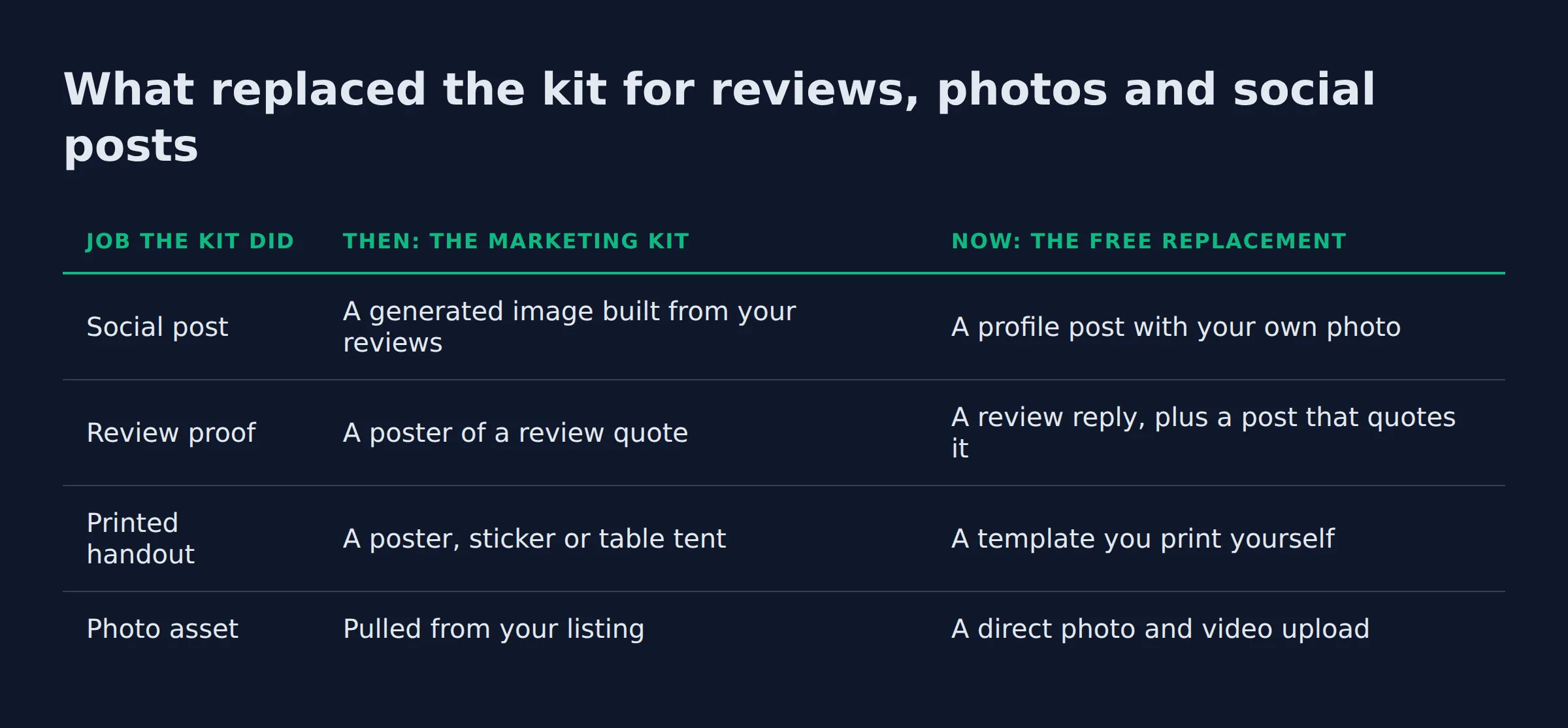
What replaced the kit for reviews, photos and social posts?
The profile itself absorbed the work. Google’s free tools cover the same ground now. Posts and updates, photo and video uploads, review replies and a review link all live in the profile.
Google states that your Business Profile costs nothing to create or manage, and the post, photo and review tools come with it.
| Job the kit did | Then: the Marketing Kit | Now: the free replacement |
|---|---|---|
| Social post | A generated image built from your reviews | A profile post with your own photo |
| Review proof | A poster of a review quote | A review reply, plus a post that quotes it |
| Printed handout | A poster, sticker or table tent | A template you print yourself |
| Photo asset | Pulled from your listing | A direct photo and video upload |
A post carries an announcement, an offer or an update straight to Google Search and Maps, as Google’s posts help page sets out. Replying to a review sits in the same dashboard, and Google’s review tools let you answer from a phone between jobs.
Posts earn attention inside your profile, and what Business Profile posts really do covers where they pay off. The review side works the same way, and the order we send requests in is in how to get more Google reviews.
The printed piece is the one kit output with no digital twin. A sticker, a table tent or a door hanger still needs paper and a printer, and that half was always the weaker one.
Google’s free tools cover every digital asset the kit made. Only the printed pieces need a printer.
The build order we run on a profile with reviews and no assets
We build the asset a customer meets at the moment of decision, and we leave the printed pieces for last. That order is the same on every profile we take over.
The first fix is the review reply. A listing with 20 reviews and no replies reads as a business nobody is minding, and a reply costs a few minutes a week.
From there we run 5 steps:
- Reply to every review, so the listing looks minded.
- Start a photo habit with photos from real jobs.
- Send a review request by text or email the same day as the job.
- Leave a review card, for the customer who never opens the text.
- Print the offline pieces once the review flow moves.
When we compare the assets across the profiles we manage, the review request and the card left after a job bring the next review. A van decal earns recognition, and most people read it after they already know the business.
A profile with 20 reviews and no assets still gets found. The reviews keep arriving only when something asks for them, and that ask is the asset.
Reviews beat decals. The asset that earns the next review pays back every printed piece you order.
Where can you still get free marketing materials for a Business Profile in 2026?
Free materials come from 2 places. Google’s own profile tools cover the digital side, and third-party design templates cover the printed side.
The best Google Business Profile marketing kit in 2026 is the profile you already own. The Business Profile Manager at business.google.com holds the post composer, the photo upload, the review replies and a shareable review link. The performance tab tells you which of them brought calls.
| Free source | What it gives you | What to watch |
|---|---|---|
| Google Business Profile tools | Posts, photos, review replies, a review link | Nothing to pay, and no upgrade needed |
| Business Profile Help community | Answers from Product Experts, plus the shutdown thread | Forum advice, so check it against Google’s pages |
| Third-party template tools | Print-ready posters, cards and social designs | Prices change, so check the vendor page before you print |
The Help community is worth a bookmark for a second reason. Product Experts there field the questions owners bring to us most often, from a rejected photo to a missing category. The answers are free and they usually point back to Google’s own documentation.
Business Profile questions and answers sit in that same public space. A good answer can show up when a customer searches your name, which makes the section worth a look once a month.
The reviews and photos you feed a free template are what make an asset worth printing.
What should your own marketing kit contain?
A kit that earns calls has 3 parts. First the profile assets you publish, then the review assets that keep reviews arriving, then the printed pieces a customer touches in person.
Build them in that order. Start with what lives on the listing, then the flow that earns reviews, then anything you pay to print.
Profile assets. These live on the listing.
- Profile posts with a date or an offer
- Photos and videos from real jobs
- Review replies that answer the review
Review assets. The flow that keeps reviews coming.
- A review link you can paste into a text
- A review request email or SMS sent after each job
- A review card left at the job
Printed pieces. What a customer holds.
- A van and window decal
- Door hangers and flyers
- A business card and an email signature
- A poster, sticker or table tent for the counter
Add the 2 website assets too. A homepage review widget and a review badge carry your rating onto a page you control. If you want a webpage version of the kit, that page is the one to build.
Every piece has to match your listing. Your name, address and phone (your N.A.P.) have to read the same on the decal, the card and the profile. Google’s name and representation guidelines cover the name on the sign as well.
That order is the work we run for service businesses across the US and Canada at Local Biz Boost. The profile, the review flow and the printed pieces get handled together.
Three parts, one order. Profile assets first, the review flow second, printed pieces last.
Do template and PDF kits break Google’s content rules?
A blank template breaks nothing. The rules follow what you publish. A stock photo sold as your work, or a claim a customer never made, can run into the same policy your profile follows.
Google’s prohibited and restricted content rules cover the listing and the material you post on it. A downloaded kit is a design file, and only the claims inside it reach that policy.
We have watched owners upload stock photos as job photos. Google wants images that represent the business, so a removed photo is a wasted upload. Review snippets go wrong the same way. A quote stays fine while it stays a quote, and it turns into marketing copy the moment someone adds a claim the review never made.
Keep performance promises off the design. A sticker that says a job finished in 2 hours is a claim. One that shows your name, your rating and your phone number is a sign.
Print the template, and keep performance promises off it.
Related: what Business Profile posts really do
Related: how to get more Google reviews
FAQ
Can I still download the old Marketing Kit PDF?
No. The kit closed with the tool on June 26, 2023, and the old help page now redirects to the Help Center home. Any kit PDF still online comes from a third party, so read it before you print it.
What was included in the Google My Business marketing kit?
Posters, stickers, table tents, flyers and social posts. Every piece was built from the reviews and photos already on the listing, so the kit was your own material in a new frame.
Is the Google Business Profile marketing kit free?
The old kit was free, and its replacements are free too. Google charges nothing to create or manage a Business Profile, and posts, photos and review replies come with it.
Does a marketing kit help me rank higher on Google Maps?
No. The kit made printed and social assets, and none of them touch the local pack. Your category, your reviews and your profile fields decide whether you appear in Maps at all.
Is there a marketing kit inside the Google Business Profile app?
No. The tools live in the dashboard at business.google.com and in the Search and Maps panels. The Google My Business app that might have carried a kit was retired in 2022, when Google My Business became Google Business Profile.
Where to start this week
Reply to your unread reviews, then send one review request after your next job. Both are free, and both sit under every printed piece you will ever order.
If you want a straight read on where your Google visibility stands, a 15-minute call covers it.