How to Rank in a City You Are Not Located In
No office needed. A service area business ranks in another city with one Google Business Profile, a real city page, and local proof from that city.
You have taken calls from a nearby city for years. Now you want that phone to ring there on purpose, and you have no office in that city. So where do you actually start?
For the full picture, see Expanding a Service Business to a New City on Google.
How do you rank in a city you are not located in? You do not need an office. A service area business ranks on three things. One Google Business Profile with that city listed as a service area. One useful page for that city. And local proof, like reviews and links from that city. A borrowed address does not work.
TL;DR
- You can rank in a city you do not live in without an office.
- Cover the city with one profile and one real page, not a second address.
- Skip the virtual office. Google can suspend the profile over it.
- Prove you serve the city with reviews, citations, and local links.
We run local SEO for owners across the US and Canada. This is the process we use when an owner wants to win a single new city.
A lot of the advice on ranking in a second city comes from people who have never run a profile for one. Here is the plain version from the operators who do.
What does it mean to rank in a city you are not located in?
Ranking in a city you are not located in means your business shows up for searches made in that city. Your profile lists no address there. You win it on relevance and prominence, and distance works against you on the map.
A storefront ranks on proximity, so a customer near the shop sees it on the map. A service area business, or SAB, keeps its address hidden and covers ground through service areas instead. That is the whole “local seo for service area business” idea in one line.
Google’s help page for local ranking says results are mainly based on relevance, distance, and popularity. Popularity here is prominence, which means how well known a business is.
You cannot shrink the distance to a second city, so the work goes into relevance and prominence.
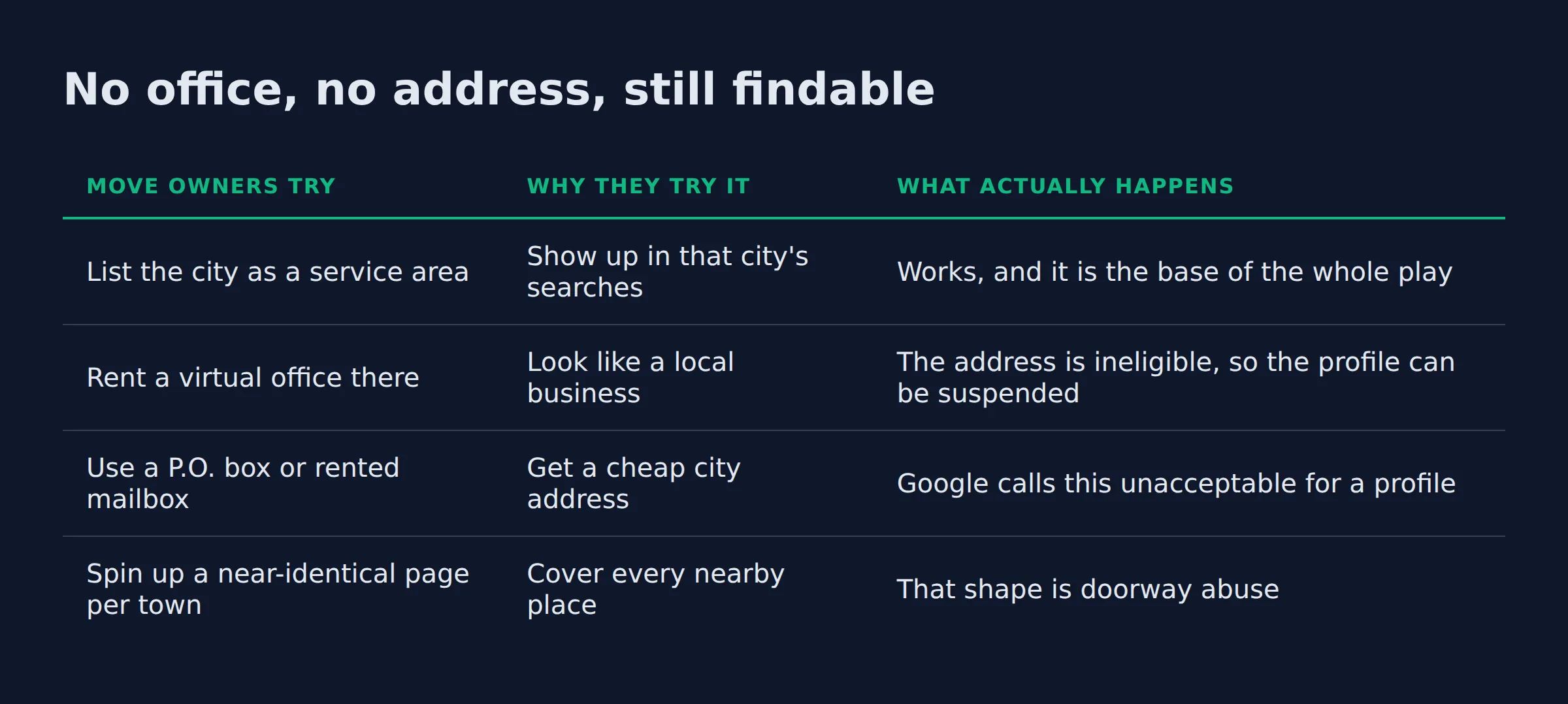
No office, no address, still findable
You can get found in a city where you have no address, and it comes down to setup. The profile and the page do the work. A few popular shortcuts quietly undo both.
Here is what owners reach for, and what each one actually does.
| Move owners try | Why they try it | What actually happens |
|---|---|---|
| List the city as a service area | Show up in that city’s searches | Works, and it is the base of the whole play |
| Rent a virtual office there | Look like a local business | The address is ineligible, so the profile can be suspended |
| Use a P.O. box or rented mailbox | Get a cheap city address | Google calls this unacceptable for a profile |
| Spin up a near-identical page per town | Cover every nearby place | That shape is doorway abuse |
Every row above takes about the same effort, and the results are nothing alike. The virtual office is the one we see most. It is also the one that can cost an owner the profile.
Google’s guidelines for representing your business say a location a business does not operate from, a virtual office, is not eligible. Rented P.O. boxes and remote mailboxes get the same answer.
The cheapest shortcut, a borrowed address, is the one that can get the profile suspended.
Does a service area business need one Google Business Profile or one per city?
One profile. A single Google Business Profile can list up to 20 service areas. You cover a second city by adding it to that list, not by opening a second profile. Google asks for one profile per business.
So the second city becomes a line in your list, and no new storefront is involved. The profile allows up to 20 service areas (the 20 service area limit). They are set by:
- Cities
- Postal codes
- Other areas you serve
Set the address to hidden if you work from home or a shop customers never visit.
Two ways owners set this up, and what changes.
| Storefront profile | Service area business profile | |
|---|---|---|
| Address on the map | Shown | Hidden |
| How you cover an area | The city around the address | Up to 20 listed areas |
| Who it fits | A walk-in location | A business that travels to the job |
| A second city | Needs a real second location | Add the city to the list |
We set this up for owners as part of our local SEO service, and the service areas list is the first thing we open. The three checks we run before anything else:
- Is the new city actually in the service areas list? The profiles we open often never added it.
- Where does the profile link point? A profile that still sends people to the homepage wastes the city you are chasing.
- Does that page prove you work there? No local reviews, photos, or jobs means no carry.
The second city is a line in the service areas list, and nothing about your address has to change.
How do you build a city page that ranks without becoming a doorway page?
Build one page per city, and make it true only for that city. A find-and-replace page can trip Google’s doorway abuse rule, so the page has to earn its place. Real proof you work in that city is what separates a city page from a doorway.
The test is simple. Cover the city name and read the page again. If it would still make sense with a different city name dropped in, it is a doorway in waiting.
Add only what is true for this city:
- The neighborhoods and nearby towns you actually cover
- The job types you get most often there
- Reviews and photos from customers who live there
Google’s doorway abuse policy names pages created to rank for similar queries and funnel users along, and that is the trap here. If two city pages overlap, point one at the other with rel="canonical". Google’s page on consolidating near duplicate pages is the method.
What separates a city page from a service area page is scope. We hand owners service area pages for local SEO when they are not sure which one to build.
Pages that fail here usually fail on depth, which is the ground thin content vs real local landing pages covers.
A city page is one of several page types a local site needs. Local service website pages that rank on Google maps the full set.
On the count, one strong page per city you can truly serve. We explain the starting number in how many location pages a local business should have.
A city page that would still make sense with a different city name is a doorway page waiting to be flagged.
What the map pack can and cannot reach from another city
The map pack reaches a short distance from a real location. A service area business has no location in the new city, so the map is the hardest place to win there. Organic results have no such radius.
That gap is the whole reason a second city is even possible for a business with one address.
This is the part owners dislike hearing. The map follows the searcher, not your wish list.
We watch a profile built in one city barely surface on the map in a city two towns over. A good page ranks in both.
One fix owners reach for is the service radius. Google does not let you set a service area as a radius distance around your business (the service area help page). You list places instead.
| The map pack | Organic results | |
|---|---|---|
| How far it reaches | A short ring around a real location | No distance limit |
| What drives it | Relevance, distance, prominence | Content, relevance, links |
| Your second city | Hard, since there is no pin there | Winnable with a real page |
| What you control | Relevance and prominence | Content, links, page quality |
When owners ask about local SEO for multiple locations, this map-versus-organic gap is the first thing to get straight.
The map pack is a local finder, and it is tied to a pin.
The map follows a pin. Organic follows a page, so it can reach a city where you have no pin.
How do reviews, citations, and local links prove you actually serve that city?
Reviews, citations, and local links are the proof that carries a city you do not live in. Reviews from customers there help. So do listings that match your name, address, and phone. Links from people who know the work all feed the prominence Google uses.
Prominence is the one factor you can move. Google says prominence grows with things like how many sites link to the business and how many reviews it has (the same local ranking page). So reviews from the new city and links from people who work there do more than any tweak to the page.
Keep the basics tight:
- Name, address, and phone identical across Yelp, Apple Maps, Bing Places, and your own site
- Data aggregators and citation cleanup so an old phone number stops following you
- A steady flow of reviews, not one burst, with an owner reply on each
- Local links from suppliers, partners, and community pages
- Google Business Profile posts to keep the profile active
Internal links with clear anchor text also tie your city pages together, so Google reads them as one topic instead of scattered pages.
You can tell Google where you work in code as well. LocalBusiness structured data describes the business and can affect how it appears in results.
The areaServed property is how you name the cities you cover (schema.org). Schema.org’s usage data puts areaServed on 1M to 10M domains, so it is a well understood property.
When we tell an owner their city page is fine on words but empty on proof, we ask for one thing first. A real job in that city.
- A photo from the work
- A customer willing to leave a review
- A supplier who will link to the business
Solid service area SEO starts with that proof.
Reviews and links from the city do the work. A city page with neither is just words.
How long does it take, and how do you track a city you are not located in?
There is no fixed timeline, and anyone who quotes you one is guessing. Ranking in a new city builds over months as reviews, links, and a trusted page accumulate. Track it one city page at a time in Google Search Console.
The profile edit is the fast piece. It can take up to 48 hours to appear (the service area help page), while the ranking builds much slower.
Track by page. In the Search Console Performance report, filter to one city page and read impressions against clicks.
A page that pulls impressions and no clicks is being seen and not chosen, so the fix is the title tag and the proof. GA4 then shows what those visitors did after they landed.
This is the same first move whether you are chasing one city or running local SEO for multiple locations.
Grid and rank tracking tools can mislead here. A local rank grid for a city with no pin will often show you nothing, and that is expected behavior. A real service radius and a real page are what move the number over time.
One more thing owners ask about is AI Overviews and AI Mode. Google says there are no additional requirements to appear in those features, nor special optimizations. The same proof that ranks your city page is what an AI answer draws on.
If a city you care about is invisible, we can show you where the visibility is leaking. That is part of how we run local SEO for owners.
Ranking a new city is a months-long build, so track one city page, not the whole site.
Related: How Google Ranks Local Businesses
Related: How to Set Up Google Business Profile Correctly
Related: What Should a Local Service Homepage Say?
Related: service area business google
FAQ
Can I rank in a city where I do not have an address?
Yes. You add the city to your profile’s service areas and build one real page for it. Your address stays hidden, and you never rent a fake one.
Do I need a separate website or a separate page for each city?
A page, not a whole site. One site with a real page per city stays easy to manage and easy to consolidate. A near-identical site per city is the doorway shape Google flags.
Can I use a virtual office or a P.O. box to rank in another city?
No. Google’s guidelines for representing your business say a virtual office is not eligible, and rented mailboxes at remote locations are not acceptable. Using one puts the profile at risk.
How many service areas can one Google Business Profile list?
Up to 20, set by city, postal code, or area you serve (the service area limit). Most single owners never come close to that number.
How long does it take to rank in a new city?
It builds over months, not weeks. A service area edit can appear in up to 48 hours. The ranking depends on reviews, links, and a page Google trusts for that city.
If you want a straight read on where your Google visibility stands in a city you are chasing, a 15-minute call covers it. Book it here: book a 15-minute call.