Service Area Business on Google: What It Is and How It Ranks
What a service area business is on Google, how the 20 area limit and the two hour drive rule work, and why the area list does not lift your map ranking.
A homeowner 40 minutes from your base searches for a cleaner. Your crew finished a job 2 streets from her last month. You never appear.
That gap is what the service area setting is for. It is also where most owners expect a ranking boost that never arrives.
What is a service area business on Google? A service area business serves customers where they are instead of at a shop. Google hides the street address on the profile and allows up to 20 areas within about 2 hours of driving from your base. The list sets where you travel. Distance still decides who sees you first.
Most guides to this question come from people who have never filled out the profile form. We audit these profiles for owners, and the same mistakes show up in the area settings again and again.
TL;DR
- A service area business travels to the customer. The address stays hidden and the profile lists up to 20 areas.
- Google caps the whole footprint at about 2 hours of driving from your base. Area edits take up to 48 hours to show.
- Adding a town tells Google you travel there. It does not make you rank there.
- The profile holds the pin. The website holds the proof for each town.
What is a service area business on Google?
A service area business is one that travels to customers instead of serving them at a shop. Google hides the street address and shows the areas you cover. Most home service crews fit this model.
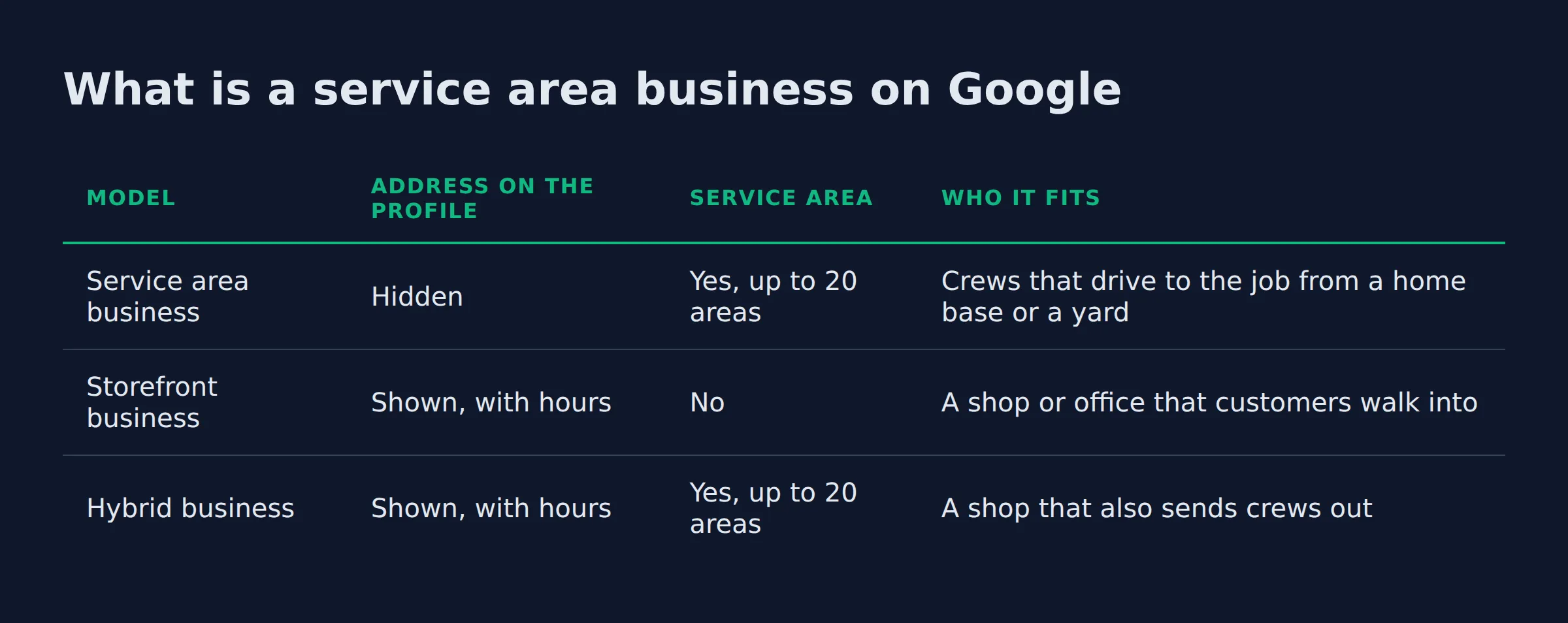
Google sorts every profile into 1 of 3 models, and the model decides what a customer sees.
| Model | Address on the profile | Service area | Who it fits |
|---|---|---|---|
| Service area business | Hidden | Yes, up to 20 areas | Crews that drive to the job from a home base or a yard |
| Storefront business | Shown, with hours | No | A shop or office that customers walk into |
| Hybrid business | Shown, with hours | Yes, up to 20 areas | A shop that also sends crews out |
The address rule is the one owners skip. If you don’t serve customers at your business address, Google’s service area instructions tell you to remove the address from the profile.
The model also has to match the business. Hybrid businesses can show an address and name an area at the same time. Google’s guidelines for representing your business allow one profile per business. A second listing for a second town is a problem.
The model you choose decides whether your home address is public.
Owners leave the house number visible because the signup form asked for it. The profile then reads as a shop that customers can walk into, which is the wrong promise for a crew with a van.
Do service area businesses show up on Google Maps?
Yes. A service area business shows on Google Maps and in the local pack with the address hidden. The pin stays at the verified base address, so distance from that base still shapes who sees you.
The local pack is the short list of 3 businesses under the map. Open the Maps tab and you get the longer list, which is the same businesses in a different order.
Google’s tips to improve local ranking say local results rest on relevance, distance and popularity, then name the third factor prominence. Distance runs from the searcher to your pin. That page also states there is no way to request or pay for a better local ranking.
Distance is the factor an owner cannot edit. A profile based in one town starts behind every competitor based in the town where the search happens.
We see this on the maps tab in most audits. An owner with strong reviews still sits under a weaker competitor whose base is inside the search city.
SAB status keeps you on the map. It does not move your pin closer to the searcher.
Prominence is the part you can build. Reviews move it, and so do mentions of the business on other sites.
How many service areas can you add on Google, and how far can they reach?
You can add up to 20 service areas, set by city, postal code or another area type. The whole footprint should sit within about 2 hours of driving time from your base.
The radius option is gone. Older profiles set up as a circle cannot be edited back into one. New areas go in by city or postal code.
Adding one takes about a minute inside the profile:
- Open the profile and select
Edit profile. - Choose
Location. - Next to Service area, select
Edit. - Pick a suggested area or type your own.
- Select
Save.
Once approved, an area edit can take up to 48 hours to appear, say Google’s service area instructions.
We have run both shapes of list. One profile carries 20 postal codes spread across a metro. Another carries the 4 towns the crew drives to each week. The narrow list gets the calls, because every area on it has a finished job and a review behind it.
20 areas sets where you travel. Position still follows distance and proof.
Does adding a city to your service area make you rank in it?
No. The area list tells Google where you travel, and it does not change your position in a city. Google ranks local results on relevance, distance and prominence. A town 30 minutes out still loses on distance to a business sitting in it.
Google documents the distance factor and nothing more. The area list is not a ranking field, and no help page promises position from it. What we see in the profiles we manage is flat: a new town shows no lift in map position on its own.
The calls do arrive, and this is the part worth knowing. They come from towns where the crew already finished work and earned a review. A town that just joined the list has no reviews and no photos, so the pin shows up with nothing behind it.
The area list decides where you can be hired. Proof decides who gets found.
The 3-question test we run before an area edit
We change an area list only after 3 questions get answered. The answers come from the owner’s call log, not from a map of the metro.
- Which towns produced a paid job in the last 90 days? Pull the call log and the invoices.
- Which of those towns has a photo or a review we can point to? A town with neither waits.
- Does the farthest town sit inside the 2-hour ring from base? If not, it comes off.
That order matters. Owners usually start at the map, add every city within reach, and end up with a list nobody can defend. Start from paid work inside the driving ring and the list builds itself.
Build the list from the call log, then check it against the driving ring.
How does a service area business verify its profile on Google?
A service area business usually verifies by video from a phone. The video shows the street near your base, your tools and proof that you run the business. Google picks which methods you can use.
Verification comes before any edit to business info. Google’s verification help spells out that the methods on offer depend on the business type and on what Google finds in public records. You cannot swap one method for another.
Google’s video verification rules ask for a live recording of at least 30 seconds. The footage has to be unedited, with no breaks, and it goes up from a mobile device through the profile. Pre-recorded clips are rejected.
For a service area business, the footage has to show the base. Film street signs or landmarks near the address, and skip empty ground with no markers.
Then show the work. Tools, a branded van and branded clothing all count. A permit or an invoice that matches the profile name works too.
The failed videos we review miss the same thing. The owner films a garage full of equipment and never steps outside to show the street. The detail that gets the next attempt approved is a street sign that ties the base to the address on the profile.
| Verification method | What it involves |
|---|---|
| Video recording | Live footage from your phone: the street near your base, your tools, and proof you run the business |
| Phone or text | A number Google reaches during setup |
| A code sent to an email address on file | |
| Live video call | A scheduled call with a Google agent |
| A postcard with a code sent to your address |
Reviews of the video take up to 5 business days, and a rejection comes with the reasons listed.
Film the street before you film the tools.
What are some examples of service area businesses on Google?
A cleaning service is the clearest example. The crew drives out and nobody visits the office. Plumbers, locksmiths, mobile mechanics and roofers work the same way.
Google’s own example on the service area page is a cleaning service or a plumber. Across the trades we audit, the pattern repeats:
- Cleaning: crews drive to homes and offices, so the base can be a house or a storage unit.
- Plumbing: vans leave a yard each morning and the customer never visits it.
- Locksmith: the customer calls from a locked door and stays put.
- Mobile mechanic: the work happens in a driveway or a car park.
- Roofing: the crew spends the week on roofs in other towns.
Trades that get compared side by side gain the most from a wide list. Cleaning and pest control sit in that group, because the homeowner is weighing a few quotes before booking.
Emergency trades gain least. The person with a burst pipe calls the first 3 numbers on the screen and stops reading.
The trade decides how much the area list is worth.
Where does the service area setting stop and your website start?
The profile holds the pin, the category and the area list. The website holds the town-level proof, one page per city you actually drive to. Google reads the profile for the map result and the page for the city search.
The two do different jobs. The profile decides whether you appear when someone searches nearby. A page decides whether you appear in the links for a city where you have no base.
On the site, LocalBusiness structured data carries your towns in the areaServed property. That is the machine-readable copy of the same list.
Pages built by swapping a town name into one paragraph across dozens of URLs are doorway abuse as Google defines it. The policy names pages targeted at specific regions or cities that funnel users to one page.
Our guide to service area pages covers how to build one that earns clicks. If the profile needs fixing first, set up your Google Business Profile as a service area business walks through every field in order.
Both halves run as one job, which is what Local Biz Boost does for owners.
A profile gets you into the map. A page gets you into a city where you have no base.
FAQ
How do you set Google Business as a service area?
Open the profile, select Edit profile, then Location, then edit Service area. Pick your cities or postal codes and save. If customers never visit your base, remove the address on the same screen before you save.
Can a service area business have more than one profile?
No. Google allows one profile for the whole area a service area business covers. A second listing for another town is the duplicate pattern that puts profiles at risk.
Will customers see my home address if my profile is a service area business?
No. The address is hidden once the profile is set as a service area business. Google also asks you to remove it when you don’t serve people there.
Does the Google Business Profile app work for a service area business?
Yes. Areas, hours, photos and messages all sit in the app. Video verification runs from a phone through the profile, so an owner with no shop can run the whole listing from the app.
What happens when someone searches from a city outside my listed service areas?
The list is a guide. Google measures distance from the searcher to your pin, so a search outside your list can still surface you, further down the page.
If you want a straight read on where your Google visibility stands, a 15-minute call covers it. Bring your service area list and we will show you which towns your profile can realistically compete in first. Book the 15-minute call.