Local Business Schema Markup Explained (Plain English)
What local business schema markup does for a local business, the JSON-LD you need, and why it feeds the knowledge panel instead of local pack rankings.
Your Google profile shows your hours and your reviews. Your website still shows the phone number you dropped 2 years ago. Google reads both.
That gap is what markup settles. Most of what gets written about local business schema markup comes from the people selling the code. This is the operator version.
Most owners want to know whether the markup is worth the trouble. If your site carries the details people check before they call, it is. The block feeds the knowledge panel and lines your site up with your Google Business Profile. It is not a ranking factor.
TL;DR
- Google reads your business details from the code instead of guessing from your page text.
- It makes a feature possible. Google decides whether to show it.
nameandaddressare the only required fields.- Use the closest
@type.RoofingContractorbeatsLocalBusiness.
What is local business schema markup in plain English?
Local business schema markup is structured data in your site code. It carries your name, address, phone, hours and services. Google reads it directly.
The vocabulary it uses is public. Schema.org holds the terms, and 2 of them carry the load. @context names the vocabulary and @type names what your business is.
Here is the part owners miss. The block is a description your visitor never sees. It sits in the code, your server hands it to Google, and the page looks the same as before.
Google’s examples use JSON-LD. That is the format its documentation walks through for local businesses, LocalBusiness structured data. The older Microdata and RDFa formats still work.
Google applies one rule. The markup must describe what a visitor can see on the page, per its general structured data guidelines. Mark up hours you never list anywhere and you have handed Google a reason to distrust the block.
We open markup blocks most weeks. The usual first problem is a block describing a business the page never mentions. It came with the theme, and the owner has no idea.
Your page looks the same as before. Google’s read of it does not.
What schema markup does for your local rankings
Schema markup changes how Google describes your business. Local ranking still comes from relevance, distance and prominence.
The knowledge panel is the visible part. Search a business name and a panel can show up with your hours and phone. A carousel of related businesses can appear for a type-of-business search instead.
Google states the limits plainly. Markup enables a feature and never guarantees it, and a structured data manual action removes rich results without touching page ranking.
The block buys you cleaner facts. A customer who searches your name gets your details instead of Google guessing from page text.
The 3 local ranking factors sit elsewhere. Distance you cannot change, and relevance and prominence are the work, as Google’s local ranking tips confirm. We break the 2 you control down in how Google ranks local businesses.
The audit is never the whole job. A perfectly marked up site with an empty profile still loses the map pack to a busier competitor down the road.
Markup makes a feature possible. Google decides whether to show it.
LocalBusiness or Organization: which type does your business need?
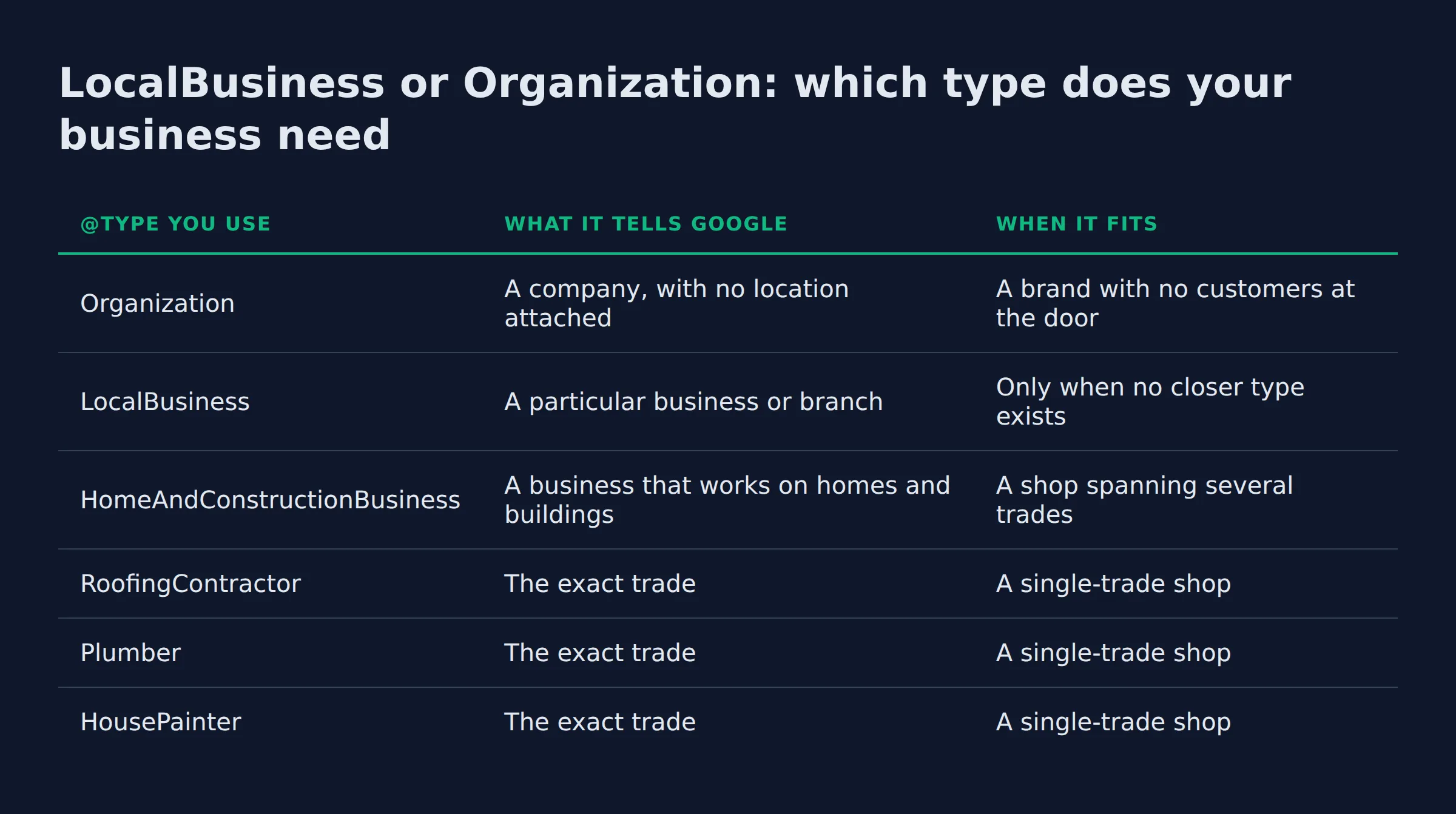
Use LocalBusiness and go one level deeper when a trade type exists. Google wants the exact sub-type. That is how a roofer ends up labelled RoofingContractor instead of the generic label every business online shares.
The type path is worth knowing. RoofingContractor sits 3 levels under Organization and 3 under Place, schema.org shows. Google reads that path as a business that travels to customers.
Pick your label here:
@type you use |
What it tells Google | When it fits |
|---|---|---|
Organization |
A company, with no location attached | A brand with no customers at the door |
LocalBusiness |
A particular business or branch | Only when no closer type exists |
HomeAndConstructionBusiness |
A business that works on homes and buildings | A shop spanning several trades |
RoofingContractor |
The exact trade | A single-trade shop |
Plumber |
The exact trade | A single-trade shop |
HousePainter |
The exact trade | A single-trade shop |
The multi-trade label is HomeAndConstructionBusiness. Schema.org describes it as a business that provides services around homes and buildings, which covers most home-service work.
LocalBusiness appears on between 1 million and 10 million domains in Google’s web index, schema.org counts. That is a crowded field. The construction branch lands between 100,000 and 1 million.
The trade labels sit lower. RoofingContractor and Plumber each land in the 10,000 to 100,000 band, per their schema.org pages.
A shop that runs 2 or 3 trades can list them in an array. Google’s own example reads "@type": ["Electrician", "Plumber", "Locksmith"]. Use that for a multi-service business.
Multi-location owners get a different structure. One block per location, each with its own address, then subOrganization or department to tie it back to the parent business.
Match the closest trade label. The exact sub-type is what Google asks for.
The properties a LocalBusiness schema actually needs
Two properties are required, name and address. Everything else on Google’s list is recommended or optional. Each extra field you fill puts more detail into the panel.
The address is an object. It has 5 parts:
streetAddressfor the street lineaddressLocalityfor the cityaddressRegionfor the state or provincepostalCodefor the ZIP or postal codeaddressCountryforUSorCA
Fill in as many as you can. Google’s own example fills all 5, and the local business documentation calls the fuller version a higher quality result for users.
| Field | Status for a service business | What it does |
|---|---|---|
name |
Required | Tells Google which business this is |
address |
Required | Your physical location |
telephone |
Recommended | The number customers call |
openingHoursSpecification |
Recommended | Your hours in the panel |
geo |
Recommended | Latitude and longitude |
areaServed |
Optional | The towns you drive to |
sameAs |
Optional | Your other profile links |
aggregateRating |
Skip unless you host reviews | See the rule below |
Reviews are the field owners ask about. Google supports review snippets for Local business only on sites that capture reviews about other local businesses, per its review snippet guidelines. Marking up your own reviews earns no stars.
We hear that request often. An owner finds out the stars in search come from markup and asks us to add it. We tell them what the block buys: business details stated in a format Google trusts, and a site that agrees with the profile.
One more field is worth adding early. @id gives the block a fixed address, so other pages can point at the same business.
name and address are the required fields. Get those 2 exact first.
How do you add it to your site with JSON-LD, step by step?
Paste one JSON-LD block into your template. Fill in name, address, telephone and your hours, then save. The build takes minutes once the details are correct.
Here is the build order.
- Copy the name, address and phone from your Google Business Profile, character for character
- Paste the block into your theme or a code snippet plugin, so every page loads it
- Set
@contexttohttps://schema.organd@typeto your closest trade - Add
telephone,openingHoursSpecification,areaServedandgeofor a fuller block - Leave
aggregateRatingout unless your site hosts reviews about other businesses - Note the page you put it on, so you can find it when your address changes
Most WordPress sites already have a block. Yoast and Rank Math ship one. Theme builders do too.
Google allows the block on any page, and it suggests a CMS plugin as the easier route, per its LocalBusiness guide. A page about the business fits best. Both work.
FAQPage markup is a separate block. Add it to the pages where you answer customer questions, and keep it out of the LocalBusiness block.
Markup does not fix thin pages. Fix the pages first, using the website pages local service businesses actually rank with.
Paste the block once in the template. Editing the same code on 30 pages is how markup goes stale.
Which markup errors do we find most often?
3 errors show up on almost every local service site we open. A name Google cannot match, an address written 2 different ways, and a generic @type that hides the trade. All 3 are quick fixes.
The name error is the quiet one. A block reading a trading name while the profile reads the legal name gives Google 2 businesses to sort out. The owner knows both names and has never compared them.
The address error is the common one. A suite number on the site and none in the profile reads as 2 addresses. A postal code typed with a space on one side does the same.
The type error costs the most. A landscaper marked only LocalBusiness gives up the trade sub-type that tells Google what the business does.
We run those checks in order. Name, address, @type. Most sites pass 1 of the 3.
Run the 3 checks in order. A block that fails the name check describes the wrong business.
Matching your markup to your Google Business Profile
Your profile is the source of truth. The name, address and phone in your markup should copy it exactly.
Google’s rules require the profile to reflect the business accurately, under its rules for representing your business on Google. So edit the profile field first, then the code. Doing it the other way round leaves the panel showing the old detail.
| Google Business Profile field | Markup property that should match |
|---|---|
| Business name | name |
| Address | address and streetAddress |
| City | addressLocality |
| Phone | telephone |
| Hours | openingHoursSpecification |
| Website | The page carrying the block |
Here is the mismatch we see:
- The profile keeps its version of the phone number
- The site keeps the old one
- The panel stays on the profile
Both keep working, and neither gets compared until someone calls the wrong number.
The comparison takes 2 minutes. Open your profile, then open the page source and search for telephone. If the digits differ, you found the work.
Copy the profile fields into the markup. Same name, same address, same phone.
How do you test the markup before it goes live?
Test the live URL. A draft has nothing for Google to fetch. Google’s Rich Results Test reads the page the way its crawler sees it, so fix every error it names before you publish.
The Rich Results Test is free and takes seconds on one URL. Four errors show up most:
@contextmissing or spelled wrongaddressCountryleft out ofPostalAddress- one extra comma breaking the whole block
- a value in the markup that appears nowhere on the page
A clean test means Google parsed it. It does not mean a feature will show.
The work carries on after the test. We recheck the Google Search Console enhancements report a few days after the page is indexed. That report is Google’s reading of the live page.
Test the live URL. The tool reads what Google can fetch, which is not always what you see.
What should you fix first?
Start with the name and the address. Those 2 fields are required, and they are where mismatches hide. Then set @type to your closest trade.
That is the whole first pass. One profile field edited to match the site, or one line of code edited to match the profile. Either way, the block starts describing the business you run.
At Local Biz Boost we make the site agree with the profile, field by field. That alignment comes first.
Start with the 2 required fields. They decide whether the block describes your business at all.
If you want a straight read on where your local visibility stands, a 15-minute call covers it. No pitch, just the fix list.
Related: How to Set Up Google Business Profile Correctly
Related: Google Business Profile Categories for Service Businesses
Related: Map Pack vs Organic Results: Local SEO Explained
FAQ
Does schema markup show as a rich result for a local business?
Rarely. Google’s review snippet support for local businesses covers sites that capture reviews about other local businesses, so your own reviews earn no stars. The knowledge panel and the carousel are where the markup shows up.
Where does LocalBusiness schema go, the homepage or every page?
Either works. Google allows the block on any page, and a page about the business fits best. A template fragment is simpler, since one edit then covers every page.
Do you need schema markup if you have no website, only a Google Business Profile?
No. Markup lives in website code, so a profile with no site has nowhere to put it. The profile works fine on its own, and the block goes in on the day the site launches.
Can you mark up more than one location with one LocalBusiness schema?
One block per location. Give each location its own address and @type, then tie it to the parent business with subOrganization or department.
Will wrong markup hurt your local rankings?
It can cost you the rich result. Google states that a structured data manual action does not affect where the page ranks in web search. The damage lands on the feature and on how accurately Google describes your business.