GMB Audit: How to Audit Your Google Business Profile
A GMB audit finds the missing, wrong and duplicated fields in your Google Business Profile before they cost you calls. Here is the checklist to run.
Your profile can look fine to you and still lose the job. A homeowner nearby searches for what you do, and you are not in the map pack they see.
A GMB audit is a structured check of your Google Business Profile against the fields Google uses to rank and show local businesses. It flags what is missing, wrong, or duplicated before those gaps cost you calls.
TL;DR
- A GMB audit checks the profile fields Google reads: name, categories, service area, hours, services, photos, and reviews.
- Google ranks local results on 3 signals. Distance is fixed, so only relevance and prominence are yours to change (tips to improve your local ranking on Google).
- Google’s own tools run the audit for free. You do not need paid software to find the gaps.
What is a GMB audit?
A GMB audit is a field-by-field review of your Google Business Profile, the listing Google shows in Search and Maps. It compares what you entered against what Google expects, then lists the gaps that keep you out of local results. GMB stands for Google My Business, the old name for the same listing.
The audit is a completeness and compliance check. It reads every field and sets it against what Google asks for. Google now puts an AI overview above the results for a search like this, so a clean profile gives that summary something accurate to read.
Google ranks local results on relevance, distance, and prominence. Google also says there is no way to request or pay for a better local ranking (tips to improve your local ranking on Google). Distance is fixed. Relevance and prominence are yours to change.
That is where the audit earns its keep. It shows which of the two you are losing on.
Most GMB advice is theory from people who have never opened a live profile. Some call this a Google business profile audit, and it is the same check. This is the version we run at Local Biz Boost, in the order we run it.
Fix the fields Google reads first: the name, the categories, and the services.
On a new home-service profile, the first ten minutes tell us most of the story. The category set is the one the owner picked on signup day, and it has not moved since. Services sit empty. The attributes tab is blank.
Distance sits outside your control, so we audit it as a comparison rather than a fix. We call that the proximity audit. It records where you sit against the profiles above you for the same search, nothing more.
What does a GMB audit check?
A GMB audit checks the fields Google uses to build your listing. The core set is name, categories, service area, hours, services, attributes, photos, and reviews. It scores each one against what Google shows for the businesses sitting above you.
The GMB audit checklist we run covers every field that changes rank. We score each one as good, weak, or missing. We use the same list on every profile, so nothing gets skipped.
- Business name: use the name on your signage and invoices. The name is the listing title Google shows in the map pack. Adding a city or a keyword breaks Google’s representation rules (guidelines for representing your business on Google). It can also trigger a suspension (prohibited and restricted content).
- Primary category: the single most specific category for your core job. Google asks for the fewest categories that describe the core business, not every service you offer.
- Secondary categories: add only the ones you actually serve. A wrong one pulls in searches that never convert.
- Service area or address: keep it accurate and precise (guidelines for representing your business on Google). A service-area business has no storefront, so the area is the whole location signal.
- Hours and special hours: a season change is where hours go wrong. Fix them before a holiday week.
- Services and products: an empty list misses searches you could match.
- Attributes: things like on-site service or free estimates. They are free to add and quick to fix.
- Photos and video: Google tells owners to add photos often (tips to improve your local ranking on Google). We aim for a few new photos a month so the newest set is never older than the current season.
- Logo and cover photo: the cover photo is the first image a searcher sees. Use a real job photo, and save the logo for the logo slot.
- Business description: say what you do and where you do it, in plain words. Google blocks content that is irrelevant to the business (guidelines for representing your business on Google).
- Reviews and replies: 97% of consumers read reviews for local businesses, and 89% expect the owner to reply (BrightLocal’s Local Consumer Review Survey). Watch the star rating and the review response rate, not just the count.
- Review link: put a short review link in your follow-up texts so a happy customer can leave a review in 2 taps.
- NAP and citations: your name, address, and phone must match across the web. A mismatch splits the trust signals Google reads.
- Verification and suspension: a profile has to be verified to rank. A suspended profile disappears until an appeal lands (fix suspended or disabled profiles).
- Questions and answers: seed the questions you get on the phone, then answer them in your own words.
- Duplicates and spam: Google wants one profile per business. A stray duplicate splits your reviews and your rank.
The audit that matters starts with the 4 fields owners never revisit: category, services, attributes, and hours.
How do you run a GMB audit, step by step?
Run the audit in 6 steps. Open the profile, rate every field, and read the Performance tab. Then compare against the top 3 map results, log any policy risk, and fix in order of impact.
Here is the GMB audit tutorial we follow, step by step. Relevance fixes come before prominence fixes, because working on a broken listing spends effort in the wrong place.
- Open
business.google.comand screenshot the profile on desktop and phone. - Rate each field on the checklist: good, weak, or missing.
- Open the Performance tab and note calls, clicks, and searches for the last quarter (Business Profile performance and insights).
- Search your main service the way a customer would, and note the 3 map results above you.
- Open those 3 profiles and compare them to yours, field by field. This is the competitor audit.
- Log duplicates and policy risks, then fix in this order:
- Name and categories first
- Then services, hours, and attributes
- Then photos and posts
Compare against the 3 profiles above you. That gap is the one costing you calls.
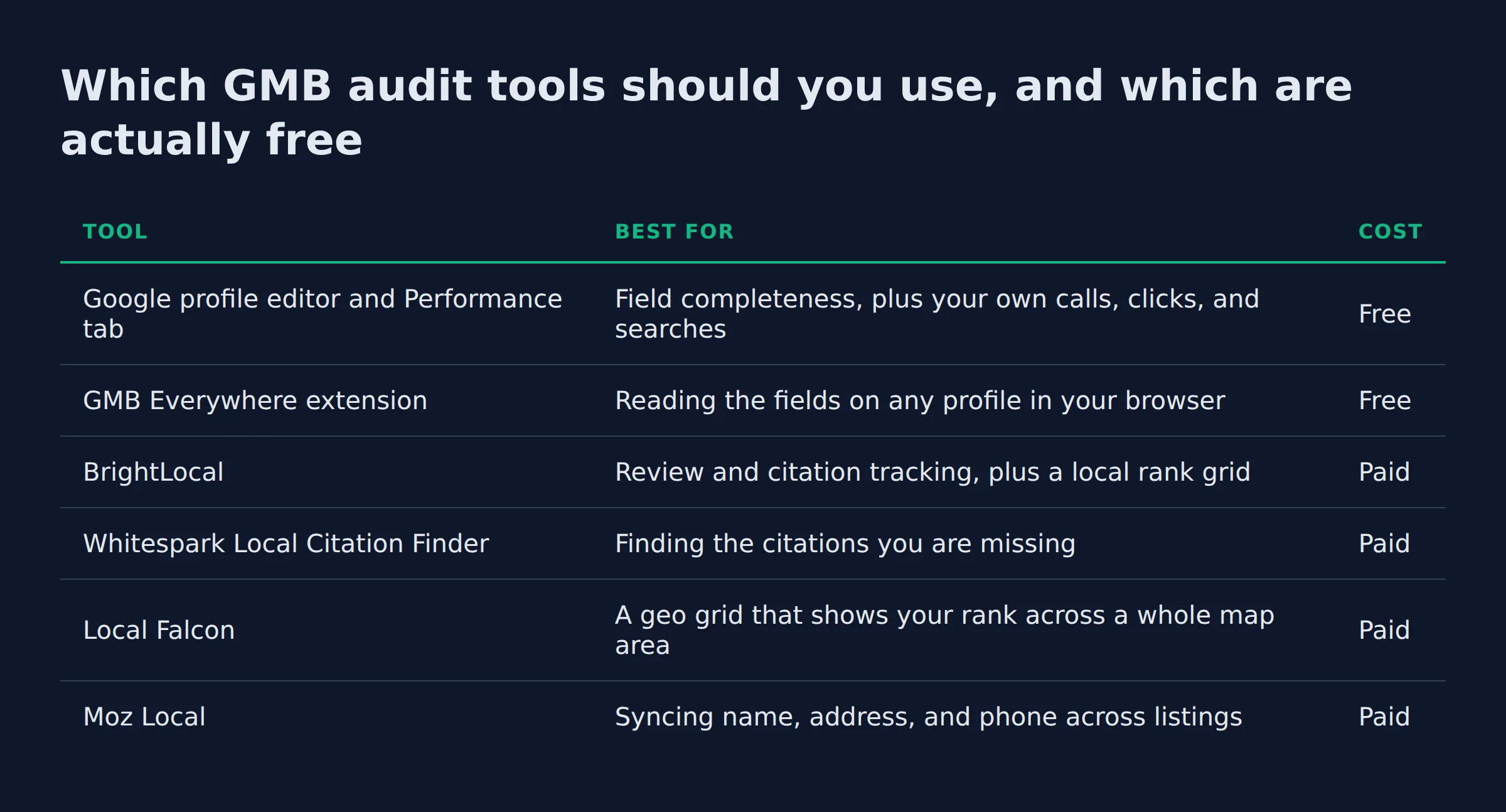
Which GMB audit tools should you use, and which are actually free?
Google’s own tools are free and cover most of the audit. The profile editor shows field completeness, and the Performance tab shows your results. Free browser extensions add field checks, and paid platforms add rank grids and citation tracking.
Start with the free tools. The editor and the Performance tab show what is missing and what it costs you. An extension like GMB Everywhere reads the fields on any profile you can open, including the profiles above you in the map pack. Every audit we run starts here.
| Tool | Best for | Cost |
|---|---|---|
| Google profile editor and Performance tab | Field completeness, plus your own calls, clicks, and searches | Free |
| GMB Everywhere extension | Reading the fields on any profile in your browser | Free |
| BrightLocal | Review and citation tracking, plus a local rank grid | Paid |
| Whitespark Local Citation Finder | Finding the citations you are missing | Paid |
| Local Falcon | A geo grid that shows your rank across a whole map area | Paid |
| Moz Local | Syncing name, address, and phone across listings | Paid |
Paid tools earn their place at scale. BrightLocal puts reviews and citations in one place. Whitespark’s Local Citation Finder finds the listings you have not claimed. Local Falcon runs a geo grid, which shows your rank across a map area instead of one point.
Three more platforms push your listing details out to the places customers look:
- Moz Local
- Yext
- Birdeye
Yext and Birdeye add review management on top, which matters more for chains than for a single crew.
One caution on tool roundups. The page that ranks second for this term tested 5 tools and its own tool won. We name what each tool is for instead, because a first-party verdict hides the tool you actually need.
A free extension and the profile editor find the same gaps a paid platform finds. Save the paid tools for scale.
How do you read your audit results in Google Business Profile performance?
Open the profile, click Performance, and read the interactions: calls, messages, website clicks, direction requests, and bookings. The searches metric splits into direct searches for your name and discovery searches for your service. Pick a date range before and after a fix to see it move.
The interaction counts tell you what customers do once they find you. The searches metric tells you how they found you in the first place (Business Profile performance and insights).
| Metric | What it tells you | What a fix should move |
|---|---|---|
| Calls | Taps on your call button | Up after hours and services are fixed |
| Website clicks | Taps on your website link | Up after the link and description are fixed |
| Direction requests | Taps for directions | Up for storefronts, flat for service-area work |
| Messages | Conversations started from the profile | Up after messaging is turned on |
| Bookings | Bookings made through a provider | Up after booking is connected |
| Searches | Terms people used, split by direct and discovery | Discovery searches should grow as fields improve |
Read the searches in two buckets. Direct searches are people who typed your business name, and they come from customers who already know you. Discovery searches are people who typed a service, and they are the new customers. A profile with only direct searches is invisible to anyone who has not heard of you.
Tag the website link with UTM parameters so Google Analytics shows which clicks started on the profile. Calls are the metric we watch closest, because a call is a job in a way a view never is.
In our audits, calls and website clicks move first after a category and services fix, often within a few weeks. Discovery searches take longer, closer to a full quarter, because they follow relevance. Read the numbers over 90 days rather than a single week. To connect those numbers to real jobs, track the calls and leads your profile sends.
Track discovery searches apart from direct searches. Rising discovery searches are the sign the profile is reaching new customers.
Is a GMB audit the same as a local SEO audit?
A GMB audit covers one asset: your Google Business Profile. A local SEO audit is wider, because it also reads the website. The profile audit is the fastest piece to fix.
The two overlap. A local SEO audit includes everything a GMB audit does, then adds:
- Your website
- Your citations across the web
- Your service pages
- Your structured data
Website items include page speed, a service page for each city you serve, and LocalBusiness schema markup. Off-site items include citations, third-party reviews, and social profiles. Search Console and Semrush cover the website side.
Here is the split we use. The profile audit finds the local gaps, and the website audit finds the technical ones. Start with the profile, because that listing is what Google shows in the local pack (tips to improve your local ranking on Google).
A local SEO audit also runs a conversion audit. That check asks whether the profile turns a view into a call. The call button, the messages setting, and the booking link all have to work. We run it on every profile we open.
Paid placements like Local Services Ads sit outside both audits. They rent space at the top of the page, and the audit does not touch them.
If you have not claimed the listing yet, set up your Google Business Profile correctly first. Once the fields are clean, the work shifts to optimization, which we cover on the Google Business Profile optimization services page. For the ongoing management side, see the Google Business Profile manager page.
When a listings service or a previous agency has been in the profile, the tells show up fast. The business name carries a city and a keyword, which is a suspension risk (prohibited and restricted content). The service area covers half the state. An unclaimed duplicate sits next to the real listing.
Run the profile audit first. It is the fastest fix and the listing Google puts in front of nearby customers.
How often should you audit a Google Business Profile?
Run a full GMB audit once a quarter and a short check every month. The monthly check is hours, new reviews and replies, and new photos. The quarterly pass covers categories, services, attributes, duplicates, and the performance numbers.
A profile is a moving target. Reviews land on their own, hours change with the season, and photos age. GMB optimization is the work that follows the audit, and it keeps going. That is why we treat the audit as a habit and not a one-time project.
| Cadence | What to check |
|---|---|
| Monthly | Hours and special hours, new reviews and replies, new photos |
| Quarterly | Categories, services, attributes, duplicates, and the performance numbers |
| After any edit | Name, address, and category, plus a re-verification if Google asks |
Profiles fall apart quietly. A single-location crew misses a season change, the hours go stale, and the photo set turns 2 years old. A quarterly pass catches all three before a customer notices, and we see all three on profiles that looked healthy from the outside.
A quarterly audit covers the full profile. Hours, reviews, and photos need a monthly look.
Related: local google advertising
FAQ
Does Google do audits?
Google runs policy checks, not a fix list for you. It removes or suspends profiles that break its rules (prohibited and restricted content), and it will not tell you which field is weak. The audit is your job.
How does Google verify a business profile?
Google chooses the method, and you cannot change it (verify your business on Google). The options may include phone or text, email, a live video call, or mail. Google recommends video verification when it is available. A mail code usually arrives within 14 days and expires after 30 days.
What is GMB SEO?
GMB SEO is the work of getting your Google Business Profile to show in local results. It covers categories, services, hours, photos, reviews, and posts. A GMB audit is the check that tells you which of those is weak.
Is GMB Everywhere free?
GMB Everywhere is a browser extension that reads the fields on a Google Business Profile you can already open. The core extension is free to use. It adds a fast view of your fields and your competitors’ fields without leaving the browser.
Are free GMB audit tools accurate?
They are accurate for the fields they can see. A free tool reads your profile and reports what is there. It cannot see the fields Google hides, and it cannot rank your fixes by impact. Use it to find the gaps, then set the order yourself.
How do I check reports on Google?
Open your profile, click Performance, and choose a date range (Business Profile performance and insights). You can also download the data as a spreadsheet from Business Profile Manager. Google Search Console and GA4 report on your website, separate from the profile.
Does reporting a Google review remove it?
Reporting sends a review to Google for a policy check. Google removes reviews that break its rules, such as paid or fake reviews (prohibited and restricted content). Buying or faking reviews is also illegal in the US (the FTC rule on consumer reviews and testimonials).
Do you need a website if you have a Google Business Profile?
The profile works without a website. But 54% of consumers visit a business’s website after reading a positive review (BrightLocal’s Local Consumer Review Survey). Without a link, you send those people nowhere.
Can I use Google Business without a website?
Yes. You can create and verify a profile with an address and a phone number (verify your business on Google). You lose the website-click metric and the link, but the profile still shows in the map pack.
Run the audit before you pay anyone
If you want a straight read on where your Google visibility stands, a fifteen-minute call covers it. We pull your profile, run this checklist, and show you the gaps in the order we would fix them. Book the 15-minute call.