Local Google Advertising: Which Option Fits Your Business
Local Google advertising means paying to appear in Search and Maps. Compare Local Services Ads, Google Ads, and the free profile route, with real costs.
Google will take an owner’s ad budget and send back clicks that never turn into jobs. Most owners never learn why. The fix starts with knowing which of the two local ad products you are actually buying.
Local Google advertising means paying Google to show your business to people searching in your city. You have two routes. Local Services Ads charge per lead and require screening. Standard Google Ads charge per click. Most service owners should test Local Services Ads first.
Most guides to local Google advertising come from people who have never watched an owner’s budget run out. We have. We manage Google Business Profiles and ad accounts for local service businesses, so we see where the money leaks.
TL;DR
- Local Services Ads: pay per lead, screened badge, placed above standard ads.
- Google Ads: pay per click, with keyword and radius control, and more setup.
- $100 buys about 8 clicks at the head-term cost, or less than 2 leads at the personal services cost per lead.
- Count booked jobs, not leads.
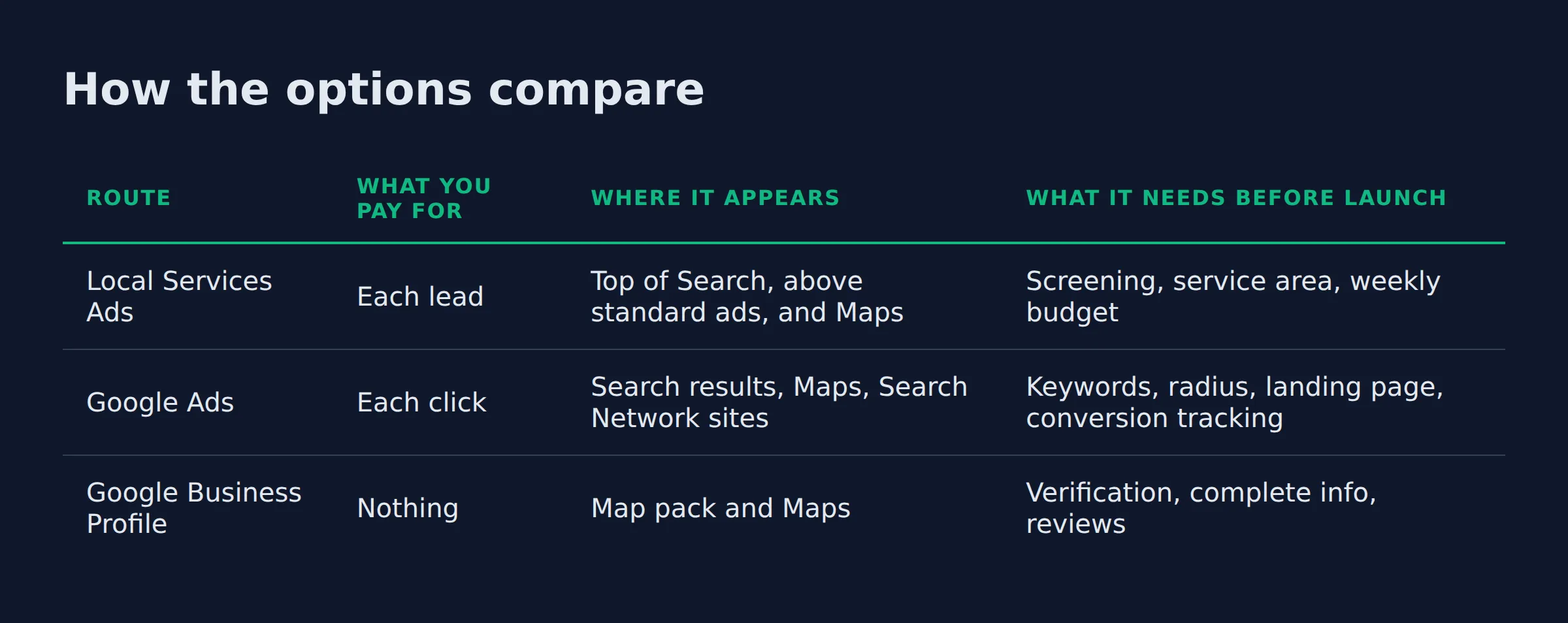
Google offers a local business 3 routes. Two cost money, and one costs time.
| Route | What you pay for | Where it appears | What it needs before launch |
|---|---|---|---|
| Local Services Ads | Each lead | Top of Search, above standard ads, and Maps | Screening, service area, weekly budget |
| Google Ads | Each click | Search results, Maps, Search Network sites | Keywords, radius, landing page, conversion tracking |
| Google Business Profile | Nothing | Map pack and Maps | Verification, complete info, reviews |
What is local Google advertising?
Local Google advertising is a paid slot in Google Search and Google Maps for people searching in your service area. The charge fires only when someone acts, by calling, messaging, booking, or clicking.
That is the part a billboard cannot do. You pay for a response from someone who was already looking for what you sell.
Google’s Local Services Ads overview lists every field the ad carries, from services and hours to reviews and your average star rating. The number a customer calls is a tracking number that forwards to your line.
On the Google Ads side you are buying keywords on the Google Search Network, plus placement in Maps. Both products reach the same searcher. They bill on different events.
The billing event is the first thing to understand, because it decides what a bad lead costs you.
How is Local Services Ads different from Google Ads?
Local Services Ads charge per lead and sit above standard ads, with a verified badge beside the business name. Google Ads charge per click and give you keywords, match types, and a radius. One buys conversations, the other buys visits.
Owners usually meet this product by searching for Google local services ads and seeing a row of badges above the map. Google’s own comparison is blunt.
Standard ads are pay-per-click text ads open to any business. Google’s Local Services Ads page calls Local Services Ads pay-per-lead listings for verified providers, placed at the top of the page.
Screening comes before the badge, and the checks change with the trade. Google’s business screening requirements spell out what gets checked:
- A background check on the owner, and on fieldworkers in some trades.
- Business registration, plus a license check at the state or province level.
- Insurance, where the category requires it.
The badge itself is now Google Verified. It replaced the older Google Guaranteed and Google Screened badges, which Google announced in August 2025, so each screened profile carries one mark.
Local Services Ads give the customer 3 ways to reach you. They can call, message, or book straight from the ad. That matters later, when you count what a lead turned into.
Standard Google Ads run on a different logic. You bid on keywords. You pick exact or phrase match, and cut waste with negative keywords.
Location targeting lets you target ads to geographic locations, including a radius around your base or a list of cities you serve. Larger accounts often get pushed toward Performance Max, which spreads spend across Google’s inventory with less control over where the ad shows.
Pick Local Services Ads when you want the phone to ring, and Google Ads when you need control over exactly which searches you appear on.
How much does local Google advertising cost?
Cost follows the billing model. Local Services Ads charge per lead, so a caller who never books still costs you. Google Ads charge per click, so a keyword that never converts still costs you. Cheap only counts if the lead becomes a job.
Across all industries, the average search ad click in 2026 is $5.42, per LocaliQ’s search advertising benchmarks. The home and home improvement category sits at $8.33. Personal services sits at $7.17.
The same report tracks what a lead costs, which is the number that matches how Local Services Ads bill. The all-industry average is $66.69. Personal services averages $54.60, and home and home improvement averages $90.92.
| Benchmark | Average cost per click | Average cost per lead |
|---|---|---|
| All industries, 2026 | $5.42 | $66.69 |
| Home and home improvement | $8.33 | $90.92 |
| Personal services | $7.17 | $54.60 |
| “local google advertising,” US | $12.10 | not measured |
The head term costs more than any of those. Our own US pull on 2026-10-19 returned $12.10 per click for “local google advertising,” with medium competition.
Local Services Ads do not publish a rate card. You set a budget based on how many new leads you want each week. Google builds the spend around that, as its guide to how to grow your business with Local Services Ads explains.
Budget shape trips up a lot of owners. Local Services Ads are sold on a weekly lead target. Google Ads run on a daily budget.
Raising one number without understanding the other is how a quiet month happens.
Judge the spend against one booked job, because a $12.10 click only pays for itself when the job behind it does.
Is $100 enough to run local Google ads?
At $12.10 a click, $100 buys about 8 clicks. At the $54.60 average cost per lead in personal services, it buys less than 2 leads. That is a sample. It will not tell you whether the channel works.
Owners ask us all the time whether Google Ads is worth it for a local business. The answer depends on one number, and you already know it. Divide your average job value by your cost per booked job.
What $100 does buy is information about your operation:
- Does the phone get answered while you are on a job?
- Does the form reach an inbox anyone reads?
- Does the tracking number actually forward?
We see the same pattern at small budgets. Week one is quiet. Week two brings a handful of calls, and most of them arrive after hours or on a weekend.
Spend the first $100 proving someone answers the phone, then spend the next $100 on more clicks.
Do you need to advertise if you have a Google Business Profile?
You do not need ads to get found locally. A complete, verified profile can win the map pack on its own, and local results rest on relevance, distance, and prominence. Ads buy placement above those results. They do not buy a better local ranking.
Google’s tips to improve your local ranking say it plainly: there is no way to request or pay for a better local ranking. What you can do is feed the 3 factors.
- Relevance: complete business info, the right category, real services.
- Distance: an accurate address and a service area you actually cover.
- Prominence: how well known the business is, from reviews and links.
That is the work Local Biz Boost does before a dollar goes to ads. Profile first, then paid placement on top. It is also why Google Ads for local business works better as a second step.
Ads make sense in a few cases. You are new in a market, or you cover a service area much wider than your shop address. Sometimes the map pack is just crowded with businesses that have more reviews than you.
Fix the profile first, because paid placement on top of a thin listing wastes every click.
How do you set up local Google advertising step by step?
Start with Local Services Ads: business info, service area, services, then budget, then screening. For Google Ads, build one campaign and set a radius around your base. Add exact and phrase keywords, and wire conversion tracking before launch.
The Local Services path is the shorter one.
- Create the Local Services Ads profile with your business name, hours, and phone.
- Set the service area and pick the job types you want.
- Set the weekly budget against the number of leads you want.
- Complete screening and upload your license and insurance documents.
- Preview the ad and launch it.
Screening is the long step. Google’s requirements page puts the average at 3 to 4 weeks after you submit documents. Plan the launch date around that gap, not the day you sign up.
The Google Ads path takes more setup. Google Ads for small business does not need a big account. One campaign and one ad group per service will do.
- Create the Google Ads account and one campaign.
- Set location targeting to a radius around your base, or to the cities you serve.
- Build one ad group per service, with exact and phrase keywords.
- Add negative keywords for jobs you do not do.
- Point the ad at a landing page that loads fast on a phone.
- Add conversion tracking and a call tracking number.
Skip step 6 and the rest is guesswork. Google Ads will report clicks all day and never tell you which ones became work.
Wire the tracking number and the conversion tag before the first click, or the account cannot tell you what the spend produced.
The 10-minute audit we run before we touch a budget
When an owner hands us an account, we do not start with bid changes. We look at 5 things first.
- The search terms report. What queries triggered the ad, and how many were jobs you do not do.
- Location settings. A radius, a city list, or presence and interest, and whether the last one is sending clicks from 3 states away.
- Ad schedule against real hours. Are you paying for clicks at 2am when nobody answers?
- The landing page on a phone. Load time, a tappable number, and a form that asks for 9 fields.
- The last 30 days of calls. How many rang out, how many hit voicemail, and who called back.
The handoff between the ad and the phone is where the leads die in most accounts we open.
Most “the ads did not work” accounts fail on the last 2 checks, not on keywords.
How do you track leads from local Google advertising?
Every Local Services Ads call runs through a Google tracking number, and the account logs each one. Google Ads needs conversion tracking plus a call tracking number. What matters is the job that lands on the calendar.
The tracking number is the only record that the lead existed. If it forwards to a cell phone on a roof, the lead becomes a voicemail nobody hears until 7pm.
In the accounts we run, calls are the lead type that turns into booked work. A message that sits in the Local Services inbox until Monday usually does not.
The Google Business Profile performance report is the other half of the picture. It counts calls, messages, bookings, and direction requests from the free listing, separate from ad clicks. Most Google Business Profile leads land there first.
| Lead type | Where it shows up | What it tells you |
|---|---|---|
| Call | Local Services account, call log | Whether someone answered |
| Message | Local Services inbox, profile messages | Whether anyone replied in time |
| Booking | Local Services bookings, calendar | Whether the job went on the books |
| Form fill | Website, CRM | Whether follow-up happened |
Cost per booked job is simple math. Total spend divided by the jobs that landed in the calendar. That number is the one to hold against your average job value.
If the calls are landing in a few different places, where leads from Google actually show up sorts out the mess. For the wiring itself, call tracking for a local service business walks through it.
Cost per booked job is the only number that tells you whether the ads are working.
Should you hire a local Google advertising company?
Hire help if you will not open the account weekly. Ask for the search terms report, the tracking setup, and a cost per booked job. Walk away from anyone who promises a ranking or a fixed number of leads.
Most local Google advertising companies sell the same dashboard. The questions matter more than the pitch.
Ask who owns the Google Ads account and the tracking number. Ask what happens to both if you leave.
Red flags are easy to spot:
- A ranking guarantee.
- A promise of a set number of leads.
- No access to the ad account.
- A contract longer than the test.
We run the profile, the ads, and the tracking as one system, because they share the same data.
The profile feeds the ads. The ads feed the call log. The call log tells you what to fix next.
Ask who owns the ad account and the tracking number before you sign, because leaving with neither means starting over.
FAQ
What is LSA in advertising?
LSA means Local Services Ads. It is Google’s pay-per-lead product for screened local service providers. The ad sits at the top of Search with a verified badge. You pay when a customer calls, messages, or books.
Can you advertise a local business on Google for free?
A Google Business Profile listing costs nothing and can put you in the map pack. Paid ads are a separate product that charges per click or per lead. The free route gets you found. Ads put you above the map pack.
Do Google Business Profile messages count as leads?
Yes. A message is a lead the moment it arrives, even if it sits unread for a day. The profile performance report counts messages as their own category, apart from calls and bookings.
How long before local Google ads produce leads?
Screening is the slow part for Local Services Ads. Leads can arrive in the first week after approval. Google Ads need a few weeks of search term data before the numbers mean much.
Can you run local Google ads without a website?
Yes for Local Services Ads, which send clicks to your Google Business Profile instead of a site. Standard Google Ads need a landing page. Without one, start with the Local Services route.
Where to start this week
Pick one route and give it 30 days. Fix the profile, wire the tracking number, and set a budget you can leave alone for a month. Then read the call log, because impressions will not pay the bills.
We do this for local service owners across the US and Canada, from the profile to the ad account. If you want a straight read on where your local visibility stands, a 15-minute call covers it.