Write a Google Review: The 30 Second Customer Path
How a customer writes a Google review in four steps, what to tell them to type, and the exact request to send. A plain guide for local service owners.
You text a customer “leave us a review on Google” and hear nothing back. Most weeks they did try. The review stopped somewhere between your message and the star row.
A customer writes a Google review in 4 steps. Sign in, find the business on Google Maps or Search, tap Write a review, then pick stars and type. Owners who want it to take 30 seconds send a direct review link, so the customer skips the search.
The pages ranking for this search explain why reviews matter. That part is settled. What they skip is the customer’s screen, which is where the review actually gets lost.
TL;DR
- The link matters more than the wording. A name search loses people at the pin.
- The request text stays short: the job, the link, and how long it takes.
- Asking for a rating or for specific words breaks Google’s review policy.
- A review can sit in Google’s check for a few days before it appears.
How does a customer write a Google review, step by step?
The customer signs in to a Google Account and finds your business on Google Maps or in the Search panel. From there they tap Write a review, tap stars, and type. The review posts under the customer’s name.
Here is how to write a Google review, 1 move at a time (add, edit, or delete Google Maps reviews):
- Sign in to Google Maps on a computer, or open the Maps app on a phone.
- Search for the business by name.
- On the left, scroll to Write a review and click it.
- Tap the stars, then write the review and post it.
The help page keeps the computer steps and the phone steps in separate tabs. The 4 moves are the same in both.
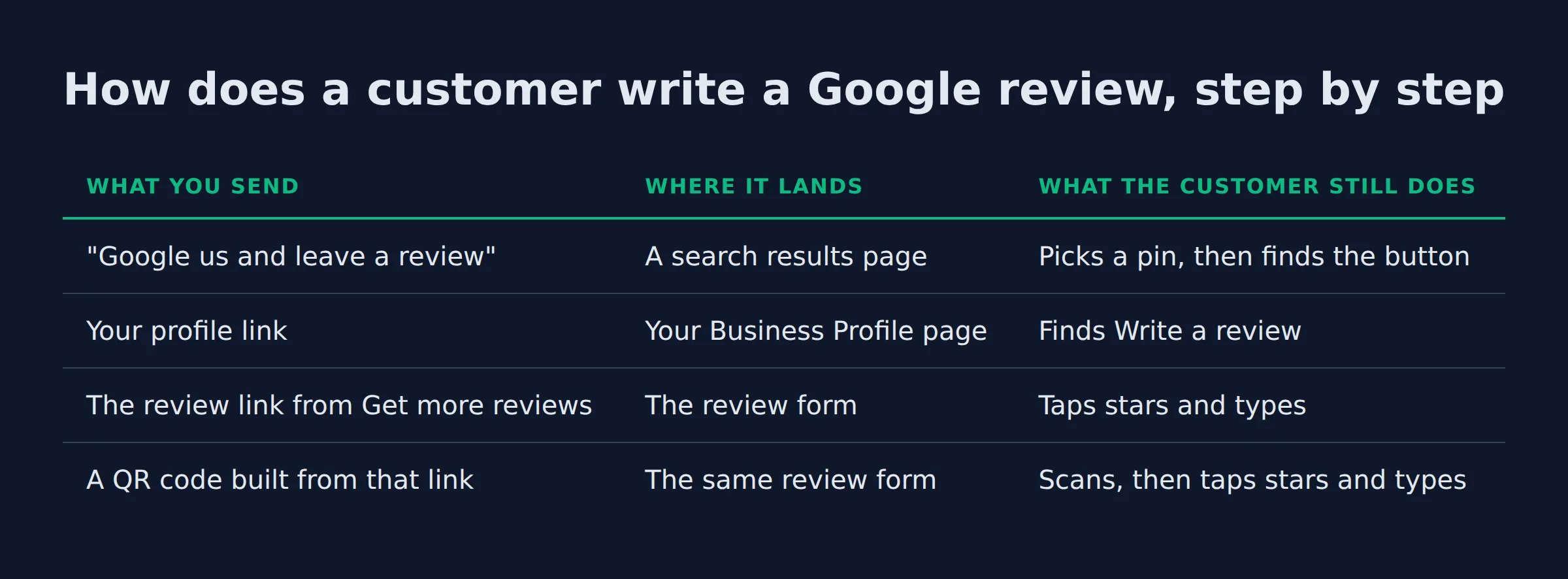
The customer’s starting point is the variable, and it decides everything. Here is what each way of asking gives them to do.
| What you send | Where it lands | What the customer still does |
|---|---|---|
| “Google us and leave a review” | A search results page | Picks a pin, then finds the button |
| Your profile link | Your Business Profile page | Finds Write a review |
| The review link from Get more reviews | The review form | Taps stars and types |
| A QR code built from that link | The same review form | Scans, then taps stars and types |
The link turns a search into a form. That is the whole speed gain.
The 3-tap test we run on every review request
We run the same test on every review request. Send the link to a phone that is signed out of Google. Then count the taps between the message and the star row.
3 taps is the target. Open the link, pick a star, hit post. Typing happens between the second and the third.
The test has 3 checks:
- Open the link in a browser that is signed out of Google. You land where the customer lands.
- Count the taps to the star row. Anything past 3 means the message or the link is doing too little.
- Search your business name the way a stranger would, in a city you serve. If several pins share a name, the customer has a choice to get wrong.
The requests we audit usually fail the first check. Most arrive with no link at all. The next most common carries the profile link, so the customer lands on a page of photos and has to find the button.
Test the link on a signed-out phone. The customer’s first screen decides the rest.
What should the customer actually type?
A useful review names the job, the problem it solved, and the town. 2 or 3 plain sentences carry more than a paragraph of praise. “Fantastic service, highly recommend” gives the next customer nothing to check.
You cannot ask for the words. That constraint shapes the whole request, and Google’s prohibited and restricted content policy bars merchants from requesting that specific content be included in a review. The policy even names content that identifies a staff member. A Google review in the customer’s own words is the version worth waiting for.
So the job name in your request is the only lever you get. Name the gutters, and the customer writes about the gutters. The words stay theirs.
Google’s guidance on writing reviews asks for evidence of a real experience and the drawbacks, not length. That maps onto what a customer does well: 1 job, told plainly, with the part that went sideways if there was one.
When you read the reviews you already have, 3 shapes carry weight.
| Pattern | What it names | Example line |
|---|---|---|
| The job and the fix | Service, problem, result | “The upstairs shower had been leaking into the ceiling. They found it in 20 minutes and fixed it the same day.” |
| The problem handled well | How a mistake was handled | “They hit traffic and were 2 hours late. The office texted me twice, and the work was still right.” |
| The repeat customer | How long, and what stayed the same | “Third winter clearing our drive. Same 2 guys, and they shovel the walk without being asked.” |
Those lines are examples of the shape, not quotes from anyone’s profile. The point is what they have in common. Each one names a job and a detail nobody could invent from a template.
The reviews owners forward to us name the job and the symptom. The 5-star line that says “great service” gets a thank you and nothing else.
Name the job in the request. The customer supplies the detail you cannot ask for.
How do you send someone straight to the review box?
Open your Business Profile in a computer browser, choose Read reviews, then Get more reviews, and copy the link Google generates. That link opens the review form. Each profile has its own link, so send the one for the location the customer visited.
Google’s page on creating a review link or QR code holds the exact path. The panel gives you 2 things: the Google review link to copy and a QR code to download.
2 practical notes from that page. The QR code only generates in a computer browser, so you cannot pull it up on the phone in the truck. And Google lists where the link belongs:
- Receipts
- Thank-you emails
- The end of a chat or text thread
- A printed sign or counter card
A service area business has no counter, so the link travels. The invoice email is the reliable spot, because it reaches the customer after the work. One profile covers the whole area, up to 20 service areas, and Google wants the overall area within about 2 hours of driving from base (manage service areas).
Multi-location owners hit one trap here. The link lives inside each location’s profile, so the north shop and the downtown shop have 2 different links. We regularly find the downtown link pasted into the north shop’s thank-you email. The review lands on the wrong profile, and the customer never knows.
Save one link per location. A shared link puts reviews on the wrong profile.
What should the message asking for the review say?
Send 12 to 25 words: name the job, give the link, and say how long it takes. Leave out the star request and the speech about small business. The link does the work.
The review request template is 1 sentence plus the link, and it stays the same on every job.
The version that gets written is 14 words plus the link:
“Glad the gutters came out clean. Here’s the link, it takes about 30 seconds: [paste the review link]”
The version that dies is 27 words:
“Thanks for choosing us! If you enjoyed the service, please take a moment to leave us a 5-star Google review. It really helps our small business grow.”
The second one fails on 3 counts. It asks for a set rating, which the policy bans. It asks the customer to find you. And it spends 3 sentences without naming the job.
The first one does the same 3 jobs in reverse. The job name tells the customer what to write about. The link removes the search. The 30 seconds prices the favor, so the customer knows what they are agreeing to.
Timing and the spoken ask at the end of a job belong to a different problem, and we cover them in how to ask customers for reviews without being pushy. This page is the message that carries the link.
Name the job and price the time in 1 sentence. The link closes it.
The 2 states that kill a review before it posts
A submitted review dies in 2 places. The customer picked the wrong listing, or they were not signed in to a Google Account.
The sign-in is the quieter one. The customer decides to write, taps through, and meets a login screen they did not plan for. That is where the tab closes. Google requires a signed-in account, and the screen is not optional. There is no anonymous review (add, edit, or delete Google Maps reviews).
You can soften it with 5 words in the request: “you’ll need to sign in”. It costs nothing and it stops the surprise.
The wrong listing is the more expensive one. A customer in a city you serve searches your name and taps a pin that is close but not yours. On a service area business there is no storefront to match the name to, so a similar name one town over is an easy mistake. The customer writes a good review of the wrong profile and never tells you.
The fix is in the link. Send the link from the profile for the location that did the work, and the pin question disappears.
A wrong pin and a sign-in screen both look like a customer who forgot. Check both before you ask again.
What is off limits when a customer writes a review?
Merchants may ask for a review and may not pay for one. A discount in exchange for a review breaks the policy, and so does asking for a set rating or set wording. Asking only the happy customers is banned as well.
The bans sit in Google’s prohibited and restricted content policy, and they bind the merchant’s ask, not the customer’s words:
- Payment, a discount, or a free add-on in exchange for a review. Google calls this fake engagement.
- A “5-star review” request, or any request for the rating you want.
- A request for specific content, including the name of the tech who did the job.
- Review gating, which means screening customers first and asking only the ones who seem pleased.
- Standing in the customer’s kitchen while they type.
Google does allow a merchant to ask any customer for a review that reflects a real experience. The line is influence over the customer. Nobody pays for it, and nobody filters for it.
Gating is the tempting one, because it protects the star rating. It also puts the profile at risk. Google can restrict a profile’s access after a pattern of policy violations, and reviews tied to manipulation get removed (Business Profile content policies).
Review velocity sits in the same policy. A steady trickle reads as steady work. A pile of reviews that arrive in one weekend reads as a campaign, and Google treats unusual volumes as a manipulation signal.
Ask everyone, offer nothing, and let the customer pick the stars.
Why has the review not shown up yet?
Google checks every review before it posts, and that check can take a few days. A review can also come down for a policy break. If the customer picked another listing, the review sits there instead.
The check is the usual answer, and Google’s page on missing or delayed reviews lists the rest. A profile merge can hold reviews back for a few days. An old phone or an out-of-date Maps app can break the form. A review removed for a policy break is not restored.
| What happened | What you see | What to do |
|---|---|---|
| The policy check is still running | Nothing on the profile yet | Wait a few days |
| Google removed it | It never appears, or it vanishes later | Nothing. Removed reviews stay removed |
| The customer posted elsewhere | It shows on a profile you do not manage | Send the right link next time |
| Their phone or app is out of date | The form fails or loops | Ask them to update Maps |
When a customer says they already left one, we look before we reply. Sometimes the review is in the check. Sometimes it is on a listing you did not know you had. If you cannot see the review at all, start with where your reviews live in the profile.
Wait out the check, then check the other listing. A removal is the only final answer.
Should you reply once the review is written?
Yes, reply to every review. It posts under your business name, your personal name stays hidden, and the reviewer gets a notification. Write for the next customer, who reads the reply before they call.
2 things about replies that owners do not expect. Google reads each reply before it posts, usually for about 10 minutes and sometimes for up to 30 days (manage customer reviews). And the reviewer can edit their words after reading yours, which moves the date on the review.
Verified businesses get the reply box, and that is the first thing to check when it is missing.
Google’s tips for review replies ask for a name, a specific answer, and no promotions. Keep it to 3 sentences. Skip the discount offer, skip the invoice details, and skip the argument.
A bad review gets 1 reply, in public. Write it for the customers who read it before they call.
Reply once, in public, and assume the next customer is the reader.
How do you get the next hundred reviews written?
Put the link where the job ends: the invoice email, the receipt, the text thread. Ask every customer, send 1 reminder, and reuse the same short text. Steady asks beat a burst.
The system is 3 parts:
- One saved review link, so nobody has to hunt for it on a job.
- One message template, with the link pasted in.
- One reminder, same link, nothing added.
A review widget on your site shows the reviews you already have. It cannot collect new ones, so use it for display and send the link for the ask. If you want software to run the ask and the reminder, WiserReview and Birdeye sell that layer. The link and the words cost nothing.
The count and the average are 2 different numbers, and owners mix them up. Google counts how many reviews you have and how positive they are as part of prominence, one of the 3 local ranking inputs (Google’s local ranking factors). The count is a ranking input. The average is what a customer reads.
A small profile feels every review. Here is what 1 new 1-star does to a 4.8 average at 4 different counts.
| Ratings on the profile | Average | After 1 new 1-star |
|---|---|---|
| 3 | 4.8 | 3.85 |
| 10 | 4.8 | 4.45 |
| 100 | 4.8 | 4.76 |
| 400 | 4.8 | 4.79 |
That is straight arithmetic on a stated average. Google keeps its own formula private, so read the shape rather than the decimals. The same 1-star costs 0.95 stars at 3 ratings and 0.01 at 400.
So the hundredth review matters more than the fifth. It makes the average stop moving.
If you want the profile, the links, and the tracking handled for you, that is our Google Business Profile work. For the pace itself, get more Google reviews over time.
The count is a ranking input and the average is a trust signal. A small profile feels every new review.
Related: google maps reviews
FAQ
Can a customer write a Google review without an account?
No. Google requires a signed-in Google Account, and you cannot add an anonymous review (add, edit, or delete Google Maps reviews). The account does not have to be a Gmail address, so any email works when a customer sets one up (tips to get more reviews).
Does the customer need the Google Maps app, or does the browser work?
Both work. The moves are the same on a computer and in the app (add, edit, or delete Google Maps reviews). A browser on a phone may hand the customer off to the app. An old phone or an out-of-date app can break the form, so a customer who says it will not load should update Maps first (missing or delayed reviews).
Can a customer edit or delete a review after posting it?
Yes. They open their contributions in Maps, choose Reviews, then Edit review or Delete review (add, edit, or delete Google Maps reviews). An edit changes the date shown on the review, so a revised review looks newer than the job.
Can I ask a customer to change what they wrote?
You can reply in public and invite them to contact you, and a good reply sometimes prompts an update (tips to get more reviews). You cannot pay or pressure for a revision, and you cannot ask for specific content, which Google’s prohibited and restricted content policy treats as manipulation.
Do reviews from Local Guide accounts carry more weight?
Google gives Local Guides points for contributions (add, edit, or delete Google Maps reviews). The local ranking guidance counts how many reviews a business has and how positive they are, and it says nothing about the reviewer’s status (Google’s local ranking factors). We read a Local Guide badge as a sign of a real, active account.
If you want a straight read on where your Google visibility stands, a 15-minute call covers it.