My Business Profile: Where It Is and How to Manage It
Where is my business profile on Google, how do you sign in and edit it, and what should you update each month? A plain-English guide for owners.
An owner emails us because his business has vanished from Google. It has not. He is signed into the wrong Google Account, and the listing he built last year sits on the other one.
When you type my business profile into Google, you want the free listing Google holds for your company on Search and Maps. You manage it by signing into the Google Account that owns it. From there you edit your hours, photos, and reviews.
That account mix-up is the most common cause we see. Most pages on this search tell you to look in the top right of Google and stop there. We run these profiles for local businesses every week, so this page covers where owners actually get stuck.
TL;DR
- Your profile shows in 3 places: the panel on Google Search, the pin on Google Maps, and the dashboard at
business.google.com(Google). - The wrong Google Account is the top reason owners think a profile is gone.
- You can edit most fields on Search or Maps without the dashboard (Google).
- Verification runs by video, phone, or postcard, and Google suggests video when you qualify (Google).
Where is my business profile on Google?
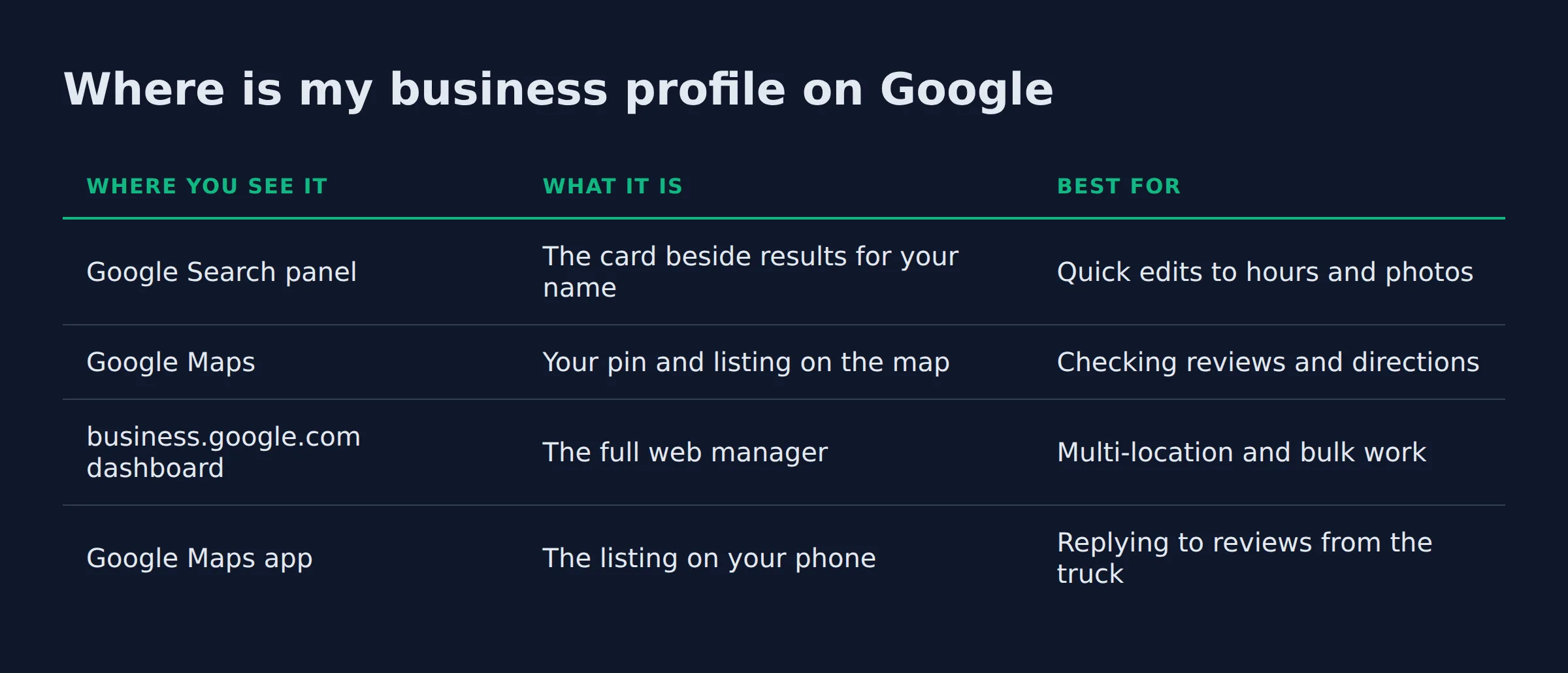
Your business profile appears in 3 places. One is the panel beside your name on Google Search. Another is the pin on Google Maps. The third is the dashboard at business.google.com. All three read the same listing, so one edit shows everywhere.
Google’s help says you can edit your verified Business Profile on Google itself (edit your Business Profile on Google).
| Where you see it | What it is | Best for |
|---|---|---|
| Google Search panel | The card beside results for your name | Quick edits to hours and photos |
| Google Maps | Your pin and listing on the map | Checking reviews and directions |
business.google.com dashboard |
The full web manager | Multi-location and bulk work |
| Google Maps app | The listing on your phone | Replying to reviews from the truck |
If you can see your profile on Search, you can manage it there.
The account check we run before we touch a profile
When an owner cannot find a business profile, the listing is usually fine. It almost always sits on a different Google Account than the one they are signed into. The listing exists, and the owner just cannot reach it.
We start every audit with the account, not the listing. We have watched a previous agency stay as primary owner while the real owner had manager access only (add owners and managers).
- Sign in at
business.google.comwith the account you think owns the listing. - If the profile is missing, try each other Google Account you own.
- Search your business name on Google Maps and tap the profile to see its status.
The owner should always hold primary ownership, and anyone helping should be a manager.
How do I sign in and edit my business profile?
Sign in at business.google.com with the Google Account that owns the listing, or open the profile on Search or Maps while signed in. From there you edit your hours and photos. You also update services and reply to reviews.
There is no separate profile password. Your my business profile login is the same Google Account you already use.
| Access level | Can do | Give it to |
|---|---|---|
| Primary owner | Everything, including removing other users | You, the owner |
| Owner | Edit info and manage users | A partner or family member you trust |
| Manager | Edit info and reply to reviews | Staff or an agency |
Give manager access by default, and hand out owner access only when someone needs to control who else can see the profile.
How do I manage my business profile each month?
A monthly pass takes about 20 minutes. Reply to every new review and add 2 or 3 photos. Then confirm your hours and special hours. Post one update and skim Insights for calls and direction requests.
Most profiles we audit get touched once at setup and then sit. Our walk-through of the Business Profile manager dashboard covers every tab in order (the Business Profile manager dashboard).
- Reply to every review, positive or negative.
- Add 2 or 3 photos from recent jobs.
- Confirm hours and add special hours for holidays.
- Publish one update about a recent job.
- Answer questions in the Q&A box and review your attributes.
- Check Insights for calls and direction requests.
Businesses that respond to every review are more likely to be used by 80% of consumers (local consumer review survey). And 89% of consumers expect a reply.
The reviews tab is where a local listing is won or lost.
What breaks in month one, and how we fix it
The damage we repair most often comes from the first week of edits. Names get stuffed with keywords. Pins drift off the real location. Service areas get stretched across a whole state.
The rules for the name, address, and service areas you may show sit in the guidelines for representing your business on Google.
- A business name padded with keywords.
- A map pin moved to a spot the crew does not serve.
- Service areas set to a whole state instead of the towns you drive.
- Primary and secondary categories left on the default from signup.
For a profile sitting near position 18 with impressions and few clicks, we fix these 3 fields first.
A name, category, and service area fix is the first move for a profile that gets seen but never clicked.
Why does Google keep asking me to verify my business?
Google re-checks the link between you and the listing. So it can ask you to verify my business again after a big edit, a move, or a suspected duplicate listing. The check runs by video, phone, or postcard, and it is routine rather than a warning sign.
Google’s help says re-verification is a normal step when your details change (verify your business on Google). A fresh google business profile installation triggers one check, and later edits can trigger another.
| Method | Best for | What to expect |
|---|---|---|
| Video | Service area businesses with no storefront | A walk-through of your truck and tools on site |
| Phone or text | Fast re-checks at a set address | A code, offered to some businesses only |
| Postcard | Steady addresses | A PIN by mail, most arriving within 14 days |
We hit the verification wall most often with a service area business that has no storefront. There is no door to film, so we shoot the truck and the tools, then a real job site.
For a service area business with no storefront, choose video verification and film the real work.
How do I find my Business Profile ID?
Your Business Profile ID is the code Google support asks for when you open a ticket. You find it in your profile’s advanced settings, and it never shows on your public listing. Copy it once and keep it.
Sign in and open the profile, then open Settings and Advanced settings (advanced profile settings).
Adding a new location, or clearing a duplicate listing, starts with this ID. You also need it for:
- Reinstatement after a suspension.
- Removal of a duplicate listing.
- An ownership or access case with support.
Shops running many locations can make bulk edits with the Business Profile API (the Business Profile API).
Save your Business Profile ID next to your name, address, and phone.
What is the difference between a normal Google Account and a business account?
A Business Profile does not need its own account. It runs on a normal free Google Account, and any email address can own one. A paid Workspace account changes your email, not your profile, so pick an account you will keep.
Google’s setup guide says you need a Google Account, new or existing (create a Google Account or use an existing one). The google my business profile is the same thing as your Business Profile under an older name.
Any Google Account can own a Business Profile, so you never need a business email first.
Do I still need a website if I have a business profile?
Yes for most trades. A profile gets you found, but it points people to a website for proof and booking. The two work together, so keep the name, address, and phone consistent.
Google decides local results on relevance, distance, and prominence (improve your local ranking). A website carries much of the prominence weight, and that mix decides who competes for the map pack. Only 35% of small businesses even have a Google Business Profile (local consumer review survey), so a well-run profile still stands out.
Our walk-through on how to set up your Google Business Profile correctly covers the first 3 fields. We match the profile and the site for local businesses at Local Biz Boost.
A profile gets you seen, and the website closes the job.
FAQ
How to prepare a business profile?
Prepare the basics before you touch Google. Fix your trading name and address first. Then gather your hours and a few real photos of the work. That is enough to start.
Can I manage my business profile without the app?
Yes. The app is handy for photos and review replies. Every field is still editable in a browser. You can work on Search or Maps or the dashboard.
Why can I not see my business profile when I search for my business name?
Usually because you are signed into a different Google Account than the one that owns the listing. Search while signed out to check. If the profile still shows, the listing is live.
What happened to Google Business Profile chat and messaging?
Google shut down chat and call history on July 31, 2024 (changes to Business Profile chat and call history). Customers can still call and message you through text or WhatsApp where eligible.
Is my business profile different from my Google Business Profile manager?
No. It is the same listing seen through a different door. The dashboard view is one way to manage the profile you already see on Search and Maps.
How long does verification take?
Postcard codes usually arrive within 14 days, per Google’s help. Video and phone checks are faster, but the route depends on your business (verify your business on Google).
If you want a straight read on where your local visibility stands, a fifteen-minute call covers it. We open your profile together and tell you what to fix first. Book a time at https://link.localbizboost.com/widget/booking/lobOMW2RpbL2Vu9SblWG